

Best Website Builder with Email Marketing Integration: 5 Options Compared for Small Business

The best website builder with email marketing integration does two things most builders quietly leave unfinished — it gets you online and gives you a real way to follow up with the people who visit. Here’s the gap most small business owners only notice after launch: traffic arrives, people browse, and then they leave. No capture. No follow-up. No second chance.
That’s not a traffic problem — it’s a missing link between your website and your revenue. The good news is that several website builders now include email tools directly in the platform, so you don’t need to juggle three separate subscriptions just to send a newsletter. This guide compares five of the best options, including what their email features actually cover and where each one falls short.
Quick Answer
If you want everything in one place without a complicated setup, Hostinger is the strongest value — starting at $2.99/month with AI-powered email marketing built in. Wix is the most flexible option with a polished email add-on. Squarespace starts at $19/month and wins on design and automation. GoDaddy is the fastest to launch. SITE123 is the most beginner-friendly budget pick. Read on for the full breakdown.
Affiliate disclosure: This article contains affiliate links. If you click and make a purchase, I may earn a small commission at no extra cost to you. I only recommend tools I genuinely believe are worth your time.
Top 5 Website Builders with Email Marketing (2026)
- Hostinger — starting at $2.99/month (email marketing included via Hostinger Reach)
- Wix — starting at $17/month (email marketing add-on from $10/month)
- Squarespace — starting at $19/month (email campaigns add-on from $6/month)
- GoDaddy — starting at $9.99/month (email marketing built into higher plans)
- SITE123 — starting at $12.80/month (newsletter tools on premium plans)
Hostinger — Best All-in-One Value with Built-In AI Email
Getting a website and a functional email marketing setup for under $3/month sounds too good to be true. But after two-plus years of using Hostinger’s builder for real projects, I can say the value is genuine — though it comes with trade-offs worth knowing about.
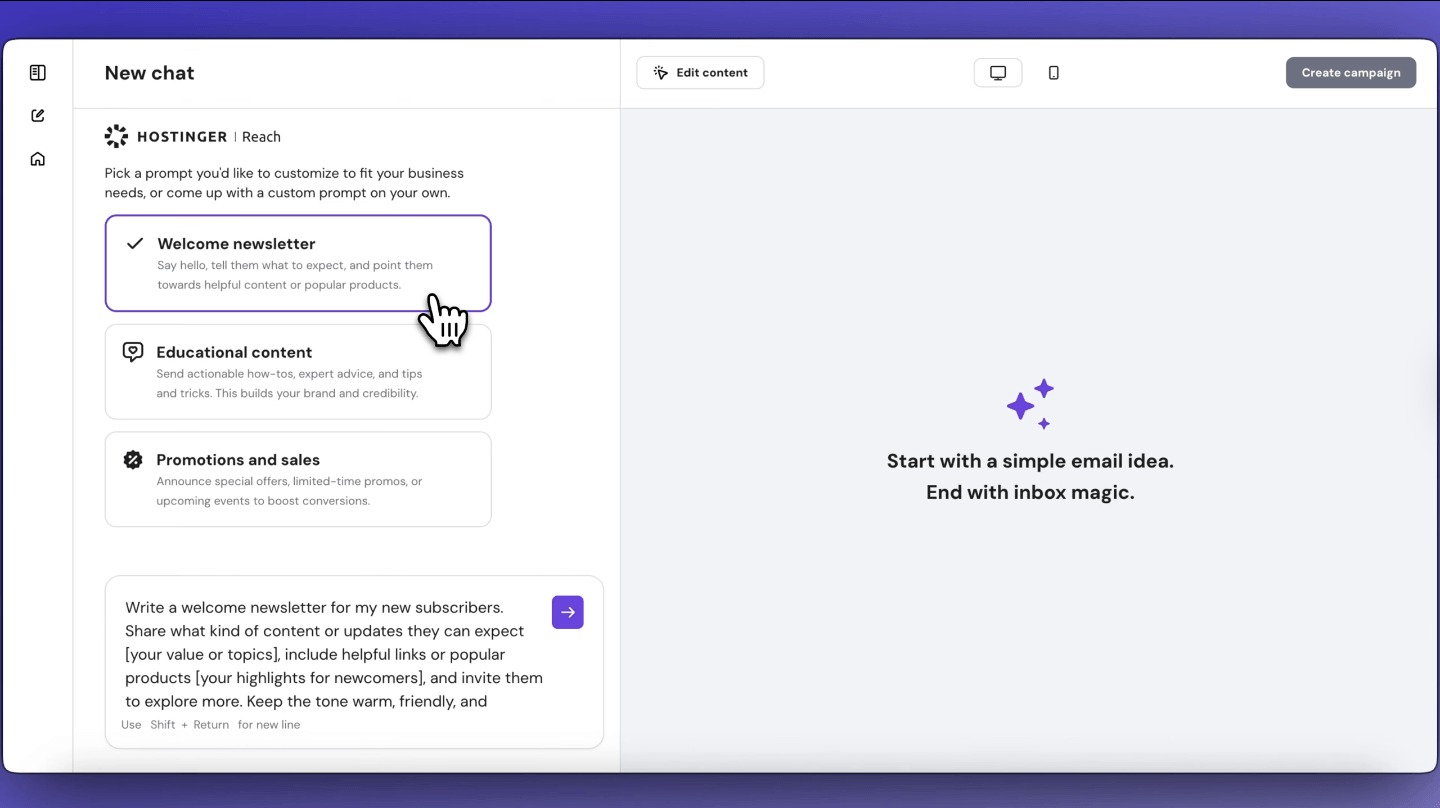
Hostinger bundles its email marketing tool — called Hostinger Reach — directly into its ecosystem, and the AI-powered campaign builder is genuinely useful for non-marketers. You write a prompt, describe your offer, and Reach drafts a campaign for you. It’s not perfect, but it’s fast, and for a small business owner who doesn’t have a copywriter on staff, that matters.
On the domain email side: setting up a professional @yourdomain.com inbox through Hostinger is straightforward. The Premium plan includes two mailboxes free for the first year, and the Business plan includes five. In practice, most small businesses only need one or two, so this rarely feels limiting.
Key Features
- AI-powered email campaign builder (Hostinger Reach) — write a prompt, get a campaign draft in seconds
- Domain email included with all paid plans (2–5 mailboxes depending on plan)
- Drag-and-drop website builder with 300+ templates
- AI website builder, AI blog generator, AI SEO assistant (Business plan)
- 30-day money-back guarantee
Pricing
- Premium Website Builder: $2.99/month (48-month plan) — renews at $10.99/month
- Business Website Builder: $3.99/month (48-month plan) — renews at $16.99/month
- Hostinger Reach (email marketing add-on): Free tier (200 emails/month, 100 subscribers); paid plans from about $1.59/month for 500 subscribers and 3,500 emails/month
Note: The promotional rates require a long-term commitment. Renewal prices are significantly higher — worth factoring in when budgeting.
Pros
- Genuinely the lowest entry price for a combined website + email setup
- AI tools are practical, not just decorative — they save real time
- All-in-one dashboard for website, email, and domain management
- Strong uptime and performance reputation
Cons
- Promotional pricing requires a long-term commitment; renewal rates are steeper
- Hostinger Reach email limits are low on the free tier
- Less design flexibility than Wix or Squarespace
Best for: Budget-conscious small businesses who want a website, professional email, and basic email marketing without juggling multiple platforms.
Not for: Businesses with large email lists or complex automation workflows.
My Verdict: Hostinger is the closest thing to a true all-in-one starter kit for small business owners. The AI email tool isn’t as polished as a dedicated platform, but for someone just getting started with email marketing, it removes every excuse not to begin. The price-to-feature ratio is hard to beat anywhere.
Start with Hostinger’s Website Builder plans and see which tier fits your setup.
Wix — Most Flexible with a Powerful Email Add-On
Building an email list on a platform that doesn’t talk to your website is a friction tax you pay every single week — every export, every sync, every mismatched segment. Wix solves this neatly by keeping your site visitors and email contacts in the same ecosystem, and the result is a noticeably smoother workflow.
Wix’s email marketing tool comes pre-installed with every account, including a free tier that allows 200 emails per month. It’s a sensible starting point — you can build your list and send your first campaigns without paying extra. Once you’re ready to grow, the paid email tiers are separate from your website plan, which gives you flexibility but also means a second line item in your budget.
The real strength here is automation. Even on the Essentials email plan, you get automated email sequences, audience segmentation, and AI-generated content for subject lines and email copy. That’s a meaningful set of tools for a solo business owner. Wix’s website builder itself is consistently regarded as one of the most beginner-friendly on the market, and for a deeper look at how it stacks up against other builders, the Wix vs Squarespace vs Hostinger comparison is worth a read.
Key Features
- Built-in email marketing tool — free plan included, no separate signup
- Drag-and-drop email editor with designer-made templates
- Automation, segmentation, and scheduling on paid email tiers
- AI content generation for subject lines and email copy
- 500+ website templates; highly customizable
Pricing
- Wix Website Builder (Light): $17/month
- Wix Email Marketing — Free: 200 emails/month
- Wix Email Marketing — Essentials: $10/month
- Wix Email Marketing — Core: $24/month
- Wix Email Marketing — Advanced: $49/month
Note: Website plan and email marketing plan are billed separately. Budget for both if you need a custom domain and email campaigns.
Pros
- Email tool integrates directly with site visitors and contacts
- Free email tier lets you start without extra cost
- Strong automation even at lower price points
- Website builder is highly flexible
Cons
- Website plan + email plan = two separate costs
- The free email plan includes Wix branding
- Advanced features are spread across multiple plan tiers
Best for: Small businesses that want design flexibility and a scalable email marketing setup.
Not for: Businesses looking for the lowest possible monthly cost.
My Verdict: Wix is the most well-rounded option if you take email marketing seriously. The email tool is genuinely capable, and the integration with your site contacts is seamless. Just go in with eyes open on the combined pricing.
Explore Wix’s premium plans to see which website tier fits your needs.
Squarespace — Best for Design-Focused Businesses That Want Email Automation
There’s a quiet frustration that comes with choosing a beautiful website builder only to discover the email tools feel bolted on as an afterthought. Squarespace is one of the few platforms that treats visual consistency seriously — your email campaigns can actually look like your website, not a different product entirely.
Squarespace Email Campaigns is a paid add-on, starting at $6/month for the Starter tier. The catch at that entry level: only 500 emails per month and no automated campaigns. If you want automation, you’ll need at least the Core plan at $11/month. That’s still a reasonable price, and the templates are consistently the cleanest of any builder on this list — that reputation is well-earned.
Squarespace also offers a solid integration with its own subscriber and member features, making it a natural choice for coaches, consultants, and creatives who want to nurture an audience rather than just blast promotions. If budget is your primary concern, the cheapest website builder for small business guide covers more affordable alternatives in detail.
Key Features
- Email Campaigns add-on — templates designed to match your site aesthetic
- Automation available from Core plan ($11/month)
- Subscriber management with unlimited subscriber storage on all paid email plans
- Drag-and-drop email editor with Squarespace’s signature clean design
- Strong SEO tools and member area features built into website plans
- 14-day free trial on website plans
Pricing
- Squarespace Website Builder: $19/month (Basic, billed annually) — $25/month billed monthly
- Core plan: $35/month (billed annually) — $48/month billed monthly
- Plus plan: $62/month (billed annually) — $82/month billed monthly
- Advanced plan: $119/month (billed annually) — $159/month billed monthly
- Email Campaigns — Starter: $6/month (500 emails/month, 3 blasts, Squarespace branding)
- Email Campaigns — Core: $11/month (5,000 emails/month, automation, no branding)
- Email Campaigns — Pro: $26/month (50,000 emails/month)
- Email Campaigns — Max: $52/month (250,000 emails/month)
Note: Website plan and Email Campaigns are separate subscriptions. The Starter email plan doesn’t include automation — budget for Core if automated follow-ups matter to your business.
Pros
- The most visually cohesive email + website combination on this list
- Unlimited subscriber storage — you’re not penalised for growing your list
- Automation available at a reasonable price point
- 14-day free trial on website plans reduces risk
Cons
- Automation is locked behind the Core email plan
- Two separate subscriptions add complexity to billing
- Less template flexibility for non-design-focused businesses compared to Wix
Best for: Creatives, coaches, consultants, and service businesses where brand presentation matters.
Not for: Businesses on a tight budget who need email automation from day one.
My Verdict: Squarespace is the premium pick for businesses where visual identity drives conversions. The email campaigns feel like a natural extension of the website rather than a third-party bolt-on. If design is your competitive edge, this is worth the extra investment.
Check Squarespace’s pricing page to compare website and email plans side by side.
GoDaddy — Fastest Setup with Email Included in Bundles
Getting stuck in the setup phase is one of the most common reasons small business owners never actually launch. GoDaddy’s website builder is deliberately built to eliminate that friction — and it works.
GoDaddy’s email marketing is bundled into its Websites + Marketing plans rather than sold as a separate add-on. This simplifies pricing considerably — one subscription covers both your website and basic email campaigns. The trade-off is that the email toolset is less advanced than Wix or Squarespace; it’s designed for simple newsletters and promotional sends rather than sophisticated automation sequences.
Starting at $9.99/month, GoDaddy is a solid mid-range option for businesses that prioritise speed and simplicity over customisation depth. It’s particularly popular with local service businesses — think plumbers, salons, and contractors — where the goal is a professional online presence with a clear call to action, not a complex marketing funnel.
Key Features
- Email marketing included in Websites + Marketing plans
- AI-powered website builder (Airo) for fast setup
- Business email address available as part of bundles
- Mobile-optimised templates with appointment booking on higher plans
- 24/7 customer support
Pricing
- GoDaddy Website Builder: starting at $9.99/month (annual plan)
- Premium plan: $21.99/month
- Business email add-on: from $1.99/month
Note: Pricing reflects annual billing. Email marketing depth varies by plan tier — check what’s included before committing.
Pros
- One of the fastest and simplest builders to set up
- Email marketing bundled in — no second subscription needed
- Strong 24/7 support — useful for non-technical users
- Competitive starting price with good feature coverage
Cons
- Email features are relatively basic
- Less design flexibility than Wix or Squarespace
- Template quality feels dated compared to the competition
Best for: Local service businesses that want to get online quickly and send occasional email campaigns without a complex setup.
Not for: Businesses that need advanced email automation, behavioural triggers, or deep segmentation.
My Verdict: GoDaddy does exactly what it promises — a fast, no-fuss online presence with basic email marketing included. The depth isn’t there for serious email marketers, but for a local business sending a monthly newsletter and the occasional promotion, it’s more than enough.
Explore GoDaddy’s Websites + Marketing plans to find the right tier for your business.
SITE123 — Most Beginner-Friendly Budget Pick with Newsletter Tools
Starting with email marketing when you’re brand new to running a website can feel overwhelming — too many settings, too many integrations, too many things that could break. SITE123 deliberately solves for that anxiety by keeping everything as straightforward as possible, including the email tools.
SITE123 includes newsletter and mailing list tools on its premium plans, and the interface is as simple as a website builder gets. It’s not competing with Mailchimp or even Wix’s email tool on features — but for a brand-new business owner who just needs a signup form, a mailing list, and the ability to send a basic newsletter, it removes virtually every technical barrier.
The pricing is transparent and one of the most genuinely affordable on this list for an annual plan. Starting at $12.80/month on a yearly billing cycle, you get a custom domain, 3GB of storage, and newsletter tools included. That said, SITE123 has real limitations as you grow — you’ll likely want to migrate to a more capable platform within a year or two as your email list and marketing needs evolve.
Key Features
- Built-in newsletter and mailing list tools on premium plans
- Signup forms to capture email subscribers directly from your website
- 14-day money-back guarantee on all paid plans
- Simple drag-and-drop editor — no learning curve
- Free plan available
Pricing
- Free: $0/month
- Basic (Premium): $12.80/month (annual plan)
- Advanced: $21.33/month (annual plan)
- Professional: $35/month (annual plan)
Note: Email marketing depth is basic compared to other platforms on this list. For growing lists or automation needs, you’ll likely need to integrate a third-party tool later.
Pros
- Genuinely the easiest setup experience on this list
- Newsletter tools included in the base paid plan
- 14-day money-back guarantee reduces risk for first-time buyers
- Free plan lets you test before committing
Cons
- Email features are limited
- Design templates are less polished than Squarespace or Wix
- Renewal pricing can increase significantly after the initial term
Best for: Complete beginners who want the simplest possible setup and just need basic newsletter capability to get started.
Not for: Businesses that are already growing their list and need segmentation, automation, or high-volume sending capabilities.
My Verdict: SITE123 is the right starting point if the biggest obstacle between you and email marketing is complexity. It won’t scale far, but it will get you started — and for many small businesses, that’s the hardest step.
See SITE123’s current pricing and plans before you commit.
Best website builder with email marketing integration — Quick Comparison
Scroll horizontally on mobile, or click platform names above to jump to full reviews.
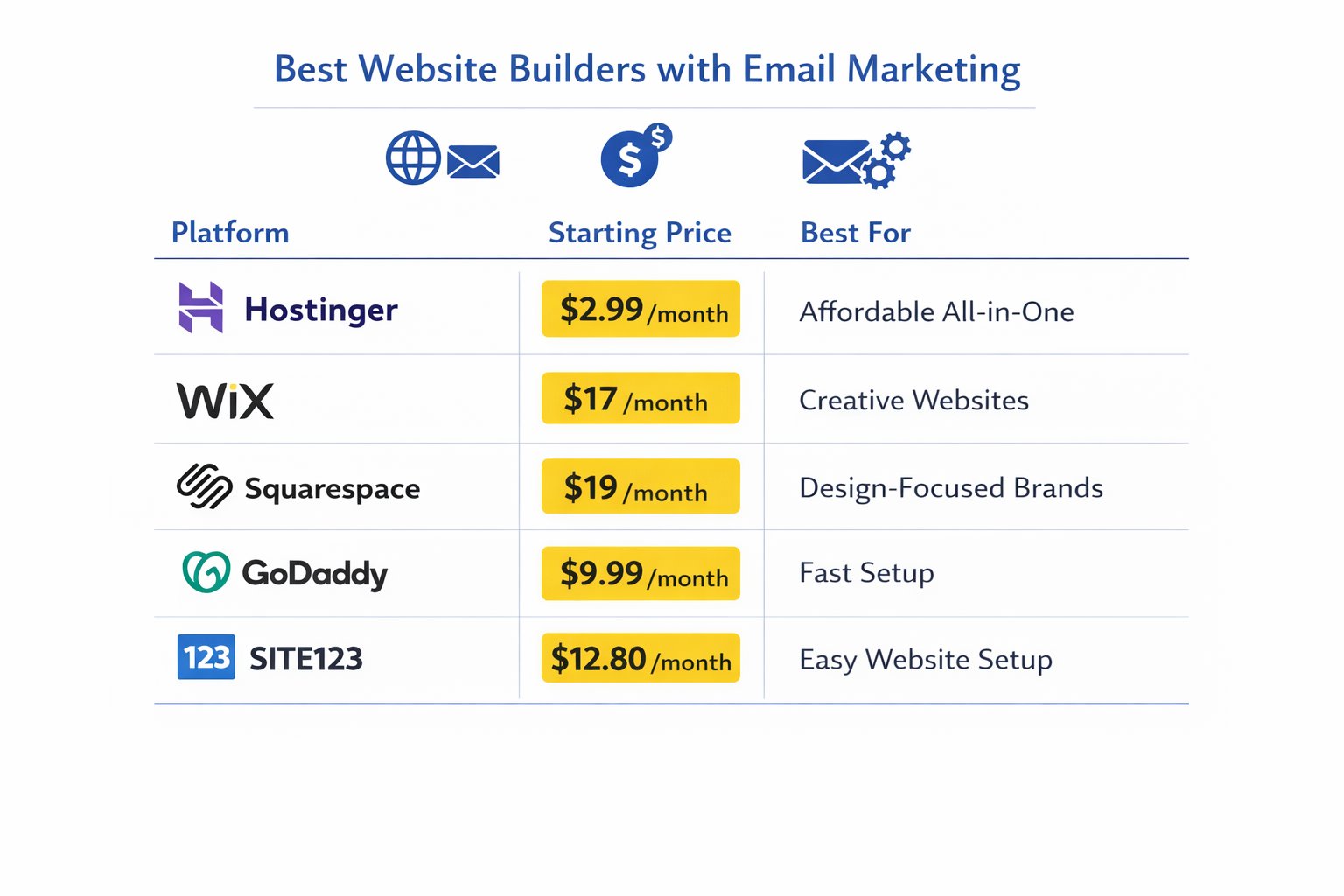
| Platform | Starting Price | Email Marketing Included? | Best For |
|---|---|---|---|
| Hostinger | $2.99/month | Add-on (free tier available) | Best all-in-one value |
| Wix | $17/month | Add-on (free tier included) | Most flexible |
| Squarespace | $19/month | Add-on from $6/month | Best design + automation |
| GoDaddy | $9.99/month | Bundled in plan | Fastest setup |
| SITE123 | $12.80/month | Basic tools included | Most beginner-friendly |
Common Mistakes to Avoid
1. Choosing a builder without checking what “included” email actually means
Many business owners discover after signing up that “email marketing included” means a 200-send free tier with heavy platform branding — fine for testing, useless for real campaigns. Fix: Before committing, check the send limit, subscriber cap, and whether automation requires a paid email add-on.
2. Treating email as a feature to set up later
This is one of the most common slip-ups when launching a website: the site goes live, but the email capture form gets pushed to “next week.” Meanwhile, real visitors arrive and leave with no way to follow up. Fix: Set up your email signup form on the same day you publish your website — even if your list is empty. Getting the form live is what matters first.

3. Picking the cheapest plan and realising automation is locked behind a higher tier
With platforms like Squarespace and Wix, automation is not available on entry-level email plans. Many business owners build their list on the starter tier, then face an upgrade just as things get interesting. Fix: If welcome sequences or abandoned cart emails are on your roadmap, budget for at least the mid-tier email plan from the start.
4. Using a free subdomain for email marketing
Sending email campaigns from a @site123.com or @wixsite.com address significantly hurts deliverability and looks unprofessional. Fix: Always connect a custom domain before sending your first campaign. Most paid plans include a free domain for the first year — use it.
5. Not factoring in renewal pricing
Hostinger’s $2.99/month rate requires a long-term commitment and renews at $10.99/month. This catches many business owners off guard. Fix: Always check renewal rates before choosing a long-term plan. For a full cost breakdown across platforms, the how much does a website cost for a small business guide covers this in detail.
Next Steps (Do This in the Next 24–48 Hours)
- Pick your platform and sign up for the right plan. If you’re starting from scratch and budget is tight, Hostinger’s Premium plan at $2.99/month gets you a website and email tools in one place. If design matters most, Squarespace’s 14-day free trial is a smart low-risk way to test the waters.
- Set up your email signup form the same day your site goes live. Place it on your homepage and in your footer as a minimum. A simple “Join my newsletter for [specific benefit]” converts better than a generic “Subscribe” box. You don’t need a large list to start — you just need a list that’s growing.
- Send your first email within 7 days of getting subscribers. It doesn’t need to be a polished campaign. A short, personal welcome email — who you are, what you do, what they can expect — is enough. The worst thing you can do is let subscribers go cold before they’ve heard from you once.
FAQ
Q: What is the best website builder with email marketing integration for a small business?
Hostinger offers the best overall value — a fully built website and AI-powered email marketing starting at $2.99/month. Wix is the most feature-rich option with a polished email add-on. Squarespace wins for design quality. The best choice depends on your budget, list size, and how important automation is to your marketing.
Q: Do any website builders include email marketing for free?
Yes — Wix includes a free email marketing tier with 200 sends per month when you sign up. Hostinger Reach also has a free tier (200 emails/month to 100 subscribers). SITE123 has a free website plan, though email tools require a paid upgrade. Free tiers are useful for testing but too limited for active campaigns.
Q: How much does it cost to get a website with email marketing?
Costs vary widely. Hostinger starts at $2.99/month for the website, with email marketing from about $1.59/month extra. GoDaddy bundles email into plans starting at $9.99/month. Wix starts at $17/month for the website with email add-ons from $10/month. Squarespace starts at $19/month plus $6–11/month for Email Campaigns.
Q: Is it better to use a built-in email tool or connect something like Mailchimp?
For most small businesses just starting out, the built-in tool is the right call — fewer logins, fewer syncing issues, and less technical setup. Once your list grows past 2,000–3,000 subscribers or you need advanced automation, dedicated tools like Mailchimp or ActiveCampaign become worth the extra cost and complexity. Start simple; upgrade when you have a real reason to.
Q: Do I need technical skills to set up email marketing on these platforms?
No — all five platforms on this list are built specifically for non-technical users. The setup typically involves adding a signup form widget to your page and connecting it to an email list, which takes around 15–30 minutes. Automation sequences take a little longer to configure but most platforms walk you through it step by step.
Q: What’s the difference between a domain email and email marketing?
Domain email (like hello@yourbusiness.com) is your professional inbox for day-to-day communication. Email marketing is a separate system for sending newsletters, campaigns, and automated sequences to a subscriber list. Most website builders offer both, but they’re usually separate features — check that your plan includes both before signing up.
Q: Can I switch email marketing platforms later without losing my list?
Yes — all major platforms let you export your subscriber list as a CSV file, which you can import into any new tool. It’s a good habit to export your list regularly regardless of which platform you use. The main thing you’ll lose when switching is your campaign history and any automation sequences you’ve built.
Q: Is Hostinger’s email marketing tool good enough for a real business?
For a business sending occasional newsletters to a list under 500 subscribers, Hostinger Reach is genuinely sufficient — especially with the AI drafting feature that speeds up campaign creation. For businesses with active lists of over 1,000 subscribers, more complex segmentation needs, or high-frequency sending, a dedicated tool will serve you better. It’s a solid starting point, not a long-term ceiling.