

Wix vs Squarespace Email Marketing: Which Platform Helps You Grow Faster?

Wix vs Squarespace email marketing looks close at first glance, but one platform is clearly better for automation and list growth while the other is better for polished, brand-friendly campaigns. If you’re already leaning toward one of these website builders, the smarter choice comes down to what kind of email marketing your business actually needs.
A lot of small business owners do not need another bloated marketing tool. They need something simple enough to set up this week, strong enough to help capture leads, and flexible enough to grow with them. That is where this comparison matters. Wix gives you more room to build automations and work from a built-in CRM-style contact system, while Squarespace makes it easier to create sleek, on-brand emails without much design effort. The trade-off is real, and once you see it clearly, the decision gets much easier.
Quick answer summary
Wix is the better choice for small businesses that want built-in email automation, better lead follow-up, and more growth-focused tools inside one platform. Squarespace is the better choice for design-led brands that want clean, polished email campaigns that match their site beautifully. For most businesses focused on growing a list and turning leads into customers, Wix wins this head-to-head.
Affiliate disclosure: This article contains affiliate links. If you buy through them, I may earn a small commission at no extra cost to you.
Quick numbered list
- Wix Email Marketing — free plan available, paid plans start at $10/month.
- Squarespace Email Campaigns — paid plans start at $8/month for 500 monthly emails.
Wix Email Marketing — Better for automation and lead follow-up
It is common to collect leads through a form and then do nothing with them for days. That is not because business owners are lazy. It usually happens because the follow-up system was never built in the first place. Wix is better here because its email marketing sits closer to the rest of the business tools inside the Wix ecosystem.
In plain English, Wix is built for businesses that want email to help drive action. If someone joins your list, books a service, or fills out a form, Wix gives you more ways to respond automatically. That matters for consultants, service providers, and local businesses where fast follow-up often decides who gets the client.
Key Features
- Built-in email marketing with a free plan for testing before you commit.
- Automation options for welcome emails, follow-ups, and customer nurturing.
- Contact management tools built into the Wix ecosystem.
- Paid plans scale from small lists to very high send volumes.
- Better fit for businesses that care about workflows more than visual perfection.
Pricing
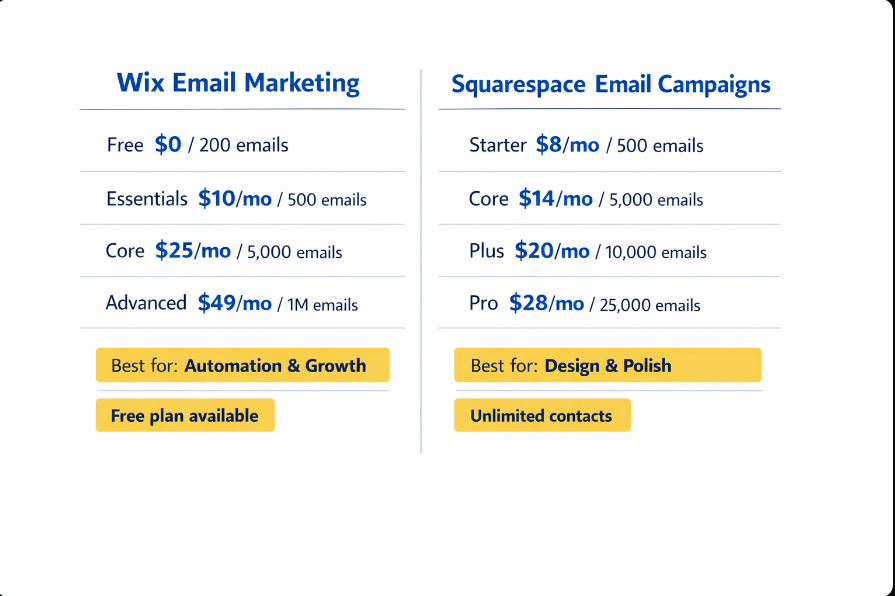
| Plan | Price | Send Limit |
|---|---|---|
| Free | $0/month | 200 emails/month |
| Essentials | $10/month | 500 emails/month |
| Core | $25/month | 5,000 emails/month |
| Advanced | $49/month | 1,000,000 emails/month |
One thing to watch: Wix email pricing is separate from Wix website plan pricing, so your real monthly cost depends on the site plan you already have.
Pros / Cons
Pros
- Free plan makes it easy to start.
- Better automation angle for small businesses.
- Stronger fit for lead generation and follow-up.
- Higher ceiling for businesses that want email to become a growth channel.
Cons
- Template design is solid, but not the main draw.
- Still less advanced than a dedicated email platform for serious segmentation.
- Best value mainly if you are already using Wix.
Best for / Not for
Best for: service businesses, coaches, consultants, and small shops that want a website builder with email marketing that can actually support growth.
Not for: businesses that mainly care about highly polished visual newsletters and brand aesthetics above automation depth.
My Verdict: Wix is the stronger option for most small business owners because it treats email as part of a working lead-generation system, not just a newsletter tool. If your goal is to build a list, follow up quickly, and automate more as you grow, Wix gives you the better long-term fit.
Explore Wix’s email marketing features to compare the free and paid options.
Squarespace Email Campaigns — Better for polished, design-first campaigns
Some businesses are not trying to build a complicated automation machine. They just want emails that look professional, match their brand, and do not feel stitched together with duct tape. Squarespace is good at that, and that is why it still deserves serious consideration.
Its Email Campaigns product is cleaner and more design-forward than many small business owners expect. The catch is that attractive campaigns and better growth tooling are not the same thing. Squarespace has improved its automation offering, but the platform still makes the most sense for brands where presentation carries a lot of weight.
Key Features
- Unlimited contacts included in every plan.
- Premium email templates built into the product.
- Smart segmentation and email personalization included.
- Marketing automations, real-time analytics, ecommerce tools, and AI email copy included.
- Pricing scales by monthly email send volume, not contact count.
Pricing
The screenshots confirm Squarespace’s exact annual pricing tiers:
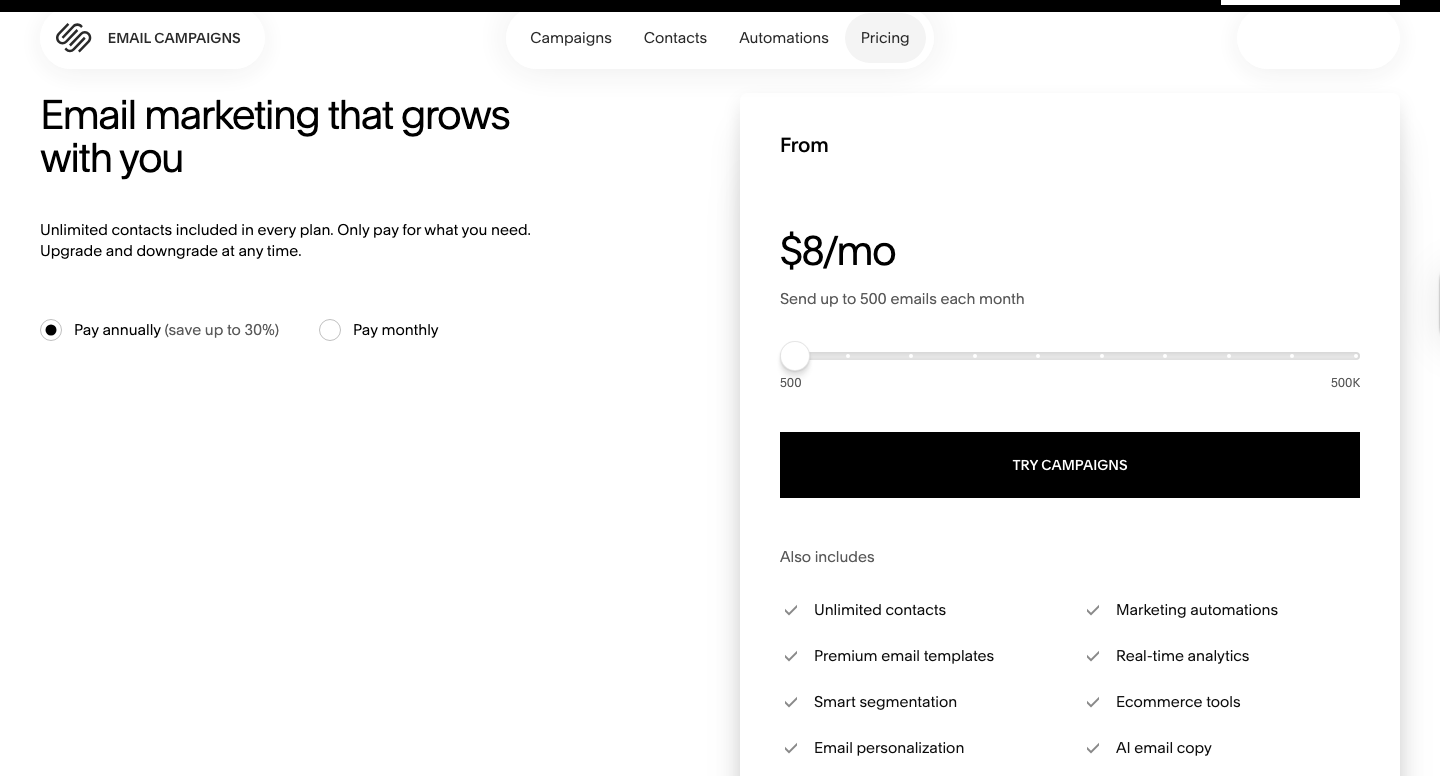
| Plan | Price | Send Limit |
|---|---|---|
| Starter | $8/month | 500 emails/month |
| Core | $14/month | 5,000 emails/month |
| Plus | $20/month | 10,000 emails/month |
| Pro | $28/month | 25,000 emails/month |
| Max | $118/month | 500,000 emails/month |
That pricing is cleaner than it first looked. Here’s why that matters: Squarespace is no longer just a “nice-looking newsletter” add-on. At the lower tiers, it is competitively priced, and the included automation, analytics, personalization, and segmentation features make it stronger than older reviews suggest.
Pros / Cons
Pros
- Very polished, design-friendly email experience
- Unlimited contacts on every plan.
- Built-in automations and segmentation included.
- Pricing is straightforward once you match it to send volume.
Cons
- No free plan shown in the verified pricing screenshots.
- Higher-volume sending gets expensive much faster than Wix.
- Better for branded campaigns than deep workflow-building.
Best for / Not for
Best for: creatives, photographers, designers, boutiques, and image-conscious small businesses that want emails to feel like a natural extension of their website.
Not for: businesses where email automation depth and aggressive lead follow-up matter more than presentation.
My Verdict: Squarespace Email Campaigns is a better option than many people give it credit for, especially now that the pricing and included features are clearer. But for most small businesses trying to grow a list and turn subscribers into leads or customers, Wix still gives you the more practical edge.
Explore Squarespace Email Campaigns to review the current plans and features.
Wix vs Squarespace Email Marketing: Quick Comparison
Quick reference — scroll horizontally on mobile, or click platform names to jump to full reviews.
| Platform | Starting Price | Best For |
|---|---|---|
| Wix Email Marketing | Free plan available, paid from $10/month | Businesses focused on automation, follow-up, and list growth |
| Squarespace Email Campaigns | $8/month for 500 emails/month | Design-first brands that want polished campaigns |
Common mistakes
1. Choosing based on website style instead of email goals
Many business owners choose the prettier website builder and assume the built-in email tool will also be the better fit. That is easy to do, especially when both platforms look capable on the surface. The fix is to start with your email goal first: if you need automation and lead follow-up, choose Wix; if you need beautiful campaigns with less effort, choose Squarespace.
2. Looking only at entry pricing
A low starting price feels reassuring, but email tools become expensive or limiting for different reasons as your list grows. Squarespace starts at $8/month, which is attractive, but send-volume pricing climbs steadily. Wix starts with a free plan and then moves up more gradually for many small businesses. The fix is to estimate your likely send volume for the next 6–12 months, not just this week.
3. Skipping your first automation because it feels “too advanced”
This catches a lot of people off guard. They set up the signup form, maybe send one newsletter, and then stop there. The fix is to create one welcome email within the first 30–60 minutes of setup. That single step can make your system feel real and immediately more useful.
4. Expecting built-in email tools to do everything forever
Both tools are good enough for many small businesses, especially in the early stages. But they are still built-in tools, not full enterprise email platforms. The fix is to use them for simplicity now, while staying aware that more advanced segmentation or reporting may eventually push you toward a dedicated tool.
Next steps
- Pick your main priority today. If the business needs stronger lead capture and follow-up, Wix is the better move. If the business needs cleaner design and brand consistency, Squarespace makes more sense. For a broader view, see the guide to the best website builder for email marketing integration.
- Set up one form and one welcome email in the next 24–48 hours. That is enough to test whether the platform feels smooth or frustrating. This guide on how to connect your website to an email list will help you get it live quickly.
- Check whether you want a true all-in-one setup. Not every business does. This article on website and email marketing all-in-one explains when keeping everything inside one platform is worth it. For the bigger platform choice, compare Wix vs Squarespace vs Hostinger.
If Wix sounds closer to your growth stage, review Wix’s email marketing plans before signing up.
FAQ
Is Wix or Squarespace better for email marketing?
Wix is better for businesses that care more about automation, lead follow-up, and list growth. Squarespace is better for businesses that care more about polished design and smoother brand presentation. For most small businesses trying to turn website traffic into leads, Wix has the stronger advantage.
Does Wix have a free email marketing plan?
Yes. Wix Email Marketing includes a free plan with 200 monthly email sends, which makes it easier to test before paying for a subscription. That free plan is one of Wix’s biggest advantages in this comparison.
How much does Squarespace Email Campaigns cost?
Based on the verified screenshots, Squarespace Email Campaigns costs $8/month for 500 monthly emails, $14/month for 5,000, $20/month for 10,000, $28/month for 25,000, and $118/month for 500,000 when billed annually.
Is Squarespace weak for automation?
No, not anymore. The verified pricing screenshots show that Squarespace includes marketing automations, smart segmentation, personalization, analytics, ecommerce tools, and AI email copy in its plans. Wix still has the stronger growth-first feel, but Squarespace is more capable than outdated reviews may suggest.
I’m a beginner and worried this will get too technical. Which one feels safer?
That concern is completely normal. Wix feels safer for beginners who want guided growth tools and a free place to start. Squarespace feels safer for beginners who care more about visual polish and a cleaner design workflow. In either case, starting with one signup form and one welcome email keeps things manageable.
Should I choose based on price alone?
Usually no. Price matters, but the real issue is fit. A cheaper platform that slows follow-up or limits how you use email can cost more over time than a tool that supports your workflow properly. That is why this comparison is really about business stage and goals, not just monthly cost.
Can these tools replace Mailchimp or MailerLite?
They can for a lot of small businesses, especially early on. But as campaigns get more advanced, some businesses will still want deeper reporting, more sophisticated automation, or broader integrations from a dedicated platform. Built-in tools win on convenience; specialist tools usually win on depth.
Which platform gives better value at small scale?
At very small scale, Squarespace’s $8/month entry tier looks clean and reasonable, but Wix still has the edge for value because it offers a free plan and a stronger automation-focused path as the business grows. If value means “lowest barrier to start and more room to expand,” Wix wins.