Website Builder vs WordPress for Small Business: The Real Difference

Website builder vs WordPress for small business — this is probably the most common question small business owners ask before building their first site. And honestly, it makes sense. Both options can give you a professional-looking website. Both can help you attract customers. But they work in completely different ways, and choosing the wrong one can cost you weeks of wasted effort before you even publish a single page.
Here’s the thing: neither option is universally better. The right choice depends on your goals, your comfort with tech, and what you actually need your website to do. Once you understand the real differences, the decision usually becomes obvious.
Quick Answer
If you want your website up quickly without touching any code, a website builder like Wix, Squarespace, or Hostinger is almost certainly the better starting point. If you need deep customisation, plan to scale your content heavily, or want full ownership of your platform long-term, WordPress is worth the extra learning curve. Most small business owners just getting started will be better served by a website builder — at least initially.
What’s the Actual Difference?
Think of it this way: a website builder is a ready-made kitchen — everything’s set up, you just need to add your food. WordPress is more like a plot of land with building materials. You can build exactly the kitchen you want, but you need to put it together yourself (or hire someone who can).
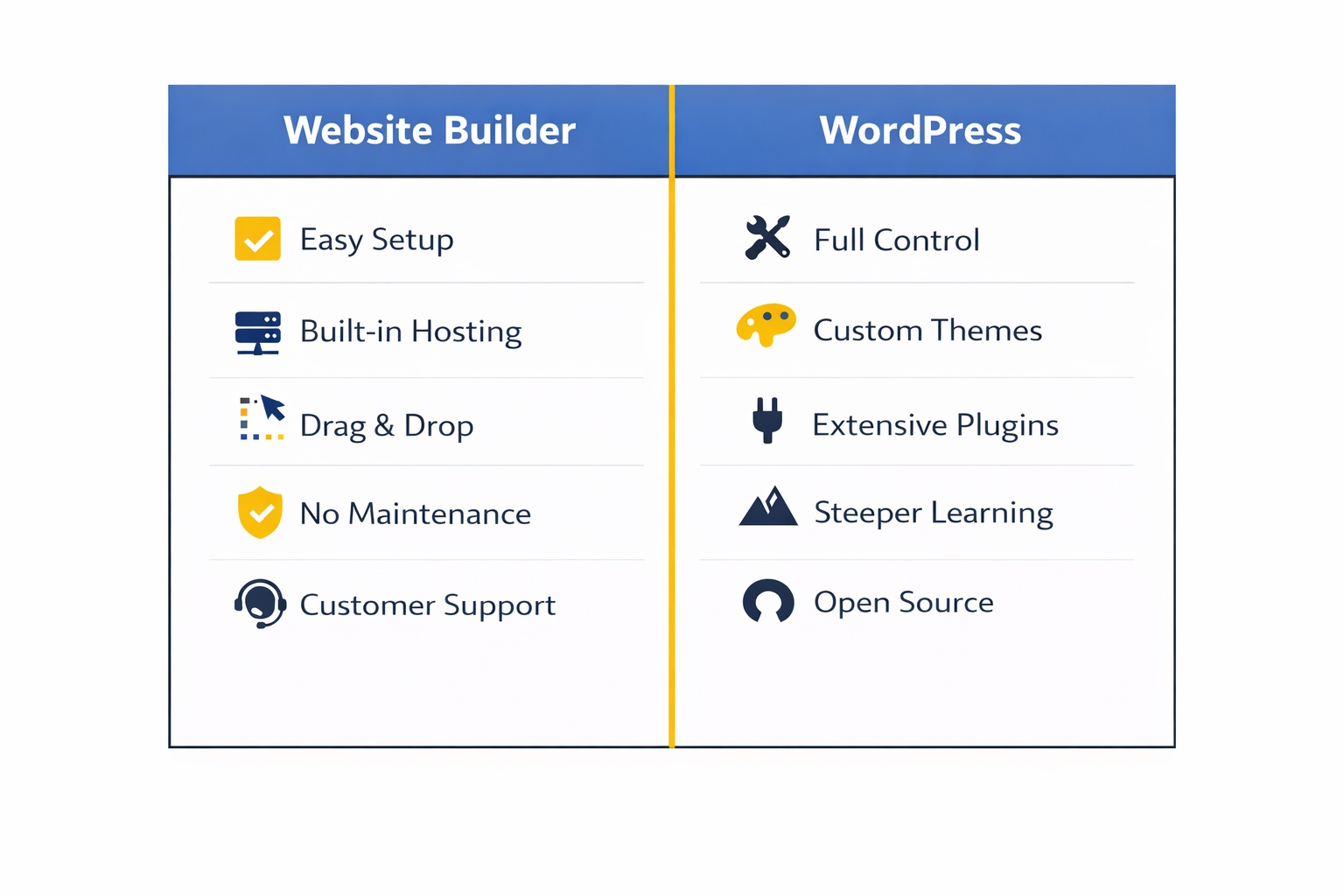
Website builders like Wix (starting at $17/month), Squarespace (starting at $16/month), and Hostinger are all-in-one platforms. Hosting, design, security updates — it’s all managed for you. You log in, drag and drop your content, and you’re live. No technical knowledge required.
WordPress (specifically WordPress.org — the self-hosted version) is free software you install on your own hosting account. You own the site outright: no platform company can raise prices on you, remove features, or discontinue a plan and leave you rebuilding from scratch. This blog runs on exactly that setup — Hostinger for hosting, WordPress.org installed with one click, and Kadence Blocks for the design and layout. Total cost comes to roughly $3–5/month for hosting, with Kadence’s free version covering everything a typical small business site needs. Powerful? Yes. But it’s not the same as logging into Wix and dragging a button across the screen.
One thing worth clarifying before you go further: WordPress.com and WordPress.org are not the same product. WordPress.com is a hosted subscription service — they manage the technical side for you, similar to a website builder. WordPress.org is the free, self-hosted software you install on your own server. Same name, completely different experience. When most people say “WordPress,” they mean WordPress.org — and that’s what this article is comparing against website builders. You can find the full breakdown of the Hostinger + WordPress.org + Kadence stack — including exact pricing and what each piece actually does — in this complete guide to the best website builders for small business.
That distinction also matters for how much does a website cost for a small business — because the WordPress.com vs WordPress.org difference alone can swing your monthly costs significantly.
When a Website Builder Is the Smarter Choice
Getting a website live shouldn’t take six months of learning — and for most small businesses, it genuinely doesn’t have to.
If any of these sound like you, a website builder is likely the right fit:
- You want to be live within days, not weeks. Most business owners get a basic site up in a weekend. Expect 2–3 hours to get comfortable with the interface and a few more to get your content polished.
- You don’t want to think about hosting, backups, or security. With a builder, it’s all included in your monthly plan — nothing to manage separately.
- Your website needs are fairly standard. Service pages, a contact form, a photo gallery, an about page — builders handle all of this without plugins or code.
- Your budget is tight. Plans typically start around $10–$17/month, all-inclusive. If you’re not ready to spend anything yet, there are solid options available — take a look at free website builders for small business to see what’s genuinely usable at no cost.
- You want to update your own content. Builders are designed for non-technical users. Changing a photo or adding a new service page takes minutes, not an afternoon.
The trade-off? You’re working within the platform’s limits. If you eventually need a complex membership site, a custom checkout flow, or very specific integrations, you may feel constrained. But for the majority of small businesses, that day never comes.
Not sure which builder to start with? The guide to best website builders for small business covers the top options with honest comparisons side by side.
When WordPress Is Worth the Learning Curve
WordPress powers around 43% of all websites on the internet — and this blog is one of them. The setup here is Hostinger hosting + WordPress.org + Kadence Blocks, and after two-plus years running it daily, the honest take is this: it’s the strongest long-term foundation available at this price point. But “long-term foundation” isn’t the same as “fastest path to live.” Expect 3–5 hours to feel genuinely comfortable — not days, but not one afternoon either.
WordPress makes sense if:
- You’re building a content-heavy site. WordPress started as a blogging platform and remains the gold standard for SEO-focused content sites with dozens or hundreds of pages.
- You need very specific functionality. With over 60,000 plugins available, if you need a niche booking system, a custom database, or a highly specific integration, WordPress almost certainly has a solution for it.
- You want full ownership and portability. You own your site completely. You can move hosts, export everything, and customise every line of code if needed. No platform can shut you down or change its pricing and take your site with it.
- You have (or plan to hire) technical help. WordPress is manageable solo, but it’s significantly smoother if you’re comfortable with basic tech — or willing to budget for occasional developer support.
The stack itself is leaner than most people expect. Hostinger’s WordPress hosting starts at around $2.69–$3/month on introductory long-term plans, renewing at $8–$11/month depending on your plan. WordPress.org software is free. Kadence Blocks’ free version handles the vast majority of small business layout needs — and Kadence Blocks Pro adds advanced features at $89/year if you eventually want them. Realistically, you’re looking at $10–18/month all-in at renewal — comparable to a mid-tier website builder, but with full ownership and no platform restrictions.
Here’s the catch: those costs aren’t as predictable as a flat website builder fee. Between hosting, premium themes, and plugins, budgeting requires a bit more thought upfront. The comparison between a website builder vs hiring a web developer adds useful perspective here too — it shows where the real costs sit across all three paths.
Website Builder vs WordPress for Small Business: Side-by-Side
Quick reference — scroll horizontally on mobile.
| Factor | Website Builder | WordPress |
|---|---|---|
| Setup time | Hours to days | Days to weeks |
| Technical skill needed | Minimal | Moderate to high |
| Monthly cost (approx.) | $10–$40/month (all-in) | $10–$18/month (varies at renewal) |
| Customisation level | Moderate | Very high |
| Maintenance required | Handled for you | DIY or outsource |
| Best for | Service businesses, local shops, portfolios | Content sites, complex or custom functionality |
Common Mistakes to Avoid
Mistake 1: Choosing WordPress because it sounds more professional
Many business owners assume WordPress automatically signals a more serious business. It doesn’t — visitors can’t tell which platform you used. A clean, fast Wix or Squarespace site looks just as professional as a WordPress site. Choosing based on perceived prestige rather than actual needs is one of the most common regrets people share after the fact.
Fix: Focus on how your site looks and performs, not what’s powering it behind the scenes.
Mistake 2: Underestimating the WordPress learning curve
This catches most people off guard. WordPress isn’t hard once you know it — but there’s a genuine onboarding curve. Installing and configuring plugins, setting up themes, managing updates, and understanding the settings panel all take real time. Many business owners start WordPress, spend weeks feeling stuck, and wish they’d started with a builder.
Fix: If you’re not confident with tech, start with a builder. You can always migrate to WordPress later once your site’s purpose is clear and your budget allows for developer help.
Mistake 3: Picking a platform without knowing what you actually need
Many business owners choose based on what a friend recommended — without thinking about their own goals first. A freelance photographer and a local accountant have very different website needs, and the same platform won’t suit both equally well.
Fix: Before you choose, write down the three things your website absolutely must do. Then pick the platform that handles those three things best. The how to choose a website builder guide walks through exactly this kind of decision process in plain language.
Mistake 4: Assuming the free plan is good enough for a real business
Free plans on website builders come with trade-offs: platform branding on your URL (like yoursite.wixsite.com), limited storage, and sometimes ads on your pages. These are fine for testing, but not for a business you want customers to trust.
Fix: Budget at least $10–$17/month for a paid plan. That gives you a custom domain and removes the platform branding — a small price for a site that looks credibly professional.
Your Next Steps (Do These in the Next 48 Hours)
You don’t need to make a perfect decision right now. Here’s a practical way to move forward without overthinking it:
- Write down your three must-haves. What does your website need to do? Contact form, online booking, product sales, a blog? This short list will tell you a lot about which platform fits best.
- Try a builder before you commit. Wix, Squarespace, and Hostinger all offer free trials. Sign up for one, build a rough version of your homepage, and see how it feels. Most people know within the first hour whether the tool suits them.
- If you’re leaning toward WordPress, start with Hostinger. Their one-click WordPress install gets WordPress.org live on your server in under two minutes — which removes the most intimidating part of the whole setup. Then add the free Kadence Blocks theme and you have a complete, professional-looking site to build on. Get clear on what that realistically costs first by reading how much does a website cost for a small business.
FAQ
Is WordPress better than a website builder for small business?
Not automatically. WordPress is more powerful and flexible, but it requires more technical knowledge and ongoing maintenance. For most small businesses — especially those just starting out — a website builder is faster, simpler, and just as effective. WordPress becomes the stronger choice when you need deep customisation, heavy content production, or features that no standard builder can provide.
Can I switch from a website builder to WordPress later?
Yes, but it’s not a one-click migration. You’ll need to recreate your content and design in WordPress rather than directly importing everything. That said, many business owners start on a builder to get live quickly, then move to WordPress once they know exactly what they need and have budget for help. It’s a perfectly reasonable two-stage approach.
Is WordPress actually free?
The WordPress.org software is free to download, but you’ll pay separately for hosting. On Hostinger, that starts at around $2.69–$3/month introductory, renewing at $8–$11/month depending on your plan. Add the free Kadence Blocks theme and you have a complete, professional setup for a low monthly cost to start. If you add Kadence Blocks Pro ($89/year) and a premium plugin or two, you’re realistically in the $10–18/month range at renewal — similar to a website builder, but you own everything outright. WordPress.com, the hosted version, starts at $4/month but restricts plugin access until the $25/month Business plan.
Which is better for SEO: website builder or WordPress?
Both can rank well in search results. WordPress gives you more fine-grained control over technical SEO, which matters for large content sites. For a typical small business website with 5–20 pages, a well-structured Wix or Squarespace site can rank just as effectively. Good content and a fast-loading site matter far more than the platform you’re on.
What’s the easiest option for a complete beginner?
A website builder, without question. Wix is consistently rated the most beginner-friendly thanks to its drag-and-drop editor and large template library. Squarespace is a close second for those who want more polished, design-led results. Hostinger’s builder is worth considering if you’re budget-conscious. For a fuller comparison, the best website builders for small business guide lays out the top options clearly.
Do I need a developer to use WordPress?
Not necessarily — many people run WordPress themselves, especially with modern page builders like Kadence Blocks. But you’ll likely want developer help for initial setup, custom design, or troubleshooting technical problems if you’re not comfortable with tech. Budget $200–$500 for a professional setup if you want it done right from the start. The full Hostinger + WordPress.org + Kadence breakdown — including what each piece costs and does — is in the best website builders for small business guide if you want to see the complete picture before committing.