
How Long Does It Take to Build a Website With AI? Here’s What Actually Happens

How long does it take to build a website with AI comes down to which clock you’re watching — the AI’s or yours. Generation itself is nearly instant, but a site you’d actually feel good sending customers to takes a bit more work.
I’ve spent over two years building and editing sites on Hostinger, and the gap between “AI made it” and “it’s actually ready” is where most people get caught off guard. In this piece, I’ll walk through both numbers — generation speed and real launch time — using my own Hostinger sessions alongside independent testing from CNET and Network Solutions. Here’s why that matters: if you’re planning your week around building a site, “a few minutes” and “a few hours” are very different promises.
Quick Answer
AI generation itself takes seconds to about a minute — the tool produces a full layout, copy, and images from a short description almost instantly. Getting that site truly publish-ready, with your real photos, pricing, and edits, typically takes 20 minutes to a few hours, and a multi-page small business site can stretch to a full day. Traditional drag-and-drop builders, used manually rather than through AI mode, usually run 8–20 hours over a week or two.
Affiliate disclosure: This post contains affiliate links. If you buy through them, I may earn a small commission at no extra cost to you.
Two Numbers, Not One
“How long does an AI website take?” is really two separate questions hiding in one. The first is generation speed — how fast the AI turns your description into a working draft. The second is launch time — how long until that draft is genuinely live with your real business details.
Most third-party benchmarks blur these together. That’s exactly why people expect a five-minute website and end up frustrated after an hour of tweaking.
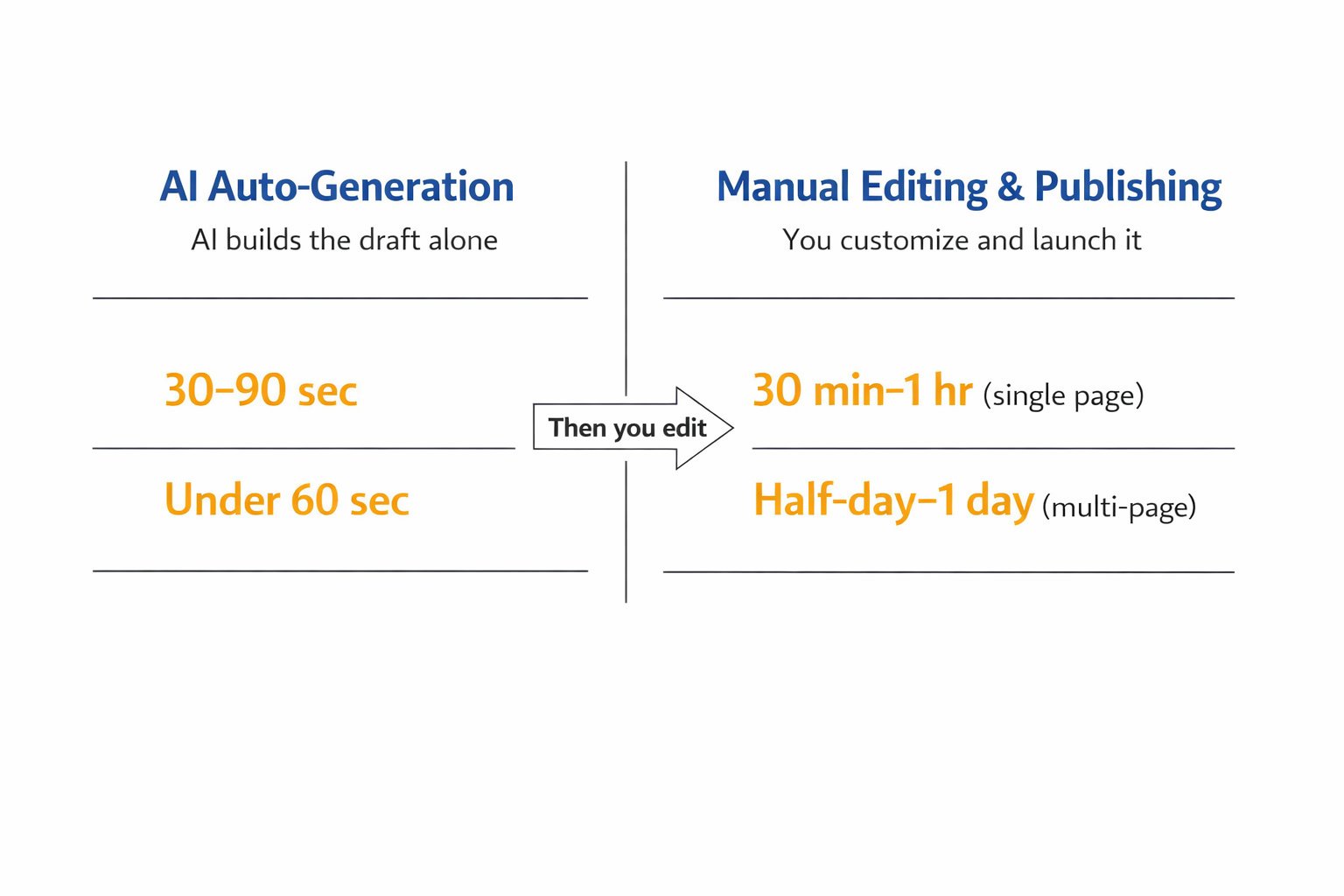
On Hostinger specifically, I’ve found generation takes roughly 30–90 seconds for a small business homepage. That lines up closely with Adviita’s under-60-second benchmark for AI-generated drafts. Editing is where the real time goes — swapping in service descriptions, uploading actual photos, fixing awkward AI-written copy. My own sessions have run anywhere from 30 minutes for a simple single-page site to 2–3 hours for a three- or four-page site with a contact form and service pages.
That tracks with CNET’s hands-on Wix AI test, where the reviewer got a working first draft in about 30 minutes but noted another two-plus hours could easily go into fine-tuning. If you need a single-page site live today, budget 30–60 minutes total. If you need a multi-page site with real content and SEO basics in place, budget a half-day to a full day rather than an hour.
Wix is a flexible website builder for small businesses, online stores, portfolios, and blogs. Explore Wix’s website builder.
AI vs. Traditional Build Times
| Platform | Starting Price | Best For |
|---|---|---|
| Hostinger AI Website Builder | $2.99–12.99/month depending on term length (promotional intro rates renew higher) | Fastest full setup — hosting, domain, and AI draft in one step |
| Wix ADI / Wix AI | Free to start; paid plans from $17/month (annual) for custom domain | Quick single-page drafts, strongest free-tier testing |
| Squarespace AI (Blueprint AI) | From $16/month (annual), no free tier | Polished design output for those willing to spend more editing time |
Network Solutions puts the general AI builder range at 10 minutes to 2 hours for beginners and quick-launch small sites, which roughly matches all three platforms above once editing is included. Freelancers typically take 2–4 weeks, and agencies take 6–12 weeks.
Here’s a reasoned dissenting take: faster isn’t automatically better. A rushed 30-minute AI site with generic stock copy can hurt conversions more than a slower, more deliberate 3-hour build where you’ve actually rewritten the AI’s first draft in your own voice. Speed only pays off if you still edit for accuracy and tone.
Common Mistakes That Slow You Down
Many business owners hit the same snags when timing their AI website build.
- Publishing the AI’s first draft without editing pricing, service areas, or contact details — do a full read-through before going live, which adds maybe 15 minutes but saves real embarrassment.
- Skipping mobile preview — AI layouts can look great on desktop and cramped on phones, so check mobile view before publishing, a 5-minute step often forgotten.
- Uploading low-quality stock images instead of real business photos — swap in your own photos early, since this is the single biggest thing that makes an AI site look less generic.
- Expecting the AI to write finished SEO copy — most AI drafts need manual keyword and meta description work afterward, so plan an extra 20–30 minutes for this if ranking matters to you.
- Trying to build a 6+ page site in one sitting — break multi-page builds into two sessions instead of rushing, since fatigue leads to sloppier edits.
Next Steps
If your goal is the fastest realistic launch, start with a Hostinger AI Website Builder site — it bundles hosting, domain, and the AI draft into one workflow, which is exactly why my own builds have consistently landed under an hour for single-page sites. For a deeper look at how these tools generate a site in the first place, see how AI website builders actually work. If you’re still deciding between AI-first and drag-and-drop, AI website builder vs. traditional builder breaks down the trade-offs beyond just speed.
My Verdict
For most small business owners who want a live site today rather than next week, Hostinger’s AI builder is the practical starting point — it’s the one I’ve used long enough to trust on both speed and reliability. You can try Hostinger’s AI Website Builder here and see your own draft in under a minute.
If you want to compare it against Wix and Squarespace side by side first, our full pillar guide to the best AI website builders and the Wix vs. Squarespace vs. Hostinger breakdown cover pricing and features beyond just build time.
FAQ
How much does an AI website builder cost?
It varies quite a bit by platform and billing term. Hostinger’s AI builder bundles into hosting plans that range roughly $2.99–12.99/month depending on the promo period, while Wix and Squarespace’s AI tools generally run $16–25/month billed annually, with Wix offering a limited free tier.
Will an AI-built website look generic or unprofessional?
It can, if you publish the first draft as-is. Swapping in your own photos, rewriting generic copy, and adjusting layout details usually takes the site from “obviously AI” to genuinely professional within 20–40 minutes.
What’s the fastest AI builder for a single-page site?
Based on both my Hostinger sessions and independent testing, single-page sites are consistently the fastest category — most tools generate a working draft in under a minute and can be publish-ready within 30 minutes with light editing.
Do AI-built websites still need manual SEO work afterward?
Yes. AI drafts usually include basic on-page structure but rarely optimize meta descriptions, headings, or keywords for your specific market, so plan on 20–30 minutes of manual SEO cleanup after the initial build.
How long does a multi-page AI site take compared to a single landing page?
A single landing page is typically live within an hour, while a multi-page site with several service pages and a contact form usually takes a few hours to a full day once you factor in structuring content and editing each page.
Can I switch hosting providers after building a site with an AI tool?
In most cases, yes, though the process varies by platform — some AI builders lock design elements to their own hosting, so it’s worth checking export or migration options before you build if switching later matters to you.