
My Honest Hostinger AI Website Builder Review After 2 Years of Real Use

This Hostinger AI website builder review comes from two years of actually running a business site on it, not a quick afternoon test. The first draft the AI produces is genuinely fast and usable — that part lives up to the hype. But the real question isn’t how good day one looks; it’s whether the builder still holds up six months in, once you’re editing pages, fixing small annoyances, and living with its limits. That’s the version of this review most people don’t get to read before they sign up. Below, I’ll cover what’s worked, what’s frustrated me, and who should skip this builder entirely.
Quick Answer
Hostinger’s AI website builder is a strong pick if you want a professional-looking site fast and cheap, without needing design skills. It’s not the right fit if you plan to scale into a complex online store or need deep template flexibility down the road — for that, Wix or Squarespace still win. Think of Hostinger as the “get online today, upgrade later if you outgrow it” option.
Affiliate Disclosure
Heads up: this post contains an affiliate link. If you sign up for Hostinger through it, I may earn a small commission at no extra cost to you. I’ve genuinely used Hostinger’s website builder for over two years, and everything below is based on that real experience, not a five-minute demo.
Quick List: Hostinger AI Website Builder At a Glance
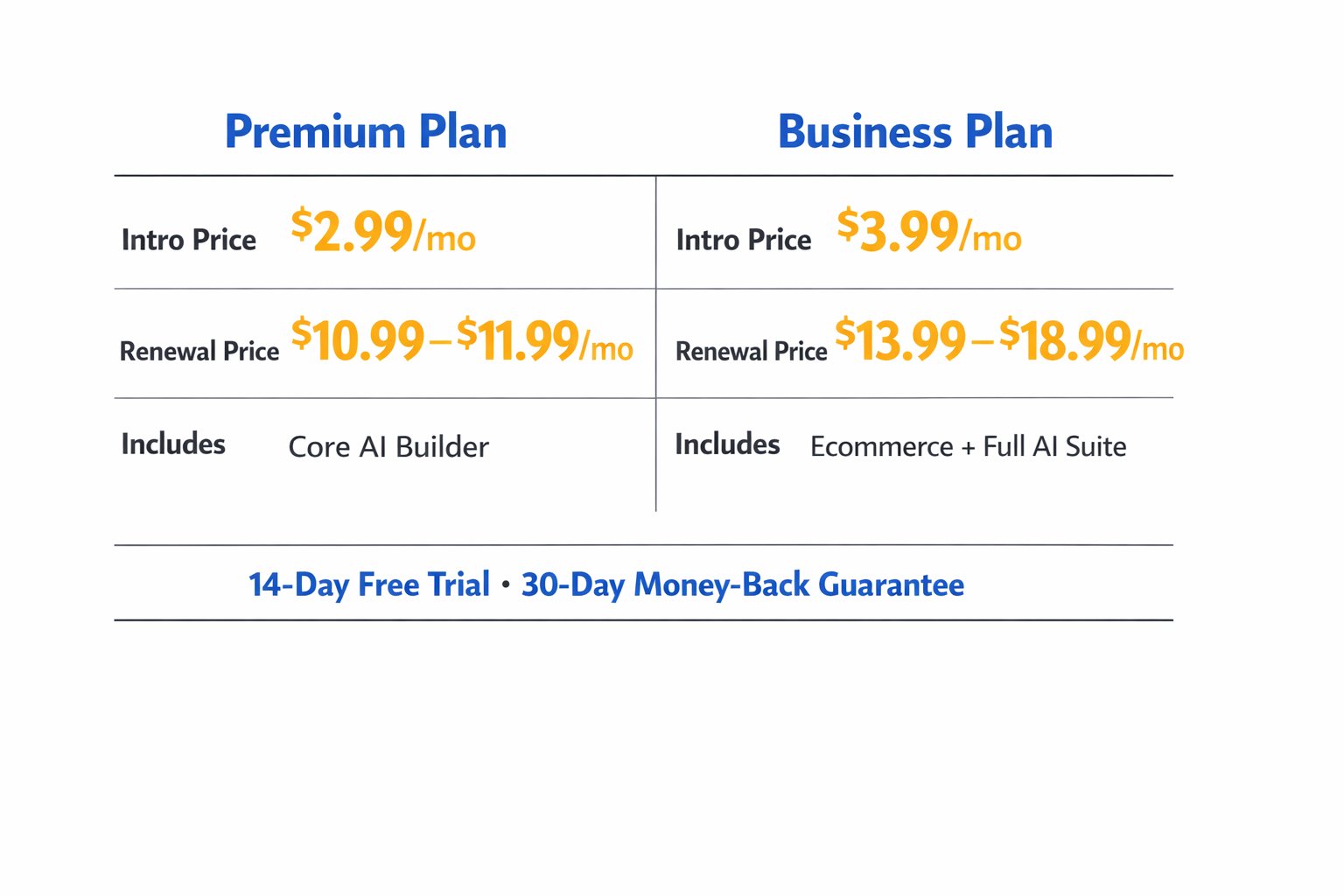
- Starting price: around $2.99/month on the Premium plan when you commit to a long intro term, renewing somewhere in the $10.99–$11.99/month range afterward
- Business plan: starts around $3.99/month and typically renews between $13.99–$18.99/month, depending on your term length and any active promo
- Trial and refund: 14-day free trial of the AI builder, plus a 30-day money-back guarantee on paid plans
- Best for: budget-conscious beginners, solo business owners, and simple brochure-style sites
- Not ideal for: stores planning to sell hundreds of products or brands that need heavy template customization
- Standout feature: describe your business in a sentence and get a full draft site in under a minute
- Biggest limitation: you generally can’t swap templates once you’ve picked one without starting the build over
What You Get With Hostinger’s AI Builder
Here’s how it actually works day to day. You answer a few prompts about your business — industry, tone, what pages you need — and the AI generates a complete draft: layout, images, and starter copy included. In plain English, it does the boring 80% of website setup for you, so you’re editing rather than building from a blank page.
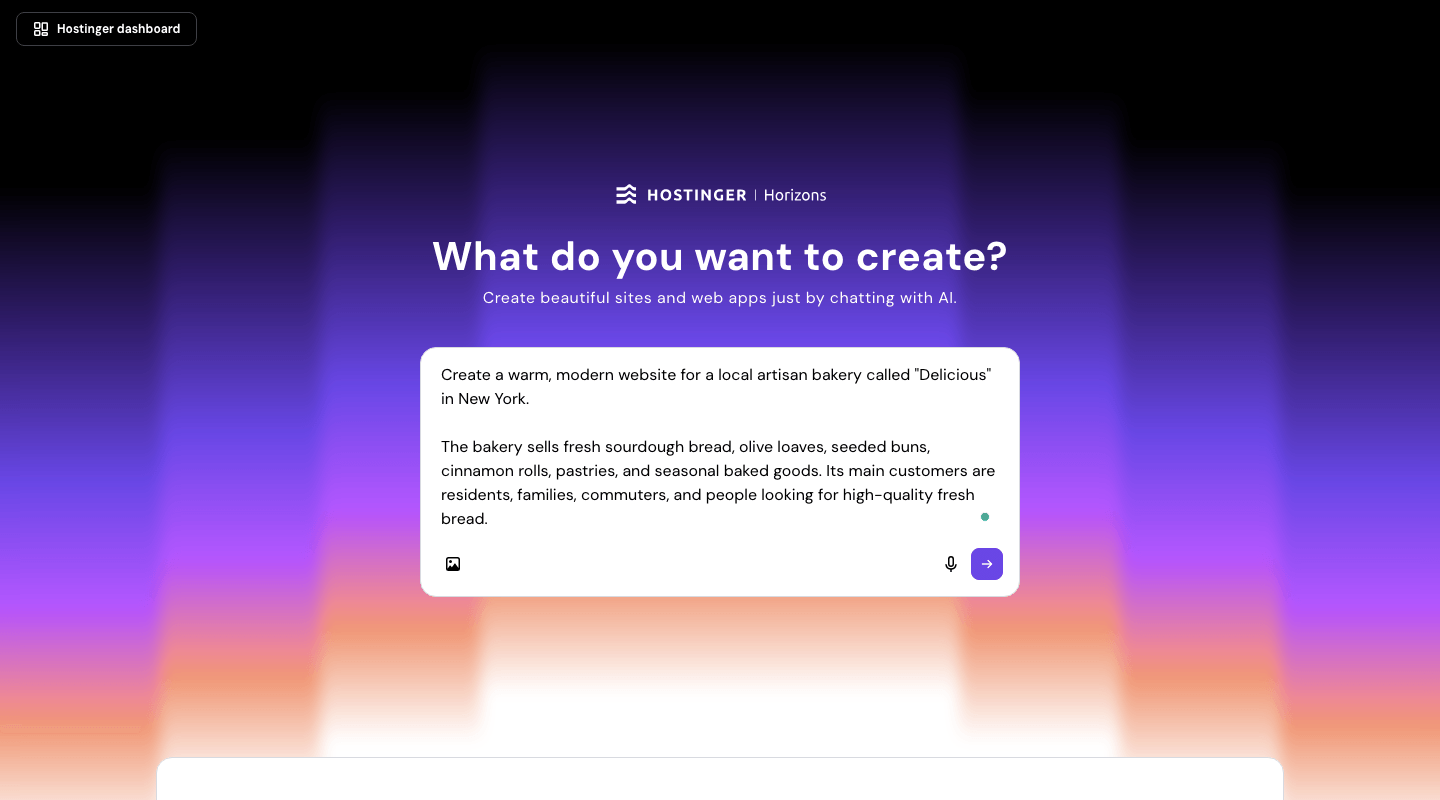
The editor itself is drag-and-drop, which makes it genuinely beginner-friendly. Hostinger has leaned into this — reviewers consistently rank it among the easiest builders for people with zero technical background, and after two years of poking at it, I’d agree. My mother-in-law could build a basic “hours and contact info” page for her shop without calling me for help, and that’s a real bar to clear.
Where it gets more interesting is the AI suite bundled into higher plans: an AI image generator, background remover, logo maker, blog post writer, and basic AI SEO tools. None of these are best-in-class on their own — you wouldn’t swap out a dedicated logo tool for it. But having them built into the same dashboard saves a genuine amount of app-switching for a solo business owner who doesn’t want five different subscriptions.
Now for the honest part. The template lock-in is real, and it’s the one thing that’s bitten me personally. Once you’ve picked a template and started building, switching to a different one usually means rebuilding your content from scratch rather than a simple reskin. If you’re the type who likes to experiment with layouts, budget extra time upfront — pick carefully the first time rather than assuming you can “try another one later” the way you can on Wix.
Image editing tools are also fairly basic compared to what you’d get in Canva or even Wix’s built-in editor. If your business leans heavily on visual branding — think photography studios or boutique product shops — you’ll likely still want a separate image tool in your workflow.
On the infrastructure side, since Hostinger is also a hosting company at its core, page speed and uptime have held up well on my end. I haven’t had a single unplanned outage in two years, and load times stayed fast even during a short traffic spike from a local news mention. That’s not something every budget builder can claim, and it’s easy to overlook when you’re comparing feature lists instead of actually running a live site.
Who Hostinger’s AI Builder Is Really For
Decision logic: if your main goal is getting a clean, functional site live fast and cheap, choose Hostinger. If you know you’ll want to redesign frequently or need advanced customization control, choose a builder with a more flexible template system instead, even if it costs more upfront. That’s the actual trade-off Hostinger is built around, and it’s worth respecting rather than fighting.
A quick dissenting take: some reviewers push Hostinger primarily as a “cheapest option” story. I’d push back on that slightly. After two years, price isn’t actually why I’ve stuck with it — the hosting speed and uptime have been consistently solid, and that matters more for a live business site than shaving another dollar off the monthly bill. The low price is the hook; reliable performance is the reason to stay.
Mini scenario: say you run a local bakery and need a site live before a weekend market. With Hostinger’s AI builder, you could realistically have a working site — menu, hours, contact form — up within an hour, using the free domain included on longer plans. That speed is genuinely where this tool shines, and it’s the kind of deadline where a heavier builder would slow you down.
Hostinger AI Website Builder Review: Pricing in 2026
Pricing here depends heavily on which term length you pick, and providers change promo rates often, so treat these as ranges rather than fixed numbers. The Premium plan (one website, core AI builder) starts around $2.99/month on a long intro term and renews somewhere between $10.99–$11.99/month. The Business plan, which adds ecommerce support and the fuller AI toolkit, starts around $3.99/month and renews somewhere between $13.99–$18.99/month, again depending on your term and any active discount at checkout.
There’s no permanent free plan, but you get a 14-day trial of the AI builder itself plus a 30-day money-back guarantee across paid plans. That’s enough time to genuinely test-drive it on a real project before committing to a longer term — and I’d recommend actually building a full page or two during the trial, not just clicking through the demo.
Hostinger vs Wix: How the AI Builders Really Compare
If you’re weighing this against the more established option, here’s the short version.
| Platform | Starting Price | Best For |
|---|---|---|
| Hostinger AI Builder | ~$2.99/month (intro rate) | Budget beginners, simple business sites |
| Wix | Higher intro rate | Deep customization, larger template library, advanced ecommerce |
Hostinger undercuts Wix’s intro pricing by a wide margin, but it trails on template variety (roughly 150–180 templates versus Wix’s 900+) and ecommerce depth for bigger stores. If price and speed matter most, Hostinger wins. If long-term design flexibility matters more, Wix — or Squarespace, if visual polish is your priority — is worth the extra spend. For a deeper side-by-side, see my Hostinger vs Wix for small business comparison.
Common Mistakes People Make With Hostinger’s AI Builder
Picking a template without a plan. Many business owners jump straight into the AI generator and pick whatever looks nice first. Fix: sketch your must-have pages before you start, since switching templates later usually means rebuilding.
Assuming the AI SEO tools are enough on their own. The built-in AI SEO features handle basics like meta tags, but they won’t replace real keyword research. Fix: pair them with a proper SEO plan — my how AI website builders work guide explains where the automation stops.
Forgetting about the renewal price. The intro rate is genuinely low, which is exactly why the jump at renewal surprises people. Fix: calendar-reminder yourself before the renewal date so you can decide to continue, downgrade, or switch with a clear head.
Overloading the Premium plan with ecommerce needs. Premium isn’t built for selling products. Fix: if you plan to sell anything beyond a handful of items, budget for Business from day one instead of migrating later.
Skipping the free trial. Some users buy a long-term plan immediately based on price alone. Fix: use the 14-day trial first, and actually build a page or two, to confirm the AI output and editor fit how you like to work.
Next Steps
If Hostinger sounds like the right fit, start with the 14-day trial and build out your homepage and one inner page before deciding on a plan — that’s usually enough to know if the editor clicks with you. Budget around 30–60 minutes for your first draft, plus a bit more time to refine copy and images afterward.
If you’re still deciding between AI builders in general, my best AI website builder for small business guide is a good next stop. And if you want to see how AI-built sites hold up against hand-coded ones, check AI website builder vs traditional builder.
FAQ
Is Hostinger AI website builder free?
No, there’s no permanent free plan. You do get a 14-day free trial of the AI builder itself, plus a 30-day money-back guarantee on all paid plans, which gives you enough runway to test it on a real project before paying long-term.
Do I need coding skills to use Hostinger’s AI builder?
No. It’s widely considered one of the more beginner-friendly builders on the market. You describe your business, the AI generates a draft site, and you edit it with a drag-and-drop tool — no code required at any step.
Can I switch templates after I’ve started building?
Generally, no, not without rebuilding most of your content. This is Hostinger’s biggest known limitation, so pick your starting template carefully rather than assuming you can swap it later the way you might on some competitors.
How does Hostinger AI builder compare to Wix?
Hostinger is cheaper to start and faster to launch a simple site with, but Wix offers more templates and deeper ecommerce and customization options. Choose Hostinger for speed and budget; choose Wix if you expect to scale design complexity later.
Is Hostinger AI website builder good for ecommerce?
It works fine for small stores — the Business plan includes ecommerce tools — but it has product limits that make it less suited to larger catalogs. If you’re planning serious online sales volume, compare it against dedicated ecommerce-first builders first.
Is Hostinger AI website builder good for SEO?
It includes basic AI SEO tools like meta tag suggestions, which help beginners avoid obvious mistakes. It’s not a substitute for real keyword strategy, though — treat it as a helpful starting layer, not your entire SEO plan.
What happens if I outgrow Hostinger’s builder later?
You can migrate to a different platform, but expect to rebuild your content rather than transfer it directly, since most builders don’t offer clean cross-platform exports. If rapid future growth is likely, it’s worth weighing that migration cost against the money you’d save now.
My Verdict
After two years of actually running a site on it, Hostinger’s AI website builder earns its reputation as the value pick: fast to launch, genuinely easy for non-technical owners, and priced well below most competitors at the intro rate. The trade-offs — template lock-in and lighter customization — are real, but they matter most if you plan to redesign often or scale into a complex store. For a straightforward small-business site you want live this week without a steep learning curve, it’s a solid, low-risk starting point. You can check current plans and the active trial offer directly on Hostinger’s website builder page.