
The Easiest Website Builder for Beginners (Honest Picks for 2026)

The easiest website builder for beginners isn’t the one with the most features — it’s the one that gets you from “blank screen” to “live website” without making you feel like you need a computer science degree. That gap between a tool that overwhelms you and one that feels like second nature is surprisingly wide, and picking the wrong one can kill your momentum before you’ve published a single page.
The good news? Three platforms consistently make that first website feel manageable: Wix, Squarespace, and Hostinger. Each takes a slightly different approach to beginner-friendliness, and which one suits you best depends on how you like to work.
Quick Answer
If you want the shortest possible answer: Hostinger is the fastest to launch (AI builds your first draft in under two minutes), Wix gives you the most drag-and-drop freedom, and Squarespace delivers the most polished results out of the box. All three require zero coding. Most beginners can have a working website live within a couple of hours — often less.
Affiliate disclosure: This article contains affiliate links. If you click through and make a purchase, I may earn a small commission at no extra cost to you. I only recommend tools I’ve genuinely researched or used.
What Makes a Website Builder Truly Beginner-Friendly?
Before comparing platforms, it helps to know what “easy” actually means in practice — because “drag-and-drop” is listed as a feature on almost every builder, but they don’t all feel the same in use.
Here’s what separates genuinely beginner-friendly tools from ones that just market themselves as such:
- Visual editing — You see your changes in real time, not after hitting “preview”
- AI setup assistance — A guided flow or AI prompt gets your first draft live before you have to make decisions
- Template quality — Good starter templates mean less blank-page anxiety
- Undo and recovery — Easy to reverse mistakes without starting over
- Help when stuck — Clear in-editor hints, live chat, or solid documentation
All three platforms below tick most of these boxes. Here’s how they compare in practice.
Wix — Most Drag-and-Drop Freedom for Beginners
Starting out with a new website, the hardest part is often not knowing where to click first. Wix solves this immediately with its Wix ADi (AI Design Intelligence) setup — answer a few questions about your business, and it builds a draft site for you to customise. From there, the editor hands you full creative control without ever asking you to write a line of code.
The drag-and-drop editor lets you place any element — text blocks, images, buttons, contact forms — exactly where you want them on the page. If you’ve ever rearranged slides in a presentation, the logic is identical. Wix also has one of the largest template libraries available, with 900+ options sorted by industry, so you’re not starting from scratch.
Key beginner features:
- Drag-and-drop editor with freeform element placement — no grid restrictions
- AI-powered setup flow guides you through your first site
- 900+ templates sorted by business type
- Built-in free plan to test before paying
- Real-time editor — what you build is exactly what visitors see
Pricing: Starting at $17/month (billed annually). Monthly billing available at $23/month.
Pros:
- Most flexible drag-and-drop experience of the three
- Huge template and app library as your needs grow
- Free plan available (with Wix branding)
Cons:
- Free plan includes Wix ads on your site
- The freedom can feel slightly overwhelming at first — too many choices
Best for: Beginners who want creative control and expect to grow their site over time.
Not for: Anyone who just wants the simplest possible experience and doesn’t need customisation options.
My Verdict: Wix is the best all-around beginner website builder if you want room to grow. The learning curve is gentle, the editor is intuitive, and the template quality is consistently high.
Explore Wix’s plans and pricing to see which tier fits your needs.
Squarespace — Best-Looking Results Straight Out of the Box
There’s a reason designers and small business owners alike gravitate toward Squarespace — the templates are genuinely beautiful, and they look that way before you change a single thing. If you’ve ever spent an hour staring at a blank page trying to decide what your website should look like, Squarespace removes most of that decision-making by handing you a design that already works.
The editor is section-based rather than fully freeform, which sounds restrictive but actually makes building faster for beginners. You’re working within a clean structure, and the AI-assisted setup walks you through the process step by step. It’s worth noting that Squarespace consistently ranks among the easiest builders for getting started in third-party testing.
Key beginner features:
- Step-by-step AI website builder walks you through setup from the start
- Section-based editor keeps your layout clean and consistent
- Award-winning templates — professional-looking before you customise
- Built-in blogging, SEO basics, and analytics on every plan
- Responsive mobile design handled automatically
Pricing: Starting at $16/month (billed annually). Monthly billing available at $25/month.
Pros:
- The most professionally polished results of the three, right from a template
- AI setup is the most guided and step-by-step of any builder tested
- No free plan, but a 14-day free trial lets you test risk-free
Cons:
- No free plan once your trial ends
- Less freeform layout flexibility than Wix
Best for: Beginners who care most about how their site looks and want a professional result without hiring a designer.
Not for: Anyone who wants maximum layout control or needs a free long-term option.
My Verdict: Squarespace templates are consistently the cleanest and most professional-looking out of the box — that reputation is well-earned. For a beginner who wants a site that looks like it was designed by a professional, this is the one to start with.
Explore Squarespace’s plans and templates to see what’s included.
Hostinger Website Builder — Fastest Way to Go Live
I’ve been using Hostinger Website Builder for over two years now, and the single thing that surprises most people when they first try it is how fast the AI setup actually is. You type a short description of your business — something like “I run a small florist in the city centre” — and within about two minutes, you have a complete draft website with placeholder content, a layout that matches your industry, and pages already created.
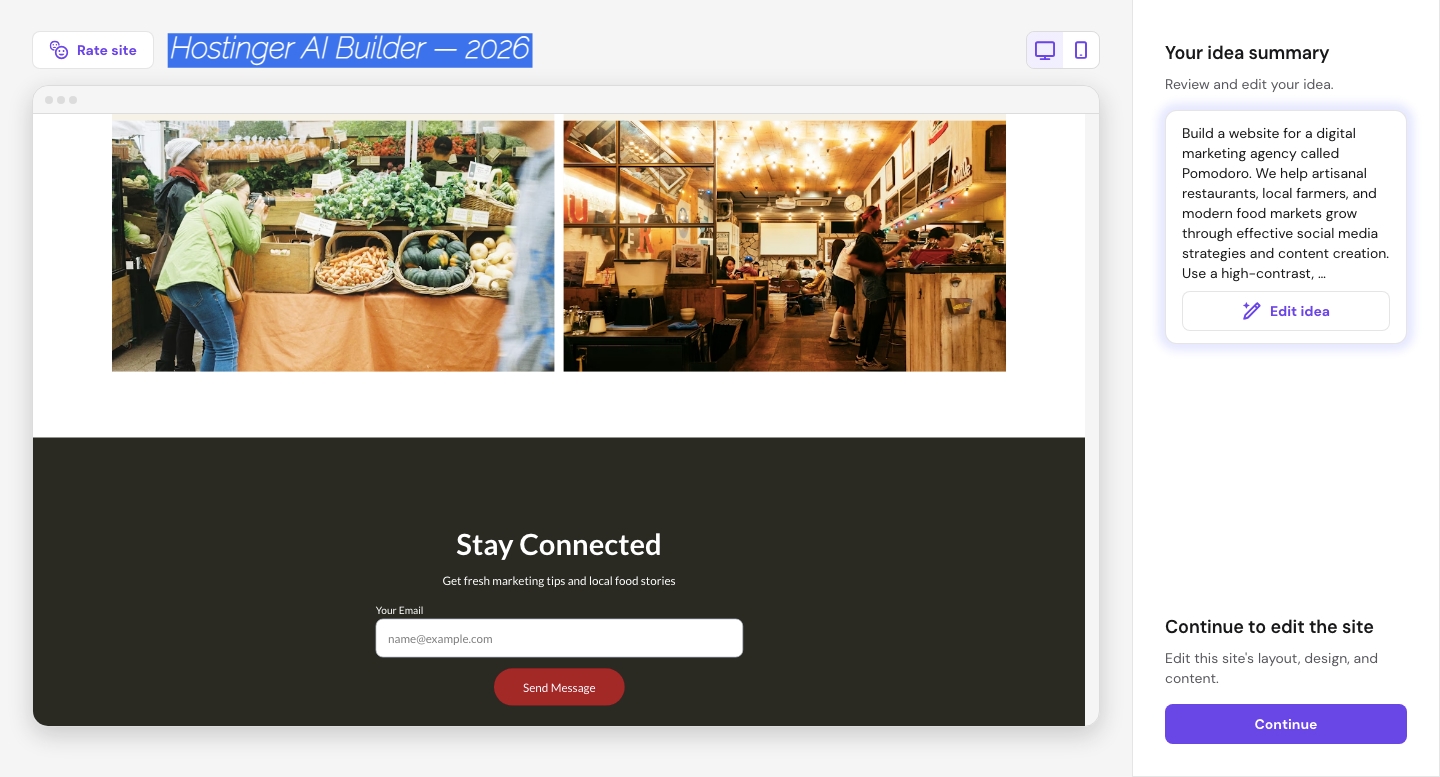
From there, the drag-and-drop editor is genuinely simple. The interface isn’t cluttered with advanced options, which is exactly what a beginner needs. There are two clean toolbars, and adding text, images, buttons or new sections takes a single click. One thing I particularly appreciate: the editor doesn’t try to do too much. It keeps the focus on building your site, not on upselling features you don’t need yet. The AI tools also extend beyond initial setup — you can use them to write copy, generate product descriptions, or tweak your layout once you’re in the editor.
Key beginner features:
- AI website builder creates a full draft from a one-sentence prompt — in under 2 minutes
- Clean, uncluttered drag-and-drop editor — focused, not overwhelming
- AI writing tools built in for help with copy and page content
- 300+ responsive templates to start from if you prefer manual setup
- 30-day money-back guarantee
Pricing: Starting at $2.99/month (billed over 24 months). Premium plan starts at $1.99/month on 48-month billing. Renewal rates are significantly higher — $10.99/month after the initial term.
Pros:
- By far the most affordable entry point of the three
- Fastest time from sign-up to live draft site
- AI tools extend throughout the editor, not just setup
Cons:
- Renewal price ($10.99/month) is much higher than the introductory rate — plan for it
- Slightly fewer third-party integrations than Wix at this stage
- Template variety is smaller than Wix’s library
Best for: Budget-conscious beginners who want the fastest possible path to a live website.
Not for: Businesses that need a large app marketplace or advanced ecommerce features from day one.
My Verdict: For a complete beginner who just wants a real website live as quickly as possible — without spending much — Hostinger is the most practical starting point. The AI builder genuinely removes the blank-page problem, and the editor is clean enough not to intimidate anyone.
Explore Hostinger Website Builder’s plans and pricing here.
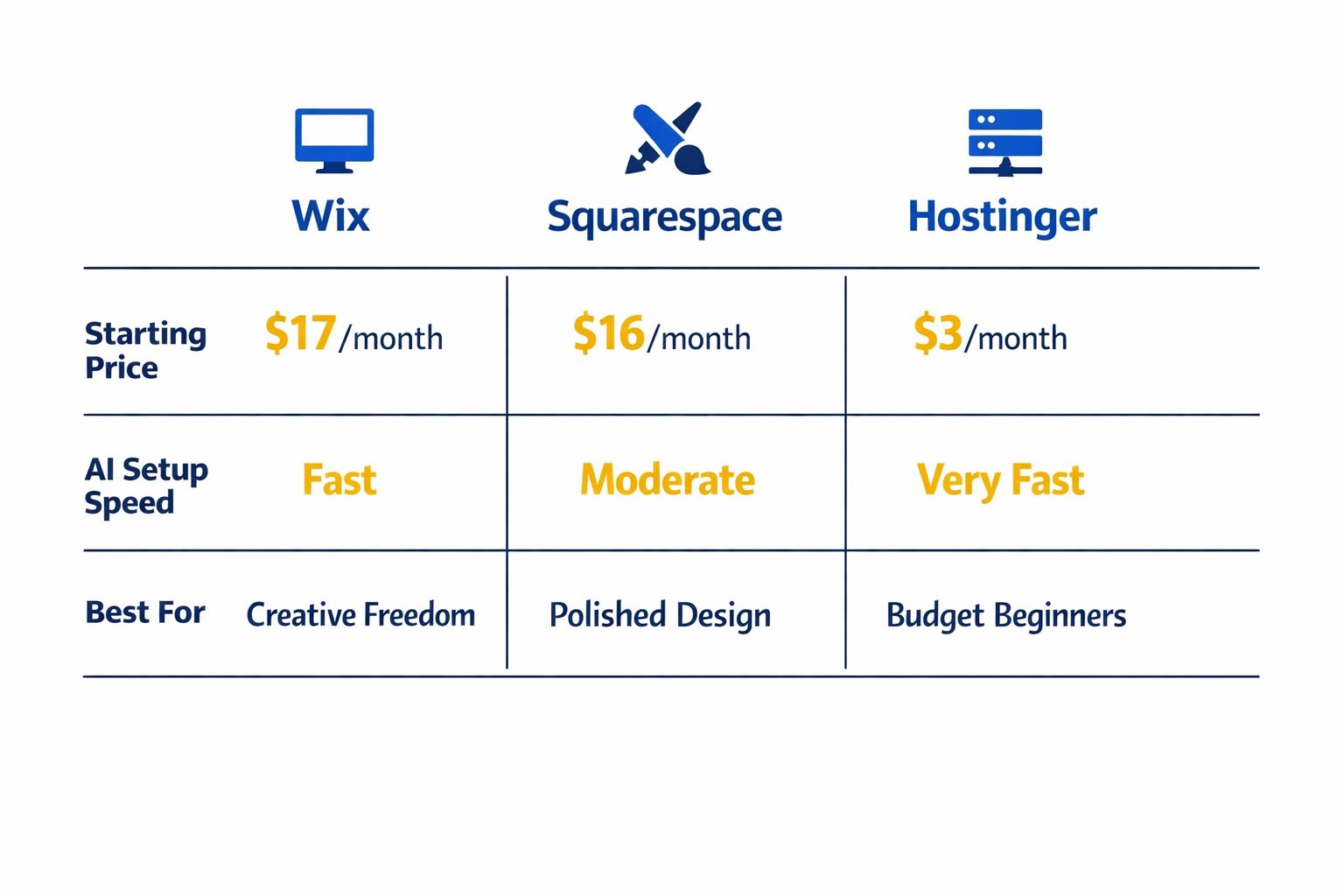
Easiest Website Builder for Beginners: Quick Comparison
Quick reference — scroll horizontally on mobile, or click platform names above to jump to full details.
| Platform | Starting Price | Best For |
|---|---|---|
| Wix | $17/month | Beginners wanting creative freedom |
| Squarespace | $16/month | Beginners who want polished design |
| Hostinger | $2.99/month | Beginners on a budget, fastest launch |
Common Mistakes Beginners Make (And How to Avoid Them)
Starting with a website builder is straightforward — but a few stumbling blocks catch almost everyone off guard. Here are the ones that come up most often.
1. Choosing a platform based on price alone
Hostinger’s $2.99/month entry price is genuinely attractive, but many business owners don’t notice that the renewal rate jumps to $10.99/month after the initial term. Before committing, calculate the total cost over two to three years, not just month one. Factor in what you actually need — if Squarespace’s design quality saves you hours of tweaking, the slightly higher price often makes sense.
2. Skipping the AI setup and starting with a blank canvas
This catches most people off guard. Every platform here has an AI or guided setup specifically designed to get your first draft done in minutes. Starting from blank is harder, not more creative. Use the AI first — you can always customise from there.
3. Trying to get everything perfect before going live
A website with five solid pages beats a perfect website that never launches. Many business owners spend weeks refining their site privately and lose momentum. Go live with a homepage, an about page, and a contact form — then improve as you go. Most visitors only look at one or two pages anyway.
4. Ignoring mobile preview before publishing
All three builders create mobile-responsive designs automatically, but that doesn’t mean your specific layout will always look great on a phone. Easy to overlook when starting out: always preview the mobile version before you hit publish. One misaligned image or oversized heading can make the whole page feel broken on a small screen.
5. Using a free plan for a business website
Free plans are useful for exploring a platform, but they come with subdomain addresses (like yoursite.wixsite.com) and platform branding. For a business, this undermines trust immediately. Budget for a paid plan from the start — even Hostinger’s entry plan includes a custom domain connection.
Next Steps (Do These in the Next 24–48 Hours)
You don’t need to figure everything out before starting. Here’s what to do right now:
- Pick one platform and sign up for a free trial or free plan. Wix has a free forever plan; Squarespace offers a 14-day free trial; Hostinger has a 30-day money-back guarantee. Spend 30 minutes building your first draft — not to publish it, just to feel how the editor works.
- Use the AI setup tool. Don’t start from blank. Type in one or two sentences about your business and let the AI generate a draft. You’ll know within 10 minutes whether the platform feels right for you.
- Read how to choose a website builder before committing. Once you’ve tested one or two platforms, that guide will help you make the final call with confidence — especially around features, pricing, and what to expect as your site grows.
Frequently Asked Questions
Which website builder is truly the easiest for a complete beginner with no tech skills?
All three platforms here work without any coding, but Hostinger’s AI builder is the fastest for getting a first draft live — under two minutes from sign-up to a working draft. Squarespace is the most guided step-by-step, while Wix gives you the most freedom to experiment. If you have no experience at all, either Hostinger or Squarespace will feel the most reassuring to start with.
How much does a beginner website builder cost per month?
Prices vary widely. Hostinger starts at $2.99/month (on a 24-month plan), Squarespace at $16/month, and Wix at $17/month — all billed annually. Monthly billing is higher on each. Hostinger’s introductory rate is the most affordable, but note that it renews at $10.99/month after your initial term.
Can I build a professional-looking website without any design experience?
Yes — that’s exactly what these platforms are designed for. Squarespace is particularly strong here: the templates are professionally designed from the start, so even your first, unedited version looks polished. Wix and Hostinger both offer templates sorted by industry, so you’re not building from a blank page.
Do I need to buy a domain name separately?
With Wix, you get a free custom domain for the first year on paid plans. Squarespace includes a free domain for one year on annual plans. Hostinger includes a free domain with most plans as well. After the first year, domain renewal typically runs $10–$20/year depending on the extension you choose.
What’s the difference between a free plan and a paid plan for a business?
Free plans let you explore the builder, but they come with limitations: subdomain addresses (not your own .com), platform branding on your site, and restricted features. For any business, a paid plan is worth it — it gives you a professional web address, removes platform branding, and unlocks contact forms, analytics, and other tools customers expect.
Is drag-and-drop actually beginner-friendly, or is it just a marketing term?
It depends on the platform. Wix’s freeform drag-and-drop lets you place anything anywhere — very free, but slightly more to learn. Squarespace uses a section-based approach that’s more structured and arguably easier for true beginners. Hostinger’s editor sits somewhere between: drag-and-drop within a clean, minimal interface. All three are genuinely visual — no code required.
How long does it actually take to build a website with these tools?
A basic website (homepage, about, contact) can realistically be done in two to four hours using a template and AI tools. If you use Hostinger’s AI setup or Squarespace’s guided builder, your first draft is ready in minutes — the time you spend is mostly on writing your own content and swapping in your photos.
Which platform is best if I might want to add an online shop later?
Wix and Squarespace both have solid ecommerce features available on higher-tier plans. Wix’s Core plan at $29/month unlocks online selling; Squarespace’s Plus plan at $39/month includes full commerce features. Hostinger also supports basic online stores. If ecommerce is a serious goal, check out the best website builder for small business comparison for a more detailed breakdown.