
How to Choose a Website Builder: 5 Questions to Ask First

Knowing how to choose a website builder is genuinely confusing when every platform claims to be the easiest, fastest, and most affordable option on the market. You’ve probably searched “Wix vs Squarespace,” ended up on a 4,000-word comparison table, and still don’t know which one to pick. That’s not a you problem. That’s a “too many options, not enough context” problem.
The good news is you don’t need to evaluate every platform. You just need a clear framework that matches the right tool to your specific business type, budget, and goals. That’s exactly what this guide walks through — step by step, no tech jargon required.
Quick Answer
The fastest way to figure out how to choose a website builder comes down to four things: your monthly budget, your business type, the features you actually need, and how comfortable you are with technology. Get clear on those four, and the shortlist becomes short fast.
Once you’ve worked through this guide, head to the full small business website builder comparison to see which specific platforms match your situation.
How to Choose a Website Builder: A 5-Step Framework
Most people start by Googling “best website builder” and end up more confused than before — and that’s a completely understandable place to land. There are dozens of platforms, each built for slightly different needs, and the marketing doesn’t make it easy to compare. Work through these five steps and the choice narrows down fast.
Step 1 — Start With Your Actual Budget
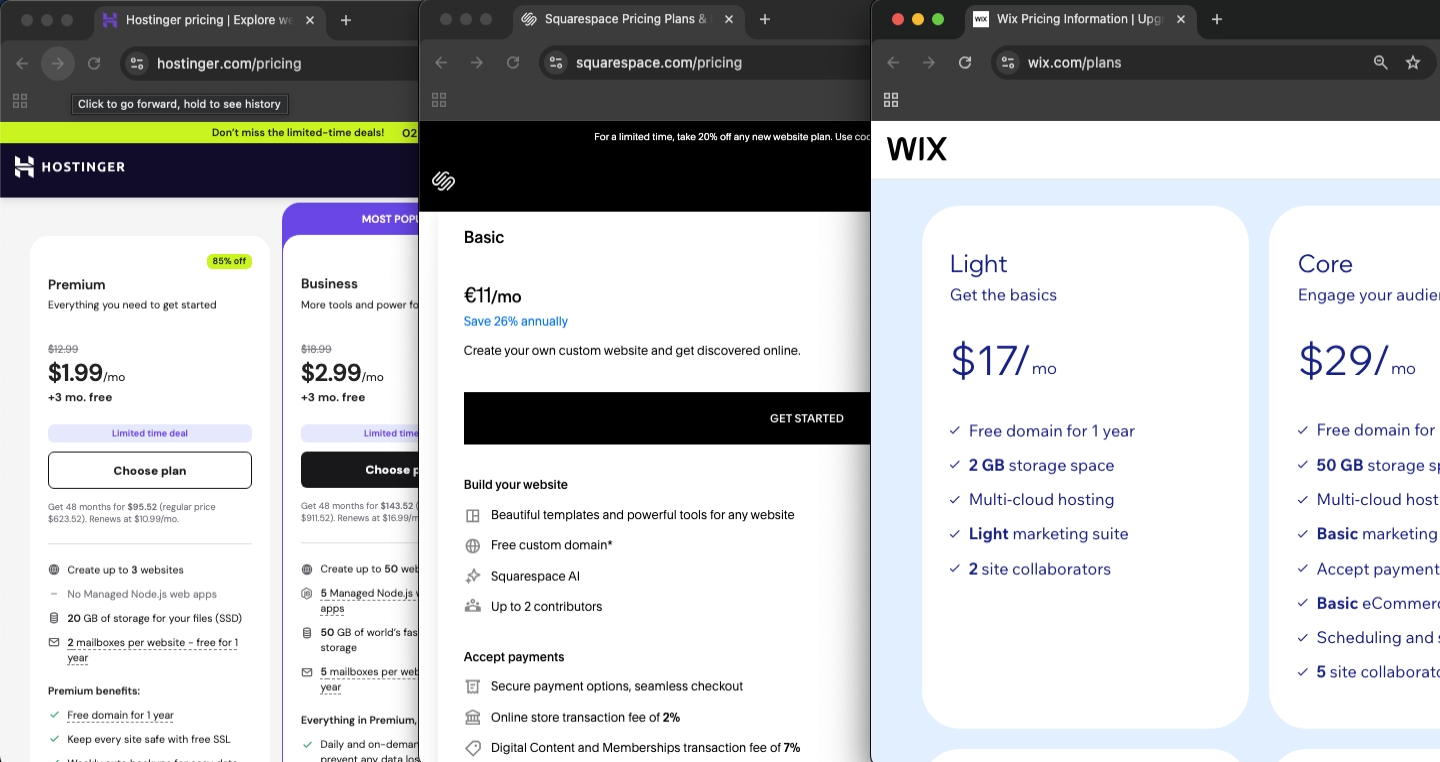
Website builder plans for small businesses typically run $16–$49/month depending on the platform and features included. Add in a custom domain ($10–$20/year) and you’re looking at roughly $240–$600/year for a solid DIY setup.
Here’s the catch: the advertised price is rarely the full picture. Many platforms charge separately for premium templates, booking integrations, e-commerce functionality, or third-party apps. A local café or solo consultant can usually get everything they need for $15–$25/month. An online shop with 50+ products will likely need a plan closer to $30–$50/month.
One thing to watch closely: introductory pricing. Some builders advertise plans as low as $1.99–$2.99/month but renew at $10.99/month or higher after the first billing term — sometimes more than five times the intro price. Always check the renewal rate — not just the signup price — before committing.
Step 2 — How to Choose a Website Builder Based on Business Type
Not every website builder is built for every business. Here’s how business types typically line up with what they need:
- Service businesses (consultants, plumbers, salons) need contact forms, booking tools, and local SEO — not a complex online store
- Product-based businesses selling physical or digital goods need e-commerce tools: product pages, cart functionality, and payment processing
- Restaurants and hospitality need menu displays, online ordering, reservation tools, and strong mobile design
- Coaches and content creators benefit most from blogging tools, email list integrations, and a clean editorial layout
A service business that starts on an e-commerce-heavy platform pays for tools it doesn’t need. An online retailer that builds on a portfolio-focused builder hits a wall fast. Once you know your category, the next step is matching it to a specific platform — the full platform comparison maps each business type to the builders that serve it best, with 2026 pricing, pros, cons, and a clear verdict for each.
Step 3 — Website Builder Features Small Businesses Actually Need
Here’s a mistake many business owners make: choosing a builder based on every feature it could offer, instead of the handful they’ll genuinely use in the first 12 months. More features often mean more complexity — and more complexity is a real reason people abandon half-built websites.
Most small business sites genuinely need:
- A mobile-friendly design that looks professional without extra work
- A contact form (or booking and scheduling tool for service businesses)
- Basic SEO controls — page titles, meta descriptions, clean URLs
- Fast load times — Google recommends pages load in under 3 seconds
- A custom domain and SSL certificate (the padlock symbol in the browser bar)
If selling online, add: product pages, cart, and payment processing.
If content is core to your marketing: solid blogging tools and email capture.
Everything else — advanced analytics, membership portals, multi-language support — can wait until you actually need it.
Step 4 — Be Honest About Your Tech Comfort Level
This one matters more than most people admit. Some builders are genuinely drag-and-drop simple — a first-timer can build a clean, professional site in an afternoon. Others offer deeper design control but come with a steeper learning curve that takes a few dedicated days to feel natural.
Most beginner-friendly builders allow a clean setup in under an hour once you’re familiar with the editor — elements snap into place, mobile layout adjusts automatically, and the basic pages (Home, About, Contact) can be live the same day. More flexible platforms give greater design control but require more time investment upfront before the result looks polished.
There’s no shame in choosing the simpler option. A live website that looks decent and works well beats a more powerful platform that never gets finished. Expect 2–4 hours to get a basic site live with a beginner-friendly builder, and a full afternoon to refine it into something you’re genuinely happy with.
Step 5 — Think About Where You’ll Be in Two Years
The cheapest or simplest option today can become a frustrating constraint in 18 months. Before committing, ask three quick questions: Can this platform grow with the business? Can e-commerce be added later if needed? Can content be exported if switching platforms becomes necessary?
Switching website builders after the fact means rebuilding pages, setting up URL redirects, and potentially losing SEO ground in the short term. It’s not a disaster — but it’s completely avoidable with a little forward thinking at the start.
Quick Decision Checklist
Run through this before signing up for any paid plan:
| Question | What to Check |
|---|---|
| What’s the monthly cost, including renewal? | Check the renewal rate, not just the intro price |
| Does it suit my business type? | Look for industry-specific templates and tools |
| Does it include the features I actually need? | Don’t pay for features you won’t use in the next 12 months |
| Is it beginner-friendly enough for me? | Try the free trial — can you figure it out in 30 minutes? |
| Can it scale with my business? | Check whether e-commerce or blogging is available on higher plans |
| Is support accessible when needed? | Look for live chat, not just email tickets |
| Are there hidden costs? | Domain, SSL certificate, premium apps, transaction fees |
Quick reference — scroll horizontally → on mobile.
If you’ve answered most of these and want to see which specific platforms pass this checklist for your business type, the small business website builder comparison has already done that work.
Common Mistakes When Choosing a Website Builder
Mistake 1: Choosing based on price alone
Many business owners head straight for the cheapest plan without checking what’s actually included. Entry-level plans often exclude the exact features needed — custom domains, contact forms, or SEO tools. Fix: Compare what’s included at each pricing tier, not just the headline number.
Mistake 2: Skipping the free trial
This catches most people off guard — they sign up based on screenshots and marketing copy, then discover the editor feels clunky or limited. Almost every major builder offers a free trial or free plan. Fix: Spend 30 minutes in the editor before spending any money. If it feels frustrating in the trial, it won’t improve on a paid plan.
Mistake 3: Picking a platform built for a different business type
A service business on an e-commerce-heavy platform pays for tools it doesn’t need. A product-based shop on a blogging-focused builder hits limitations fast. Fix: Start with business type as the primary filter, then look at platforms that serve it well.
Mistake 4: Ignoring the mobile experience
Many business owners build and preview on desktop, then launch without checking how the site looks on a phone. More than half of all web traffic now comes from mobile devices. Fix: Use the mobile preview during the build — not after. Most builders offer a one-click toggle to see the mobile layout.
Mistake 5: Over-engineering the first version
More features aren’t always better, especially when they add complexity and delay launch. A simple 5-page site that’s live beats a 15-page site that’s been “almost finished” for three months. Fix: Build what’s needed today with enough room to grow, and add features as the business actually needs them.
Your Next Steps (24–48 Hours)
- Write down your four answers — budget ceiling, business type, three must-have features, and your honest tech comfort level. This takes 10 minutes and immediately narrows the field.
- Try one free trial — but first, check the full platform comparison to see which builder matches your business type. Every platform listed there offers a free trial or free plan, and no credit card is required to test the editor.
- Read the full platform comparison — now that you know what to look for, the small business website builder guide breaks down which specific platforms match each business type, with honest pros, cons, and 2026 pricing.
Frequently Asked Questions
How do I know which website builder is right for my business?
Start with business type and the features genuinely needed. A service business needs different tools than an online shop or a content-focused blog. Once those two things are clear, the shortlist gets very short, very fast. The full platform comparison can narrow it down further based on your specific situation.
How much should a small business website builder cost?
Most small businesses spend $15–$35/month on a website builder plan. E-commerce plans run higher, typically $29–$80/month depending on features. Always check the renewal rate — introductory pricing can be significantly lower than what’s charged after year one. Budget for the renewal price, not the signup price.
Can I switch website builders later if I change my mind?
Yes, but it involves rebuilding pages and setting up URL redirects, which takes time and can temporarily affect search rankings. It’s manageable — not a disaster — but choosing carefully upfront saves a real headache down the road.
Do I need technical skills to use a website builder?
No. Beginner-friendly builders are designed specifically for non-technical users — no coding required. A basic site can be built in under an hour once familiar with the editor, and full customisation typically takes a day. If drag-and-drop tools feel comfortable, a modern website builder will too.
What features should every small business website have?
At minimum: a mobile-friendly design, clear contact information, a contact or booking form, basic SEO controls, fast page load speeds, and an SSL certificate. Everything beyond that — e-commerce, memberships, advanced analytics — depends on the specific business type and how the site is being used.
What’s the difference between a website builder and WordPress?
A hosted website builder bundles hosting, design tools, and support into one monthly plan. WordPress.org is self-hosted software that gives more control but requires managing separate hosting and ongoing updates. For most non-technical small business owners, a hosted website builder is the more practical and lower-maintenance starting point.
Is a free website builder plan good enough for a small business?
Free plans are useful for testing a platform, but most come with significant limitations: platform branding shown on the site, no custom domain, and restricted features. A paid plan starting at $15–$20/month is a worthwhile investment for a professional result — and most offer a free trial before any payment is required.