Best Website Builder for Small Business: 7 Honest 2026 Picks


Picking a website builder feels like it should take an afternoon. You know roughly what you need — a clean site, a contact form, maybe a way to take bookings or sell a few products. Simple enough, right?
Here’s what actually happens. You open five browser tabs, get lost in feature comparison charts, watch two YouTube reviews that are clearly just paid promotions, and two hours later you still haven’t made a decision. It’s not that the options are bad — it’s that most guides assume you already know what to look for.
This one doesn’t. Finding the best website builder for small business in 2026 comes down to a handful of honest questions about your business — and this guide answers all of them. Honest pricing (including what you actually pay after the introductory rate), clear pros and cons, and a straight answer for who each platform is actually right for. No hype, no padding.
Quick Answer
The best website builder for small business in 2026 depends on what you actually need. Choosing wrong costs you time, money, or both — so this guide gives you a clear answer, not more options to scroll through. Wix offers the best all-around flexibility for most business types. Squarespace is the strongest pick for design-led brands. Hostinger punches well above its price point for budget-conscious owners. The WordPress.org + Hostinger + Kadence combination is the most powerful long-term setup for businesses serious about content and growth. And if selling products is your primary goal, Shopify remains the ecommerce benchmark.
Affiliate disclosure: Some links in this guide earn a small commission at no extra cost to you. It helps keep the site running — and it doesn’t change which tools are recommended or why.
If you want more detail before comparing platforms, these guides will help you narrow down the right choice:
- How to choose a website builder
- Website builder vs hiring a web developer
- How much does a website cost for a small business
- Website builder vs WordPress for small business
Top 7 Website Builders for Small Business (2026)
- Wix — Best overall flexibility ($17/month)
- Squarespace — Best for design-focused brands ($16/month)
- Hostinger — Best value standalone builder ($1.99/month)
- WordPress.org + Hostinger + Kadence — Best for full ownership and long-term growth ($3–5/month total)
- Shopify — Best for online stores ($29/month)
- GoDaddy — Best for getting online fast ($9.99/month)
- Site123 — Best for absolute beginners ($10.66/month)
Wix — The Most Flexible Option for Most Businesses
Most service business owners have had this happen at least once: the contact form stops working, a button disappears on mobile, or the booking link breaks right before a busy weekend. It’s not incompetence — it’s what happens when a website builder isn’t flexible enough to handle real business needs. Wix was built specifically to prevent that frustration, with enough design freedom to actually work the way your business does.
Wix has spent several years evolving from a drag-and-drop novelty into a genuinely capable business platform. For service businesses, local shops, consultants, and portfolio sites, it still delivers the best balance of ease and flexibility of any builder on this list in 2026.
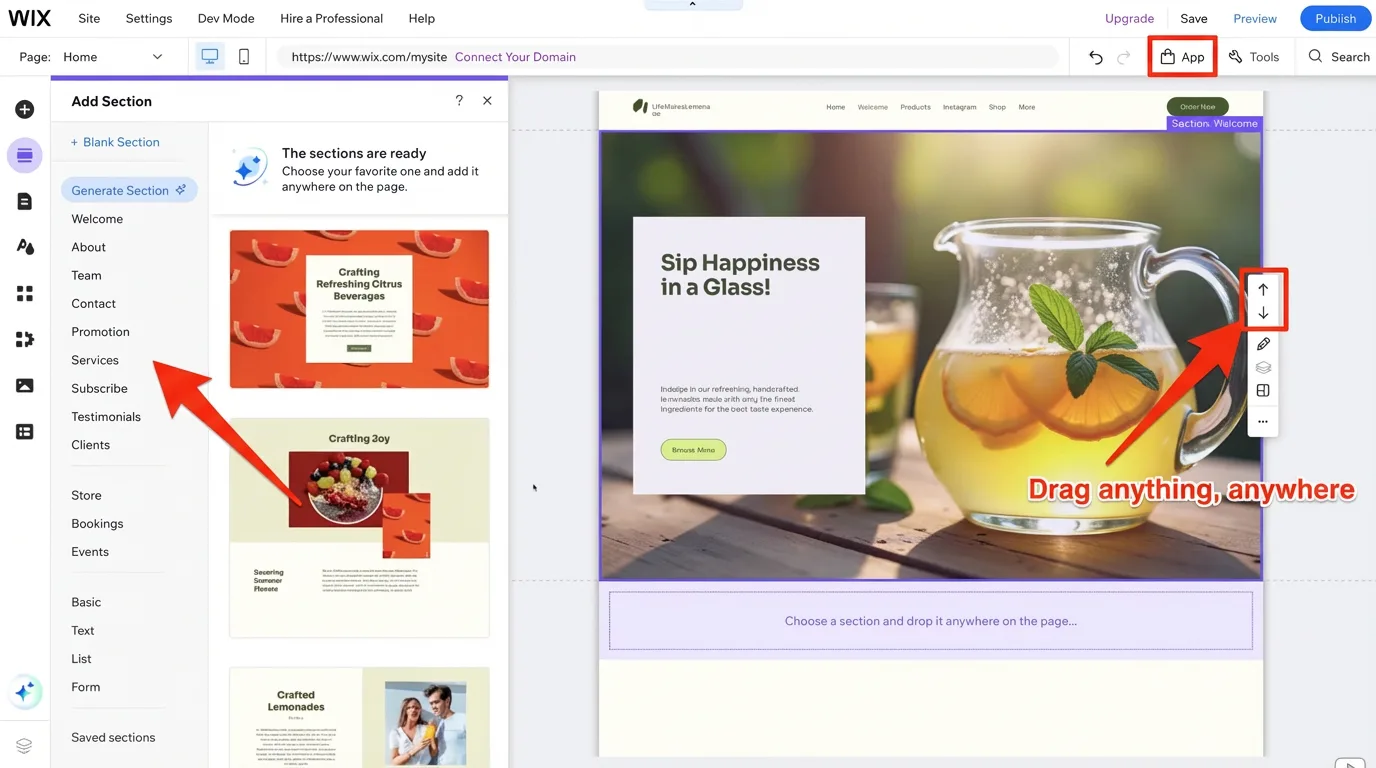
The defining feature is freedom. Unlike most builders that force you into a grid structure, Wix lets you place any element anywhere on the page — drag a button left, resize a section mid-page, stack elements exactly how you want. That level of control rarely comes this easy. If you want more control over design and layout, read How to choose a website builder.
Key Features
- True drag-and-drop editor: place any element anywhere — saves hours of fighting with templates that don’t do what you want
- Wix App Market: 300+ third-party integrations for booking, forms, email marketing, and more — add features as your business grows without rebuilding anything
- Wix AI site builder: generates a starting layout from a short business description in minutes — cuts setup time from days to hours
- Built-in SEO controls: meta tags, URL slugs, structured data, and Google Search Console integration — helps your site get found without hiring an SEO agency
- Wix Bookings: appointment scheduling tool built into higher-tier plans — reduces missed bookings and back-and-forth emails
Pricing
Starting at $17/month (Light plan, billed annually). The Core plan at $29/month adds ecommerce and marketing tools. The free plan is available for testing but displays Wix ads — not suitable for a professional presence.
Pros
- Unmatched design freedom compared to any other beginner-friendly builder
- Huge app ecosystem: add features as you grow without rebuilding anything
- Free plan available for risk-free testing before paying
Cons
- Switching templates after publishing requires rebuilding the site from scratch
- Can feel slightly overwhelming on first login due to the sheer number of options
Best for: Service businesses, local shops, creative freelancers, booking-based businesses
Not for: Large-scale ecommerce operations, owners wanting the absolute lowest renewal price
My Verdict: Wix earns the top spot because it adapts to almost any small business type without asking you to learn code or hire a developer. Most business owners feel comfortable within the first afternoon of building. The App Market means the platform genuinely grows with your needs rather than forcing an upgrade or platform switch later.
Explore Wix’s plans and pricing to find the right tier for your business.
Squarespace — Best for Design-Focused Brands
If you’ve ever looked at a competitor’s website and thought “mine looks nothing like that” — that feeling is worth paying attention to. For businesses where the first impression drives the buying decision, a dated or generic-looking site isn’t just an aesthetics problem. It’s costing you enquiries, and it’s an easy fix. Squarespace exists specifically for this: professional-grade design results without hiring a designer.
If how your website looks matters as much as what it says, Squarespace consistently produces the most polished results of any drag-and-drop builder. The templates are genuinely beautiful by default, and the editor enforces just enough structure to keep everything looking professional even if design isn’t your strength.
The recently updated Fluid Engine editor gives more layout flexibility than Squarespace’s earlier grid system, closing some of the gap with Wix on design control. It’s not quite as freeform, but the output is noticeably more refined. If visual design matters most to your business, compare it with How to choose a website builder.
Key Features
- Award-winning template library: modern, professionally designed, and mobile-optimized — looks professionally built from day one, without hiring a designer
- Fluid Engine editor: updated block-based layout system for more creative control
- No third-party transaction fees on any paid plan — saves real money on every sale compared to builders that charge 2–3%
- Built-in blogging, portfolio, and event tools included without extra plugins — reduces cost and complexity of running multiple tools
- Integrated email marketing campaigns and social media scheduling — keeps your marketing in one place instead of juggling three subscriptions
Pricing
Starting at $16/month (Basic plan, billed annually). The Core plan at $23/month adds full ecommerce features. Month-to-month billing is available but significantly higher — the Basic plan jumps to $25/month without an annual commitment.
Pros
- Best-in-class template design of any builder reviewed — results look professionally made
- No transaction fees even on the entry-level plan
- Strong built-in blogging and content tools for service businesses that publish regularly
Cons
- Less flexible for highly custom layouts than Wix — less freeform drag-and-drop
- No free plan; the trial is time-limited
Best for: Photographers, boutiques, food brands, creative agencies, service businesses with a strong visual identity
Not for: Budget-focused owners, businesses needing a large app ecosystem
My Verdict: Squarespace is the right choice when your brand’s visual impression does the selling. Expect 2–3 hours to get fully comfortable with the editor — slightly longer than Wix — but the results are noticeably more polished. For any business where aesthetics build trust (skincare, wedding services, architecture, fine dining), that extra setup time pays back quickly.
Explore Squarespace’s pricing plans to compare all features across tiers.
Hostinger — Best Value Website Builder in 2026
Budget website builders have a reputation problem — and it’s earned. Many of them look fine in the promotional screenshots, charge almost nothing upfront, then quietly double in price at renewal. After 2+ years of building and running live sites on Hostinger, it’s the one budget option that consistently delivers a professional result at a price that makes sense both at signup and at renewal.
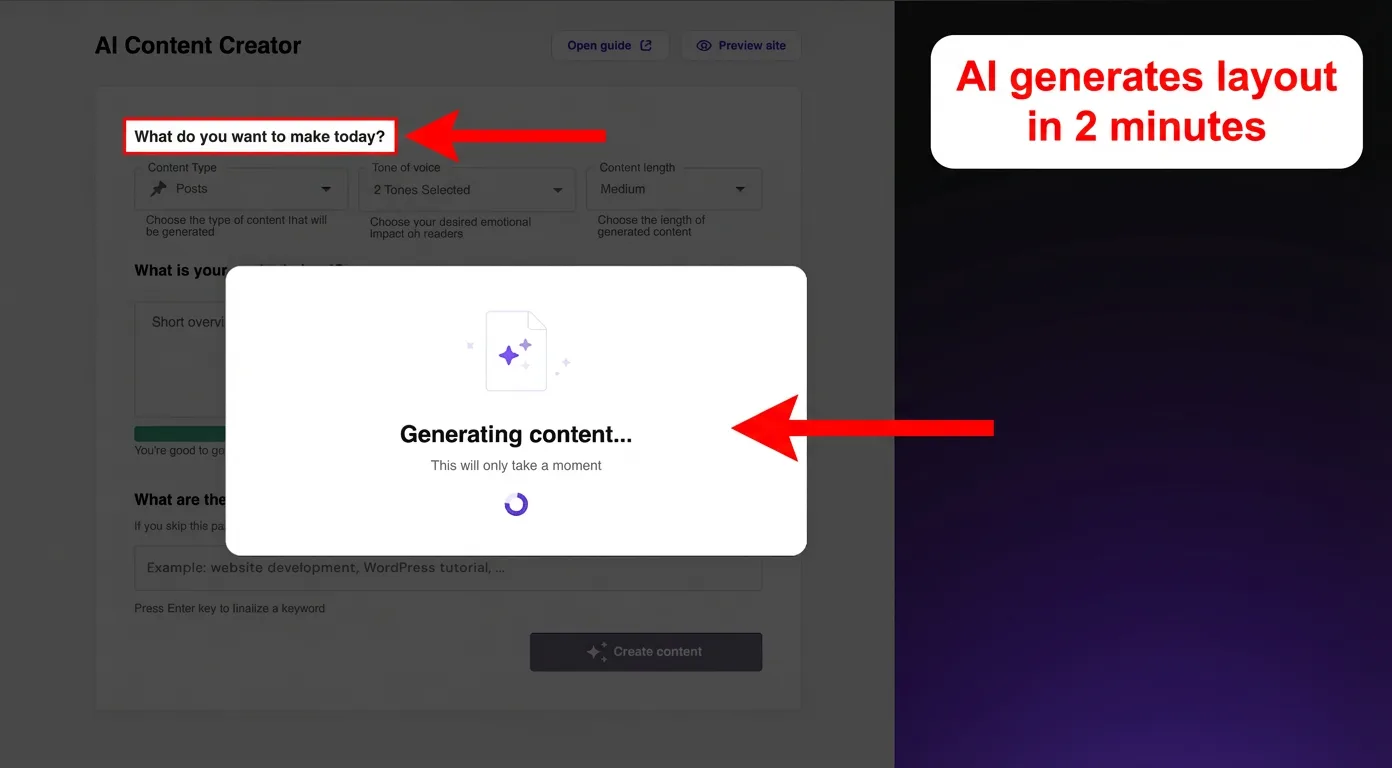
The AI-powered builder is the standout feature. Describe your business in a few sentences, and Hostinger generates a full site layout — complete pages, sections, and placeholder copy tailored to your business type — in under two minutes. It’s not a finished product, but it’s a usable, well-structured starting point that saves hours compared to building from scratch. If budget is your main concern, see How much does a website cost for a small business.
Key Features
- AI website builder: generates complete layouts from a business description in under 2 minutes — turns a blank page into a working starting point before you finish your coffee
- 150+ mobile-responsive templates across popular small business categories — reduces the risk of a site that looks broken on a customer’s phone
- Built-in ecommerce: sell up to 500 products on the Business plan with 0% transaction fees — keeps more money from every sale in your pocket
- Free domain name included for the first year on annual plans — removes one setup cost and one extra account to manage
- 24/7 live chat support with consistently fast response times — reduces stress when something goes wrong at 9pm before a launch
Pricing
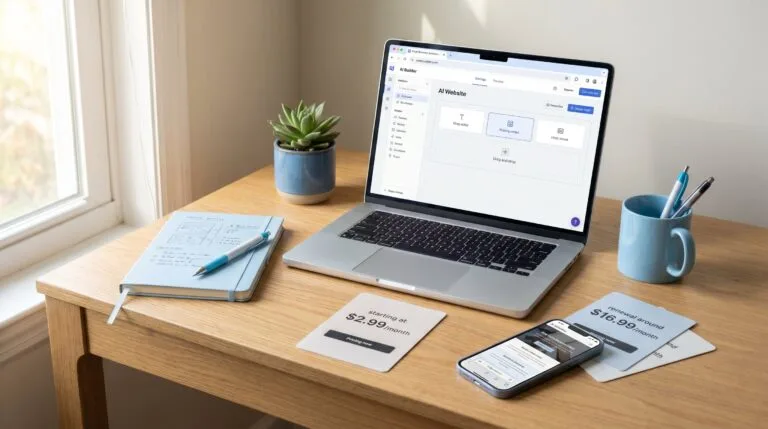
Starting at $1.99/month (Premium plan, 48-month term, billed upfront at $95.52). Renews at $10.99/month. The Business plan starts at $2.99/month introductory and renews at $16.99/month.
One thing to watch: the introductory rate requires a 48-month upfront commitment. These are still reasonable prices at renewal — just make sure you’ve budgeted for the jump before signing up.
Pros
- Lowest real-world pricing of any capable standalone builder on this list
- AI builder genuinely reduces setup time — not just a marketing feature
- Free domain and SSL included even on the entry-level plan
Cons
- Best introductory rate requires a 48-month upfront commitment ($95.52)
- Renewal rate at $10.99/month is a significant jump from the intro price
- Editor is capable but less flexible than Wix for complex, fully custom layouts
Best for: Budget-conscious small businesses, first-time site builders, local service businesses that need something professional live fast
Not for: Businesses needing highly customized layouts or a large third-party app ecosystem
My Verdict: Hostinger is the strongest pick when budget is a real constraint but a professional-looking site isn’t optional. The AI builder shortcut alone justifies the low price for beginners, and the included domain and SSL remove two common first-timer headaches. Go in with eyes open about the renewal rate — factor that into your year-two budget.
See Hostinger’s website builder plans and pricing to check current promotional rates.
WordPress.org + Hostinger + Kadence — Best for Full Ownership and Long-Term Growth
Most small business owners don’t think about website ownership until something forces them to — a platform price increase, a feature being removed, or a plan being discontinued. By then, rebuilding is the only option. The WordPress.org + Hostinger + Kadence setup solves that before it becomes a problem: you own the site outright, on your own hosting, with no platform company that can change the terms on you.
Here’s a setup that deserves its own spotlight — and one that’s used daily to run this very blog. Combine Hostinger’s affordable hosting, the free WordPress.org software, and Kadence Blocks for design, and you get a professional, fully owned website for roughly $3–5/month total. No platform restrictions, no forced upgrades, no monthly fee to a website builder company.
Before going further — a quick clarification that trips up a lot of people. WordPress.com is a hosted subscription service where WordPress manages everything for you. WordPress.org is the free, self-hosted software you install on your own hosting — like Hostinger. Same name, completely different products. For most small businesses serious about long-term growth, WordPress.org is the more powerful choice. If long-term ownership and SEO are important, read Website builder vs WordPress for small business.
The Stack — Three Pieces That Work Together
Think of it like this:
- Hostinger = the land and the building (the server that stores your website)
- WordPress.org = the empty shop interior (the free website software, installed on Hostinger with one click)
- Kadence Blocks = the furniture and interior design (the tool that makes everything look professional — no coding needed)
Each piece is independent. Each has its own account. And together they produce results that rival websites costing 5–10x more per month.
Key Features
- Hostinger one-click WordPress install: WordPress.org is live on your server in under 2 minutes — removes the most intimidating part of self-hosted WordPress entirely
- Kadence Blocks Design Library: 600+ pre-built page patterns and full-page layouts — browse, click, and your page structure is done — no blank page, no wasted hours
- Kadence AI builder: describe your business and Kadence AI populates your chosen template with AI-generated content and images tailored to your brand — a complete starting site in minutes, not hours — and it uses your actual business details
- Inline AI content editor: generate and refine text directly inside any page block — saves the back-and-forth between your site and a separate writing tool
- Full plugin access: install Rank Math for SEO, WooCommerce for ecommerce, booking tools, contact forms — most are free or low cost, and you only pay for what you actually use
- 900+ Google Fonts, full typography controls, and complete color and gradient design control via Kadence Blocks
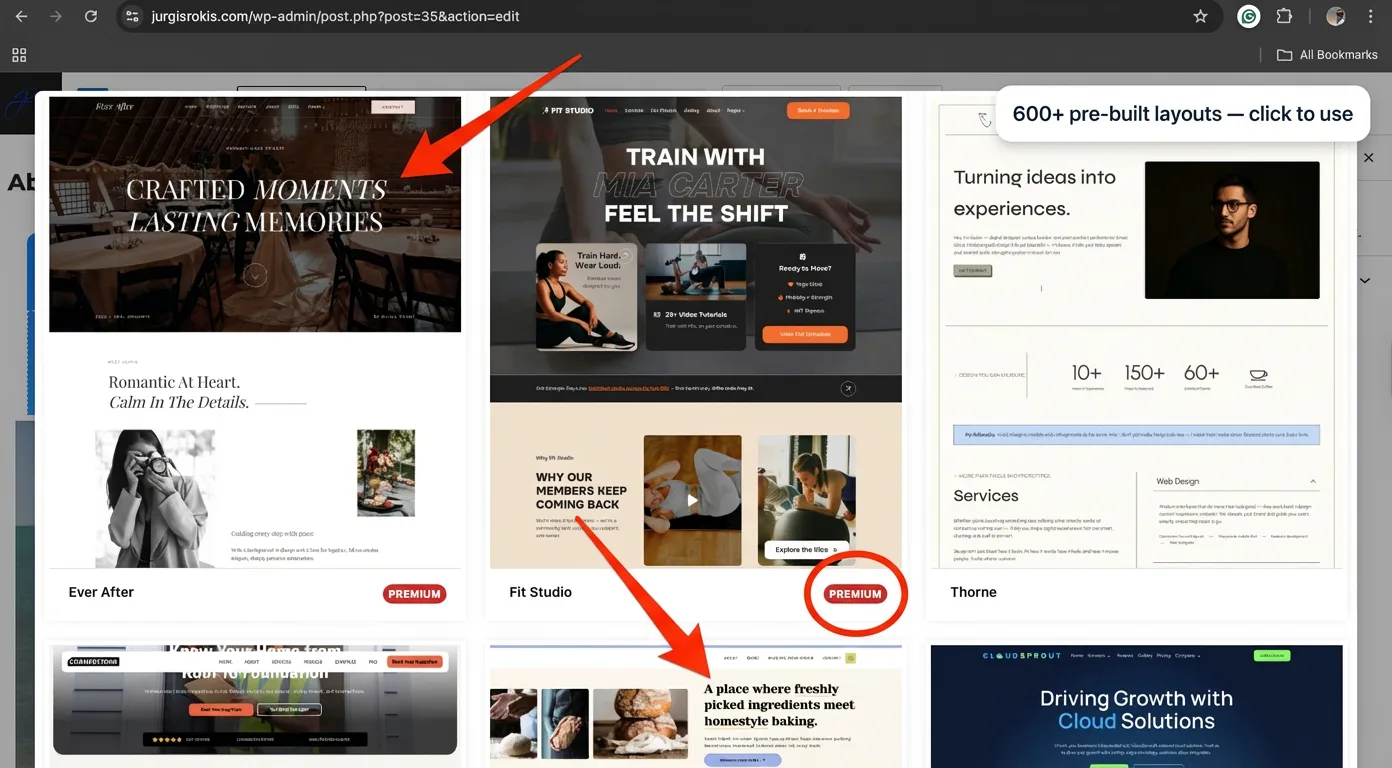
This is where the stack gets compelling:
- Hostinger WordPress hosting: starting at $1.99/month (introductory, 48-month term) — renews at $10.99/month
- WordPress.org software: free
- Kadence Blocks free version: free — covers the vast majority of small business layout needs
- Kadence Blocks Pro: $89/year ($7.42/month) — adds advanced row layouts, animations, and WooCommerce design tools
Total realistic cost: $3–5/month for hosting plus free Kadence, or around $10–18/month including Kadence Pro at renewal.
For businesses wanting advanced layout control, Kadence Blocks is worth exploring — the free version alone covers more than most small business sites ever need.
Pros
- You fully own the website — no platform company can change pricing, restrict features, or shut it down
- Kadence AI dramatically reduces setup time — a complete layout in minutes, not a blank page to stare at
- Largest plugin ecosystem in the world: add virtually any feature without rebuilding anything
- Best long-term SEO foundation of any option on this list
Cons
- Steeper learning curve than pure drag-and-drop builders — expect 3–5 hours to feel fully comfortable
- You are responsible for updates and basic maintenance (though Hostinger and Kadence make this largely automated)
- Not the right choice for someone who wants something live in one hour with zero learning curve
Best for: Content-driven businesses, bloggers, service businesses building long-term organic search traffic, anyone who wants full ownership and maximum flexibility
Not for: Complete beginners who want something live today with zero technical involvement
My Verdict: The Hostinger + WordPress.org + Kadence Blocks combination is the strongest long-term setup on this entire list. The Kadence AI builder removes the biggest barrier for beginners — the blank page — by generating a complete, brand-tailored starting layout from a short description. Explore Kadence Blocks and the AI features here to see what’s possible before committing. For hosting, see Hostinger’s WordPress hosting plans — the one-click install makes getting started genuinely painless.
A note on WordPress.com: If the self-hosted route feels like too much right now, WordPress.com offers a simpler hosted version starting at $4/month — no server management required. The trade-off is less flexibility, and plugin access is locked behind the $25/month Business plan. It’s a valid starting point, but most businesses that outgrow it end up migrating to self-hosted WordPress eventually anyway.
Shopify — Best for Online Stores
Selling products online is genuinely exciting — until the backend starts fighting you. Inventory that doesn’t sync, checkout flows that confuse customers, transaction fees that quietly eat into every sale. These aren’t signs that ecommerce is hard. They’re signs the platform wasn’t built for it. Shopify was, and that difference becomes obvious the moment you compare managing a real online store on a general-purpose builder versus managing it here.
Shopify is purpose-built for ecommerce, and that singular focus shows in every corner of the platform. From inventory management to abandoned cart recovery to hundreds of payment gateway integrations — no other platform on this list comes close for businesses where selling products is the primary goal.
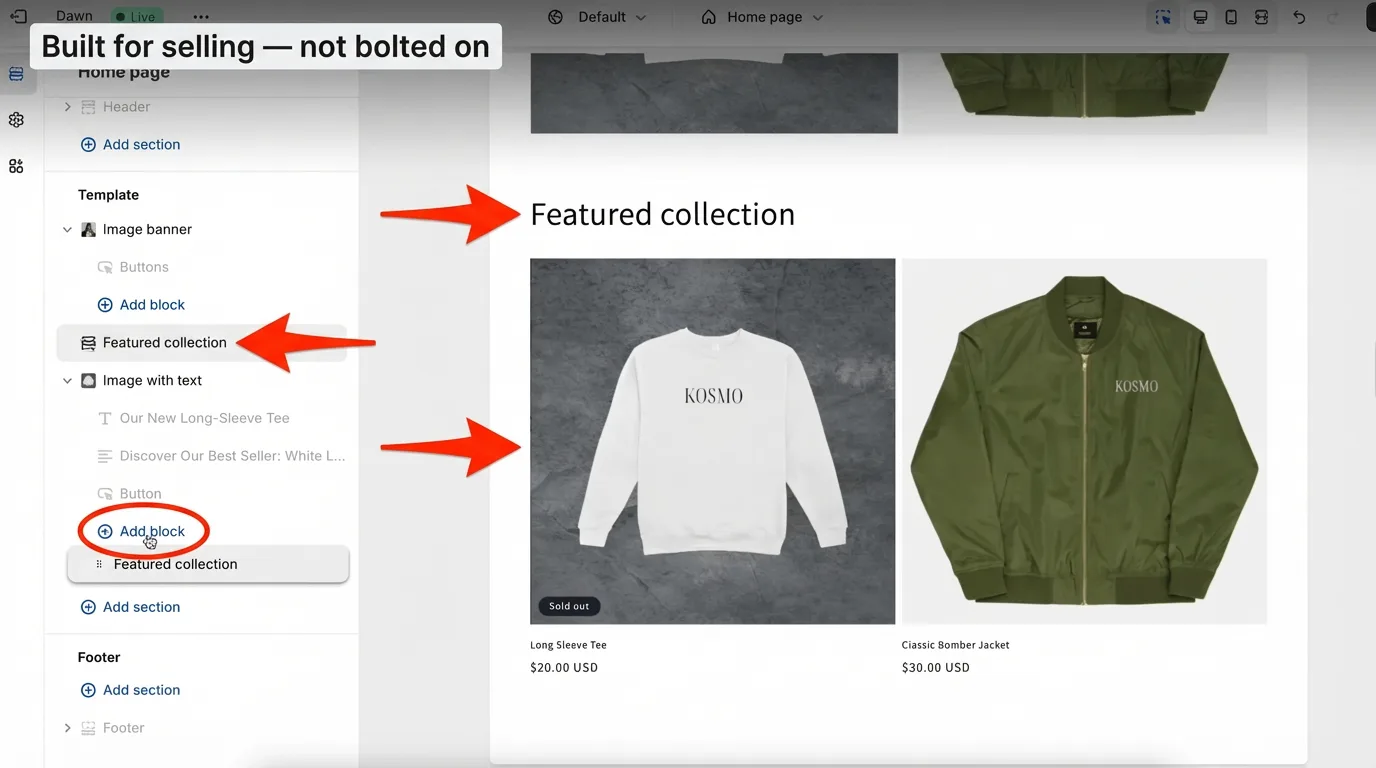
Having built and managed Shopify stores firsthand in the past, the standout quality is how much complexity Shopify hides from the store owner. Multi-currency, taxes, shipping rules, digital downloads — features that would require multiple plugins and careful configuration on other platforms are native in Shopify, ready to use from day one.
Key Features
- Complete ecommerce engine: inventory, product variants, collections, discount codes, and gift cards built in — eliminates the plugin stack that breaks ecommerce on other platforms
- 8,000+ apps in the Shopify App Store — add reviews, upsells, subscriptions, or loyalty programs without custom development
- Shopify Payments: built-in card processing that eliminates third-party transaction fees — saves a meaningful amount on every sale at volume
- Abandoned cart recovery emails included on all paid plans — recovers revenue that would otherwise be permanently lost
- Point-of-sale (POS) hardware integration — keeps online and in-person sales in one dashboard instead of two separate systems
Pricing
Starting at $29/month (Basic plan, billed annually). Monthly billing is $39/month. The catch: a 2% transaction fee applies on the Basic plan if you don’t use Shopify Payments. For stores processing meaningful volume, the Shopify plan at $79/month (annual) reduces those fees and often pays for itself quickly.
Pros
- The most complete ecommerce feature set at this price point — nothing else is purpose-built like this
- Scales smoothly from 10 products to 10,000+ without a platform change
- POS integration makes it ideal for businesses with both physical and online sales
Cons
- Overkill and overpriced if you’re not primarily selling physical or digital products
- Transaction fees outside Shopify Payments can add up faster than expected
- Monthly costs climb quickly when adding necessary apps for email, reviews, or upsells
Best for: Product-based businesses, retail stores with online and in-person sales, growing ecommerce brands
Not for: Service businesses, bloggers, anyone who primarily needs a simple web presence
My Verdict: Shopify is the right choice the moment products — not services — become your primary business model. The platform is more expensive than the others on this list, but the ecommerce infrastructure it provides would cost significantly more to replicate elsewhere. Start with the 3-day free trial to get a real feel for the dashboard before committing to a plan.
Explore Shopify’s plans and pricing to compare tiers and payment processing fees.
GoDaddy — Best for Getting Online Fast
Most local service businesses don’t need a complex website. They need a clean page with a phone number, their services, their hours, and a way for customers to get in touch — live before the end of the week. That’s a completely reasonable goal, and it’s exactly what GoDaddy is built for. No unnecessary features, no steep learning curve, just a functional professional presence that gets you found.
GoDaddy’s website builder is the “just get it done” option on this list. It’s not the most powerful, and it won’t win any design awards — but for a local business that needs a clean, functional site live within a day, GoDaddy removes almost every obstacle standing in the way.
The AI-assisted setup is genuinely fast. Answer a few questions about your business, and GoDaddy generates a complete site structure — homepage, about page, contact form, hours, and location — in minutes. For a plumber, a cleaning service, or a local retailer that just needs a professional online presence to share with customers, that speed has real value. If you need to launch quickly, compare it with How to choose a website builder.
Key Features
- AI site builder: generates a full website structure from business type and description — live in under an hour without any design decisions to make
- Built-in appointment booking and online payment acceptance (Premium plan) — starts taking bookings and payments the same day you go live
- Integrated marketing dashboard for email campaigns and social media posting — reduces the number of tools a local business needs to manage
- Guided SEO setup: walks through on-page optimization step-by-step — helps local businesses get found without hiring an SEO consultant
- 24/7 phone and chat support — reduces the risk of a site going down with no one to call
Pricing
Starting at $9.99/month (Basic plan, billed annually). Renews at $16.99/month. The Premium plan at $14.99/month adds bookings and online payments.
Pros
- Fastest setup experience of any builder on this list — a complete site in under an hour
- Strong 24/7 support options for owners who want help available when things go wrong
- Good all-in-one marketing tools for local business promotion
Cons
- Design flexibility is noticeably limited compared to Wix or Squarespace
- Renewal pricing increases significantly — the gap from $9.99 to $16.99/month catches many owners off guard
- Templates feel less polished than Squarespace or Wix
Best for: Local service businesses, tradespeople, brick-and-mortar shops needing a fast, functional web presence
Not for: Design-conscious brands, content-heavy sites, ecommerce stores with large product catalogs
My Verdict: GoDaddy is underrated for the small business owner who simply needs something professional live today. Don’t choose it if design quality or advanced features are important — but for a local electrician, a hair salon, or any service business that just needs a homepage and a contact form, GoDaddy gets the job done faster than anything else reviewed here.
Check GoDaddy’s website builder plans to see current pricing and what each tier includes.
Site123 — Best for Absolute Beginners
Building your first website is supposed to be exciting. For a lot of small business owners it becomes a source of real stress instead — too many options, too much jargon, too many tabs open with conflicting advice. That’s not a knowledge problem. It’s a tool problem. Site123 removes that entirely: one decision at a time, plain English throughout, and a finished site at the end that looks genuinely professional.
Site123 earns its place on this list for one specific reason: it is the most beginner-friendly website builder available. The guided setup process walks through every single step, the choices are deliberately simple, and the end result is a clean, mobile-friendly site with no overwhelm involved. For a small business owner who has never built a website and feels intimidated by every other option on this list — Site123 removes that fear entirely.
The platform is legitimate and functional. It does exactly what it advertises. That said, there are some billing practices worth knowing about before signing up — covered honestly below. If you’re a complete beginner, start with How to choose a website builder.
Key Features
- Step-by-step guided setup: the most hand-held onboarding process of any builder reviewed — removes the blank-page paralysis that stops most first-timers
- 180+ templates organized by business category — reduces decision fatigue by showing only relevant designs for your business type
- Built-in multilingual support — rare at this price, useful for businesses serving multiple language audiences
- Basic ecommerce available on Advanced plan and above
- Free plan available for testing with no credit card required — zero financial risk to try it
Pricing
Starting at $10.66/month (Advanced plan, billed annually at $127.98 upfront). Month-to-month rates are significantly higher at $32/month for the same plan.
Pros
- Easiest setup experience on this list — suitable for complete non-technical beginners
- Multilingual support built in without extra plugins or configuration
- Free plan allows genuine testing before any financial commitment
Cons
- 30% cancellation fee if you cancel mid-subscription — this is a real charge, not buried small print
- Auto-renewal charges have caught multiple users off guard — card is charged before clear notification arrives
- Very limited design customization compared to Wix, Squarespace, or Hostinger
- Ecommerce features only unlock on higher-tier plans
Best for: Absolute beginners, non-technical business owners who need something simple live with no confusion
Not for: Businesses that plan to grow and customize significantly over time, or anyone who may need to cancel early
My Verdict: Site123 works as advertised — the builder is genuine, the support is responsive, and the setup process is the simplest available anywhere. But go in with eyes wide open on two things: first, treat it as a full 12-month commitment from day one because the 30% cancellation fee makes mid-term exits expensive; second, note your renewal date and check your email carefully before it arrives. If you can commit to a full year and you genuinely need the simplest possible starting point, Site123 delivers. If there’s any chance you’ll want to cancel early, choose Hostinger or GoDaddy instead — both are similarly beginner-friendly without the cancellation penalty.
See Site123’s plans and pricing — and read the cancellation terms on the same page before signing up.
Quick Comparison: Best Website Builders for Small Business
Quick reference — scroll horizontally on mobile, or click platform names to jump to full reviews.
| Platform | Starting Price | Best For |
|---|---|---|
| Wix | $17/month | Service businesses, local shops, freelancers |
| Squarespace | $16/month | Design-focused brands, photographers, creatives |
| Hostinger Builder | $1.99/month | Budget-conscious owners, fast AI-assisted setup |
| WordPress.org + Hostinger + Kadence | $3–5/month | Full ownership, blogging, long-term SEO growth |
| Shopify | $29/month | Online stores, product-based businesses |
| GoDaddy | $9.99/month | Local services, fastest possible launch |
| Site123 | $10.66/month | Absolute beginners, simple business sites |
Common Mistakes to Avoid
1. Confusing WordPress.com with WordPress.org
This catches more people off guard than almost any other mistake in this space. WordPress.com is a hosted subscription service — you pay monthly, and WordPress manages everything. WordPress.org is free software you install on your own hosting (like Hostinger). They share a name but are fundamentally different products with different pricing, flexibility, and long-term implications. If someone recommends “WordPress” without specifying which one, always ask which they mean.
2. Choosing based on the introductory price alone
Many business owners sign up for the lowest advertised rate without checking what the plan costs after the promotional period ends. Hostinger’s $1.99/month becomes $10.99/month at renewal. GoDaddy’s $9.99/month becomes $16.99/month. These are still reasonable prices — but not knowing creates real budget surprises. Always check the renewal rate before signing up.
3. Picking an ecommerce platform for a service business (or vice versa)
Shopify is purpose-built for selling products. It’s a poor match for a consulting firm that just needs a homepage and a contact form. The most-talked-about platform isn’t always the right fit. Match the tool to the job first, then check the price.
4. Skipping the free trial
Every platform on this list offers either a free plan or a free trial. Many business owners skip straight to a paid plan without ever opening the editor. Spend 30–60 minutes with the free version before paying — how the interface feels matters far more than any feature list when you’re the one updating the site at 10pm.
5. Forgetting to check mobile before publishing
A site that looks perfect on a desktop can be a mess on a phone. Most builders include a mobile preview mode inside the editor. Use it before every major publish. At least 60% of small business site visitors arrive on mobile — a broken mobile layout drives potential customers away faster than no website at all.
Next Steps (Do These in the Next 24–48 Hours)
Ready to stop comparing and start building? Picking the best website builder for small business is only useful if you actually take the next step — here’s exactly what that looks like.
- Pick your top two options and test them free today. Don’t read another review. Open the free trial for whichever two builders match your business type and spend 30 minutes in each editor. The one that feels more intuitive after that session is almost always the right choice. Most people feel comfortable within the first afternoon of building.
- Sketch your five key pages before opening the builder. Most small business sites need: Homepage, About, Services (or Products), Contact, and one supporting page (FAQ, Blog, or Testimonials). Having this structure in mind before you open the editor saves hours of back-and-forth rearranging.
- Check the domain renewal rate before year one ends. Most builders include a free domain for year one, but renewals typically run $15–25/year. Check whether your builder’s included domain renews at a competitive rate — and if not, note the renewal date so you’re not surprised by the charge.
FAQ
Which website builder is easiest for a complete beginner?
Choosing the best website builder for small business starts with matching the tool to your comfort level. Site123 has the most guided, step-by-step setup process of any builder on this list — it walks through every decision without assuming any prior knowledge. Hostinger’s AI builder is a close second and adds significantly more long-term flexibility. Both are strong starting points if the idea of building a website from scratch feels overwhelming. Just note that Site123 has a 30% cancellation fee mid-subscription — treat it as a full-year commitment from day one.
How much does a small business website actually cost in 2026?
Expect to pay between $10–30/month for a functional, professional small business website including hosting. Introductory rates like Hostinger’s $1.99/month are real savings — but always factor in what the plan costs at renewal. A domain name adds roughly $10–15/year on top. The WordPress.org + Hostinger + Kadence combination is the most cost-effective professional setup at $3–5/month total.
What’s the difference between WordPress.com and WordPress.org?
WordPress.com is a fully hosted service — Automattic manages the servers, software updates, and security. You pay a monthly fee and focus on your content. WordPress.org is the free, self-hosted software where you install WordPress on your own hosting (like Hostinger) and manage your own site. WordPress.com is simpler to start; WordPress.org gives full ownership, more flexibility, and lower long-term cost — but requires a small amount of initial setup.
Is Shopify worth it if I only sell a few products?
For small product catalogs (fewer than 20–30 products), Shopify is likely more than you need. Squarespace’s Core plan at $23/month or Hostinger’s Business plan with built-in ecommerce are more cost-effective starting points. Shopify earns its cost when your store scales: high transaction volume, complex inventory, multiple product variants, or in-person selling alongside an online store.
Can I switch website builders later if I change my mind?
Switching is possible but not painless. Text content and images can usually be exported, but your design, SEO structure, and URL setup will need rebuilding on the new platform. This is exactly why testing with the free plan before committing saves significant time and money. One important exception: Site123 charges a 30% cancellation fee for mid-subscription exits — factor that into the decision before signing up.
Do I need to know how to code to use any of these builders?
No. Every builder on this list is designed for non-technical users. Wix, Squarespace, Hostinger, GoDaddy, and Site123 are all visual editors with no coding required. The WordPress.org + Hostinger + Kadence combination also works without code for most small business layouts — the Kadence AI builder and pre-built layout library handle the heavy lifting — though it has a slightly steeper learning curve than pure drag-and-drop builders.
Which builders are best for local service businesses (plumbers, electricians, salons)?
GoDaddy and Wix are the strongest choices for most local service businesses. GoDaddy offers the fastest setup with appointment booking and payments built in. Wix adds more design flexibility and a better long-term app ecosystem. Hostinger is worth considering for local services on a tight budget — the AI builder can generate a serviceable, professional local business site in under 30 minutes.
Is there a truly free website builder for small business?
Wix and Site123 both offer free-forever plans — but both display platform branding and use subdomains (like yourbusiness.wixsite.com), which isn’t appropriate for a professional business presence. WordPress.org itself is free, but you still need to pay for hosting (from $1.99/month with Hostinger). The free plans are best used for testing before committing to a paid plan.