

Wix vs Squarespace Pricing in 2026: What You Actually Pay (And What Surprises You Later)

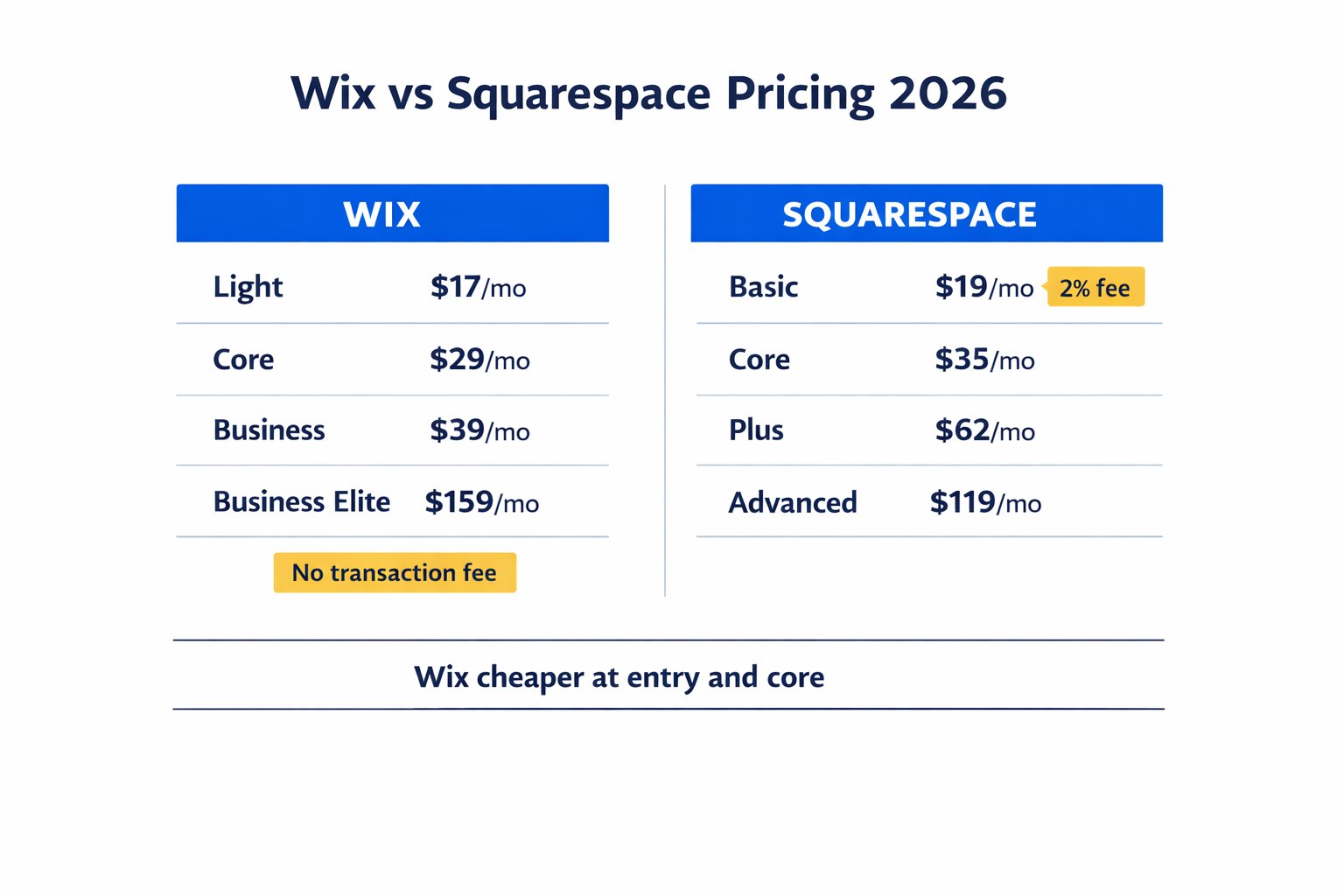
Wix vs Squarespace pricing is straightforward once you compare the current annual plans side by side. Wix is cheaper at both the entry level and the core level, while Squarespace charges more but still appeals to people who want a more design-led experience.
Here’s the catch: the monthly price is only part of the story. Once you factor in transaction fees, storage, email, and plan upgrades, the real difference can be bigger than the headline number suggests. If you’re still weighing several builders, this sits nicely alongside the broader best website builder for small business guide.
Quick Answer
Wix is cheaper than Squarespace at both the entry and core levels with current 2026 pricing. Wix Light starts at $17/month and Wix Core starts at $29/month, while Squarespace Basic starts at $19/month and Squarespace Core starts at $35/month.
Affiliate disclosure: This article contains affiliate links. If you click and purchase, I may earn a small commission at no extra cost to you.
Wix vs Squarespace pricing: quick comparison
Quick reference — scroll horizontally on mobile, or visit each platform’s pricing page to see full feature details.
| Platform | Starting Price (annual) | Best For |
|---|---|---|
| Wix | $17/month | Flexible sites, ecommerce from $29/month |
| Squarespace | $19/month | Design-focused sites, portfolios, service businesses |
Transaction fees for sellers:
| Plan | Wix | Squarespace |
|---|---|---|
| Entry plan | No transaction fee | 2% fee (Basic) |
| Core plan | No transaction fee | No transaction fee |
| Ecommerce entry | $29/month (Core) | $35/month (Core) |
If you want a wider side-by-side view beyond price alone, the Wix vs Squarespace vs Hostinger comparison helps show where each builder fits.
How Wix Pricing Works in 2026
Wix offers four paid plans, all billed annually for the lowest rate.
- Light — $17/month (or $24/month billed monthly): No ads, custom domain, 2 GB storage, no online store or booking tools. It’s a solid fit for a local café, freelancer portfolio, or a service business that just needs a professional web presence.
- Core — $29/month (or $36/month billed monthly): Unlocks online payments, Wix Bookings, Wix Events, and 50 GB storage. This is the plan most small businesses actually need.
- Business — $39/month: Adds advanced shipping, automated sales tax, and 100 GB storage. Worth it once you’re running a real online store.
- Business Elite — $159/month: Priority support and full ecommerce features. For most small businesses, this is more than you’ll ever need.
What to watch on Wix: the free domain included in annual plans renews at around $17.35/year after year one. Professional email isn’t included, so Google Workspace costs an extra $6/user/month. Wix’s free plan exists, but it shows Wix branding and doesn’t allow a custom domain, so it’s not a real business option.
One thing that catches people off guard: if you start on Light and later need bookings or payments, you’ll need to upgrade to Core — you can’t just add those features à la carte.
Explore Wix’s current plans and pricing to see which tier matches your business needs.
How Squarespace Pricing Works in 2026
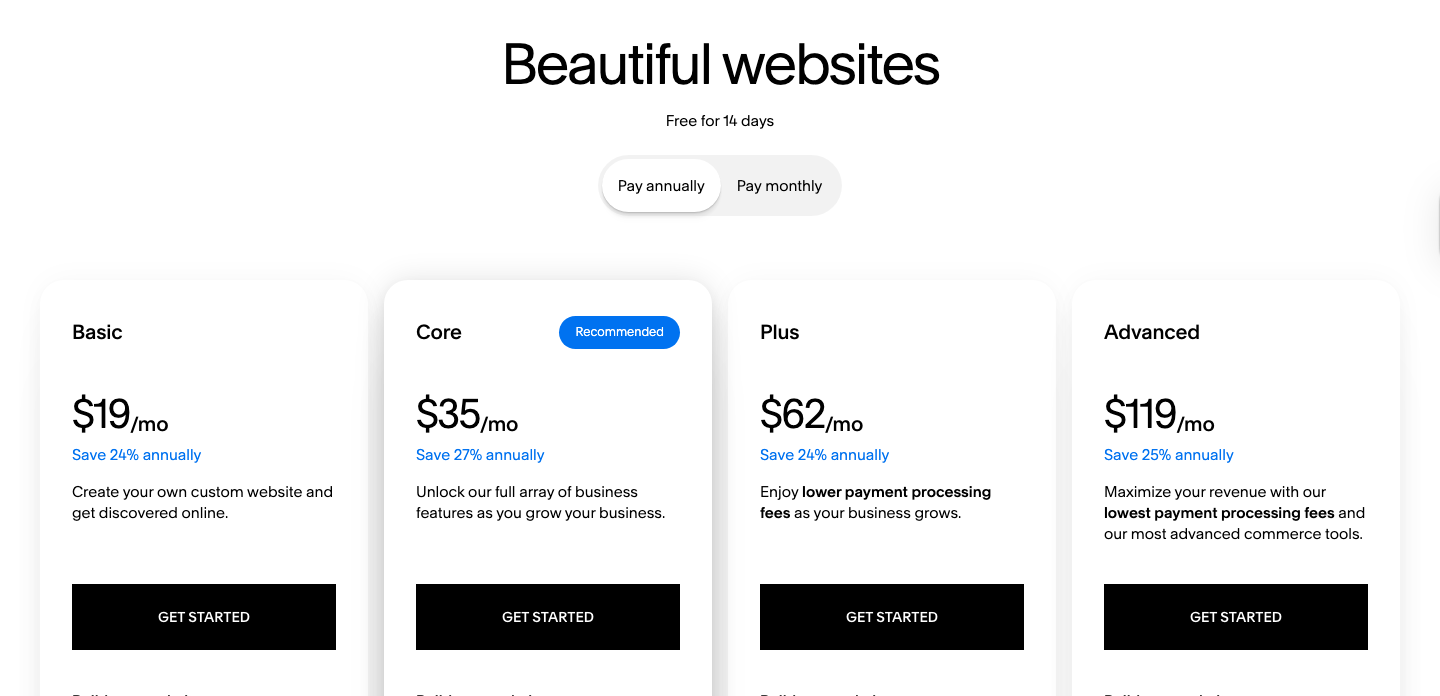
Squarespace also has four paid plans, all with lower rates on annual billing.
- Basic — $19/month (or $25/month billed monthly): Unlimited products, Blueprint AI, SEO tools, and unlimited storage. The catch is a 2% transaction fee on every sale.
- Core — $35/month (or $36/month billed monthly): Removes the transaction fee, adds advanced sales tools, unlimited contributors, Google Shopping integration, and one free year of Google Workspace Business Starter for one user. This is the first plan that makes sense for a serious small business.
- Plus — $62/month: Lower credit card processing rates. Useful only if you’re doing high sales volume.
- Advanced — $119/month: Lowest processing fees and unlimited video storage. Built for established stores with significant monthly revenue.
What to watch on Squarespace: the 14-day free trial doesn’t roll into a free plan, so once the trial ends, you pay or your site goes offline. The domain and professional email are free for year one on annual plans, but renew at around $10–$20/year for the domain and $7–$22/user/month for email after year one. Acuity Scheduling is a separate add-on starting at $16/month.
The design quality is still a strong point. Squarespace templates are consistently among the cleanest out of the box, and the editor produces professional results without much design experience. But with the updated pricing, Squarespace now sits above Wix at both the entry and core levels.
Check Squarespace’s full plan breakdown and pricing before committing, especially if you plan to sell online.
Common Mistakes to Avoid
1. Choosing based on the intro price only
Many business owners see a plan headline and stop there, but the real cost includes renewals, email, and any extra tools you need. That’s where the budget gap usually shows up. Add the full setup cost before deciding. This also connects well with the full breakdown in how much does a website cost for a small business.
2. Picking Squarespace Basic if you plan to sell
The 2% transaction fee on Basic sounds small, but it adds up quickly if you make regular sales. If selling matters at all, Core is the safer choice because it removes that fee. That one detail can change the true monthly cost.
3. Overbuying on Wix
Wix makes the higher business tiers look appealing, but most service businesses don’t need them. Light or Core is enough for many small sites. It’s easy to overspend when you only need the basics.
4. Forgetting about professional email
Neither platform includes business email in the base plan cost. This catches most people off guard. Budget for email separately so your pricing comparison stays realistic.
5. Ignoring monthly versus annual billing
Annual billing is cheaper on both platforms, but only if you’re sure about the builder. Monthly billing gives you more flexibility while you test. A short trial period is a smart way to avoid locking in too early.
Next Steps (Do This in the Next 24–48 Hours)
- Map your real needs before choosing a plan. Ask yourself whether you need payments, bookings, or just a simple website. That answer usually tells you whether Light, Core, or a higher tier makes sense.
- Start a free trial or test build. Spend 30–60 minutes building a homepage on each platform. The one that feels less frustrating is often the better long-term fit.
- Compare the wider feature set if price is close. If the budget difference is small, design, flexibility, and ease of use matter more than a few dollars a month. For a broader low-cost roundup, check the cheapest website builder for small business article and the budget website builder comparison chart.
FAQ
Is Wix or Squarespace cheaper for a small business website in 2026?
Wix is cheaper at both the entry and core tiers with the current pricing. Wix Light is $17/month compared with Squarespace Basic at $19/month, and Wix Core is $29/month compared with Squarespace Core at $35/month. That makes Wix the lower-cost choice overall for most small business owners.
Does Wix charge transaction fees?
No, Wix does not charge transaction fees on its paid plans. You still pay standard payment processor fees, but Wix itself does not take a cut. That’s especially useful if you plan to sell products or services and want predictable monthly costs.
What happens to my Squarespace site after the free trial?
After 14 days, your Squarespace site goes offline until you choose a paid plan. Unlike Wix, Squarespace does not have a free-forever plan. Your work is saved, but you need to upgrade to keep the site live.
Which plan do most small business owners actually need?
For a simple service business, Wix Light is often enough. If you need payments, bookings, or a real store, Wix Core is the more practical starting point. Squarespace Basic works for simple sites too, but the 2% transaction fee makes it less attractive for sellers.
Are there hidden costs I should budget for?
Yes. Common extras include domain renewal, professional email, and booking tools. Wix and Squarespace both look affordable at first, but these add-ons can change the real monthly cost quickly.
Can I switch between Wix and Squarespace easily?
Not really. These are closed systems, so a move usually means rebuilding the site rather than transferring it perfectly. That’s why it’s worth choosing the better fit up front.
Is annual billing worth it, or should I pay month to month?
Annual billing usually saves money, but monthly billing is safer if you’re still deciding. If you’re confident in the platform, annual plans are the better value. If you’re testing, monthly gives you more freedom.
What if I just need the cheapest option possible?
Wix Light is the cheapest of these two on the current pricing. If budget is your main concern, it’s the better starting point for a simple website with no ecommerce needs.