
Hostinger vs Wix for Small Business: My Honest Review After 2 Years of Daily Use

Hostinger vs Wix for small business is one of the most searched website builder comparisons right now — and the moment you see the price gap, it’s obvious why. Wix starts at $17/month. Hostinger starts at $2.99/month on a long-term plan. That’s a real difference, and it raises a fair question: what exactly are you getting for the extra cost with Wix?
The honest answer is: quite a lot. But that doesn’t automatically make Wix the right choice for your business. Both platforms can get a small business website live quickly. They’re just built on very different philosophies — and choosing the wrong one means either overpaying for features you’ll never use or hitting a ceiling right when your business starts to grow.
Quick Answer
Hostinger wins on price and is excellent for simple, professional small business sites. Wix wins on features, templates, and ecommerce depth. For budget-conscious owners who need a clean site fast, Hostinger delivers strong value. For businesses that want marketing tools, scalable ecommerce, or a bigger app ecosystem, Wix justifies the higher monthly cost. If you want complete long-term control — and you’re willing to invest a few hours in setup — WordPress.org on Hostinger hosting gives you the most flexibility of all three.
Affiliate disclosure: This post contains affiliate links. If you click and purchase, I may earn a small commission at no extra cost to you. I only recommend tools I’d genuinely point a friend toward.
Top 3 Website Builders for Small Business in 2026
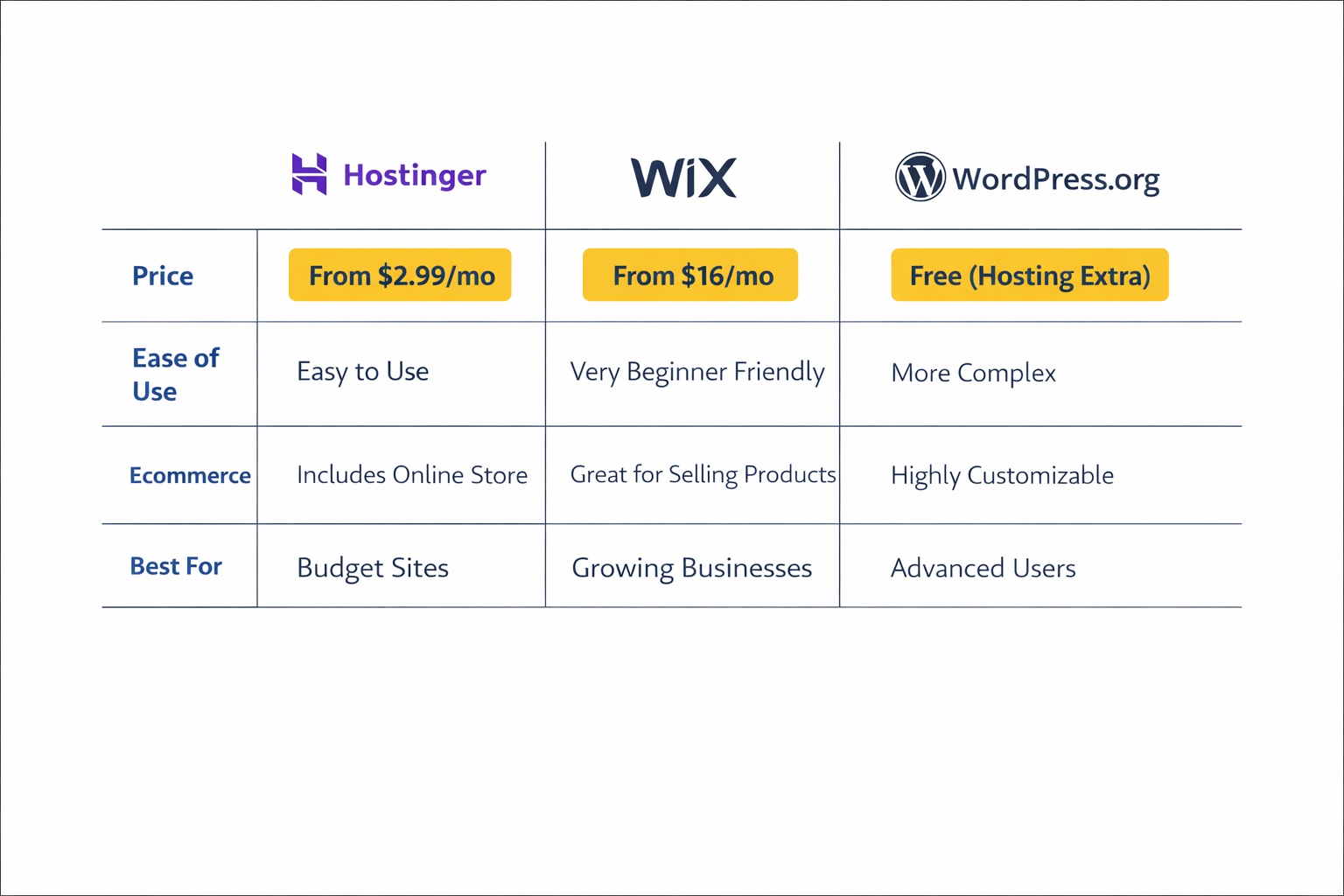
- Hostinger Website Builder — starting at $2.99/month
- Wix — starting at $17/month
- WordPress.org (on Hostinger hosting) — starting at $2.99/month for hosting
Hostinger Website Builder — Best for Small Budgets and Simple Sites
Getting a professional-looking website on a tight budget used to mean settling for something that looked it. That’s changed. Hostinger’s platform now delivers a genuinely capable result at a price that leaves most small business owners pleasantly surprised — not compromised.
I’ve run this blog on Hostinger for over two years, using their hosting with WordPress and Kadence. The underlying hosting infrastructure has been rock solid: fast load times, uptime I’ve never had to stress about, and a control panel (hPanel) that actually makes sense without a technical background. More detail on that setup is in my best website builder for small business pillar article.
The Hostinger Website Builder is a separate AI-powered product built on top of that same hosting infrastructure. You answer a few questions, and an AI draft is generated in under 30 seconds — from there, you drag, drop, and customize.
Key Features
- AI website builder generates a full site draft in under 30 seconds
- 150+ responsive templates across common business categories
- Built-in AI heatmap shows where visitors focus on your pages
- Ecommerce support for up to 500 products (physical and digital)
- 20+ payment gateways including Stripe and PayPal — zero transaction fees
Pricing
- Premium Website Builder: starting at $2.99/month (48-month promotional plan) — includes free domain and SSL
- Business Website Builder: starting at $3.99/month — adds ecommerce and priority support
- Standard annual pricing runs higher; promotional rates require a longer-term commitment
Pros / Cons
Pros:
- Genuinely affordable — one of the cheapest builders with real features
- Fast AI setup; most users are live within a couple of hours
- Zero transaction fees on ecommerce sales
- Reliable hosting infrastructure that holds up day-to-day
Cons:
- Ecommerce capped at 500 products — a hard ceiling for growing stores
- Fewer templates than Wix (150+ vs 2,000+)
- Thin app/plugin ecosystem compared to Wix or WordPress
Best for: Local service providers, solo professionals, and small businesses that need a clean, fast website without a high monthly cost.
Not for: Businesses with large product catalogs, complex marketing automation needs, or those planning aggressive ecommerce growth.
My Verdict
Hostinger’s website builder punches well above its price point. The AI setup is genuinely fast, the hosting infrastructure is reliable — I can say that from two-plus years of daily use — and the zero transaction fees on ecommerce are a real advantage for small store owners just getting started. If your goal is a professional site live quickly without overcomplicating things, Hostinger is the first place to look.
Explore Hostinger’s website builder plans and pricing or check Hostinger’s current promotional deals
Wix — Best for Feature-Rich, Scalable Business Websites
Paying more for a website builder is easy to resent — until the features you’re paying for actually save you time and money elsewhere. Wix sits at a higher price point than most budget builders, and that gap is real. But the reason small businesses consistently stay with Wix long-term is that it rarely forces you to outgrow it.
Wix is widely regarded as the most full-featured drag-and-drop website builder available today. The editor gives you pixel-level design control without a single line of code. The 2,000+ templates span hundreds of business categories, so you’re choosing between genuinely polished options — not hunting for the least-bad one.
Here’s the catch though: once you go live on a Wix template, switching to a different one means rebuilding your site from scratch. That’s worth knowing before you click publish. If you’re still weighing whether a builder is even the right move, this website builder vs hiring a web developer comparison is worth reading first.
Key Features
- 2,000+ professional templates across hundreds of business niches
- Wix AI builder creates a personalized first draft in roughly a minute
- Built-in email marketing, CRM, live chat, and social media tools
- Ecommerce for up to 50,000 products with POS, subscriptions, and multi-channel selling
- App market with 500+ integrations for added functionality
Pricing
- Light: $17/month (annual) — basic site, no ecommerce
- Core: $29/month — adds ecommerce basics
- Business: $36/month — full ecommerce suite
- Business Elite: $159/month — advanced scaling
Pros / Cons
Pros:
- Enormous template library — genuinely hard to produce a bad-looking site
- Best ecommerce feature set among website builders (second only to Shopify)
- Built-in marketing tools reduce your need for third-party apps
- Free plan available for testing before committing
Cons:
- Significantly more expensive than Hostinger at every tier
- Template lock-in: switching templates post-launch means rebuilding
- Light plan includes only 2GB storage — limiting for media-heavy sites
Best for: Small businesses that need professional design, built-in marketing tools, or an online store with room to grow.
Not for: Business owners on very tight budgets, or those who only need a simple 3–5 page informational site.
My Verdict
Based on what small business owners consistently report, Wix earns its price through sheer feature depth. The ecommerce tools alone — multi-channel selling, CRM, and subscription support — give it a clear edge over Hostinger for anyone planning to sell at scale. Most users feel comfortable with the editor within the first afternoon. If your budget allows for $17–$36/month and you want a platform that handles marketing alongside your website, Wix is a genuinely strong choice.
Explore Wix’s business plans and pricing or browse Wix’s template library
WordPress.org — Best for Full Control and Long-Term Flexibility
Some small business owners hit a ceiling with hosted website builders — usually when they want a feature that simply isn’t available without a plugin, or when they realize they want to own their platform outright rather than rent it. That’s exactly where WordPress.org fits in. It’s not a hosted builder; it’s open-source software you install on your own hosting account. And paired with Hostinger’s shared hosting, it’s surprisingly affordable.
This is how jurgisrokis.com is built — WordPress.org on Hostinger hosting with the Kadence theme. After more than two years of daily use, that combination has been stable, fast, and worth every minute of the initial setup. If you want the full breakdown of that setup, this website builder vs WordPress for small business guide covers it in detail.
Key Features
- 60,000+ plugins for virtually any feature you could need
- Full design control with page builders like Kadence, Elementor, or Divi
- WordPress.org software is free — you pay only for hosting
- Best-in-class SEO potential using plugins like Rank Math or Yoast
- Complete data ownership — no platform can change the rules on you
Pricing
- WordPress.org software: free
- Hostinger shared hosting: starting at $2.99/month (promotional long-term rate)
- Budget additionally for a premium theme ($0–$89/year) and essential plugins
Pros / Cons
Pros:
- Maximum flexibility — nearly unlimited customization
- Lowest long-term platform cost of the three options here
- Best SEO ceiling available in any website platform
Cons:
- Steeper learning curve — not plug-and-play like Wix or Hostinger builder
- You manage updates, backups, and basic security yourself
- Setup takes longer — expect half a day for a clean basic site
Best for: Business owners who want complete ownership, plan to blog or do content marketing seriously, or need advanced SEO capabilities.
Not for: Anyone who wants a site live in an hour with zero technical involvement.
My Verdict
WordPress.org on Hostinger is what I’d recommend to any small business owner who’s willing to spend an afternoon on setup in exchange for years of flexibility. The Hostinger hosting infrastructure holds up reliably over time — that’s from direct experience, not a guess. The ceiling here is essentially unlimited, and the long-term cost is lower than either Wix or Hostinger’s website builder. The tradeoff is simply time and a small learning curve upfront.
Explore Hostinger’s WordPress hosting plans
Hostinger vs Wix for Small Business: Who Should Choose Which?
Here’s a plain-English breakdown — no hedging.
Choose Hostinger Website Builder if:
- Your monthly budget is under $5–$10
- You need a clean site for a service business, local shop, or portfolio
- You want to sell up to 500 products without paying transaction fees
- Fast AI setup and reliable hosting matter more than deep feature sets
Choose Wix if:
- You want professional design with 2,000+ templates to choose from
- You’re building a store that could grow beyond a few hundred products
- You need built-in email marketing, CRM, or appointment booking
- You’re comfortable paying $17–$36/month for a platform that scales with you
Choose WordPress.org (on Hostinger) if:
- You want full ownership and the maximum long-term flexibility
- Content marketing and SEO are core parts of your growth plan
- You’re comfortable with a slightly longer initial setup
Still weighing your options more broadly? This guide to the best website builder for small business covers the full landscape. And if you’re still deciding between a builder and hiring a developer, this website builder vs hiring a web developer comparison is worth a read before you commit.
Quick Comparison
Quick reference — scroll horizontally on mobile, or click platform names to jump to full reviews.
| Platform | Starting Price | Best For |
|---|---|---|
| Hostinger Website Builder | $2.99/month | Budget sites, simple stores |
| Wix | $17/month | Feature-rich sites, growing stores |
| WordPress.org | ~$2.99/month (hosting) | Full control, SEO, content marketing |
Common Mistakes to Avoid
1. Choosing based on entry price alone
Many business owners pick the cheapest plan, then hit a wall when they need ecommerce or email marketing. The fix: write down your top three must-have features, then check which plan actually includes them — not just the headline price on the homepage. This guide on how much a website costs for a small business gives you a realistic number to budget against.
2. Ignoring Wix’s template lock-in
This catches a lot of people off guard. Once your Wix site is live, switching templates means rebuilding from scratch. Browse at least 10 templates in your category before you start adding content — it’s worth taking an extra 20 minutes upfront.
3. Treating WordPress.org and WordPress.com as the same thing
Many business owners sign up for WordPress.com thinking they’re getting WordPress.org — they’re not. WordPress.com is a hosted platform (like Wix) with plan restrictions. WordPress.org is the self-hosted open-source software. Pair the latter with Hostinger hosting for the most flexible and affordable setup.
4. Not accounting for Wix’s real monthly cost
Wix’s Light plan at $17/month sounds reasonable until you realize ecommerce requires a Core ($29) or Business ($36) plan. Add a couple of apps from the marketplace and the real monthly cost climbs fast. Map out which plan you’ll actually need — then budget from there.
5. Skipping the free trial
Wix offers a free plan for testing. Hostinger offers a 30-day money-back guarantee. There’s genuinely no good reason to sign a 12-month or 48-month contract without spending 30 minutes in the editor first. Test one page on your top choice before you pay for anything.
Your Next Steps (Do This in the Next 24–48 Hours)
- List your non-negotiables. Five minutes, three questions: What’s your monthly budget cap? What features do you genuinely need in year one? How much setup time are you willing to invest? This exercise alone will make the right choice obvious. If you want a broader framework, this how to choose a website builder guide walks through the process step by step.
- Test the editor before committing. Open Wix’s free plan or Hostinger’s AI builder and build one test page. You’ll know within 30 minutes whether the editor feels natural for you — or whether it’s going to become a source of weekly frustration.
- Price the plan you’ll actually use. Go to the pricing page of your top choice and find the plan that includes your must-have features. That number — not the entry price — is what you’re really signing up for.
If you’re still undecided on the builder vs. self-hosted question, the website builder vs WordPress for small business guide walks through the tradeoffs clearly. For a broader view of what free options exist before you spend anything, check the free website builder for small business guide too.
Frequently Asked Questions
Is Hostinger or Wix better for a small business?
It depends on your priorities. Hostinger is the better choice if budget is your main concern — it’s one of the most affordable website builders with real, usable features. Wix is better if you need design flexibility, built-in marketing tools, or a scalable online store. For a simple service or portfolio site, Hostinger handles the job well at a fraction of the price. For a store or marketing-driven site, Wix is worth the extra cost.
How much does Hostinger vs Wix cost per month?
Hostinger’s Website Builder starts at $2.99/month on a 48-month promotional plan; standard annual pricing is around $12.99/month. Wix starts at $17/month (Light, annual billing) and rises to $36/month for full ecommerce features. Over 12 months, that’s roughly $204 for Hostinger’s standard plan versus $432 for Wix’s Business plan — a $228/year difference that matters on a small business budget.
Can I sell products on both Hostinger and Wix?
Yes, both support ecommerce. Hostinger allows up to 500 products, supports 20+ payment gateways, and charges zero transaction fees. Wix supports up to 50,000 products and includes more advanced tools: multi-channel selling, POS, subscriptions, and CRM. For a small store with a limited catalog, Hostinger is more than capable. For a growing store with complex needs, Wix has a noticeably stronger feature set.
Is Hostinger’s website builder good for beginners?
Yes — it’s one of the fastest ways to get a professional-looking site live. You answer a few questions, the AI generates a full draft in under 30 seconds, and you customize from there. Most users have a complete, publish-ready site within two to three hours. It’s a strong option for first-time website owners who want results without a steep learning curve.
Does Wix have better SEO tools than Hostinger?
Wix has more comprehensive built-in SEO features — structured data, canonical tags, 301 redirects, and a guided SEO setup wizard. Hostinger covers the essentials (custom meta tags, sitemap, SSL) but isn’t as deep. If SEO is a core growth channel, Wix has the edge over Hostinger’s builder. For maximum SEO control, WordPress.org with Rank Math is the strongest option of the three by a significant margin.
Can I switch from Hostinger to Wix later if I outgrow it?
Technically yes, but it’s not simple — you’ll need to rebuild your site on the new platform from scratch rather than import it. It’s worth getting the platform choice right upfront. If you’re unsure about your long-term needs, this how to choose a website builder guide can help you think it through before committing to a contract.
Is a free website builder good enough for a small business?
Free plans are useful for testing but rarely appropriate for a live business site — they typically display platform branding, limit storage, and block custom domains. A professional domain and a paid plan signal credibility to customers in a way a free subdomain simply doesn’t. Check this free website builder for small business guide if you want to explore what’s possible before spending anything.