Free Website Builder for Small Business: What’s Actually Free

A free website builder for small business sounds almost too good — a professional online presence with zero upfront cost. The catch is that “free” means very different things depending on which platform you’re looking at. Some tools offer a permanent free plan you can keep indefinitely; others give you a 14-day trial to test before you commit. Both are genuinely useful — but they’re not the same thing.
Before you spend an afternoon building your site only to hit an unexpected wall, it’s worth knowing exactly what you’re signing up for. This guide breaks down what each type of free plan actually includes, which tools are worth your time, and when it makes sense to move to a paid plan — without any pressure to spend a cent until you’re ready.
Quick Answer
Yes, you can build a real business website for free. The most common trade-offs: a branded subdomain instead of your own domain name, platform ads showing on your site, and limited storage. Wix and Site123 offer permanent free plans you can keep indefinitely. Hostinger and Squarespace offer 14-day free trials that let you build and test before committing. For most small businesses, a free plan is a solid starting point — not necessarily a permanent home.
Two Types of “Free” — Know the Difference
This trips up a lot of business owners, and it’s genuinely not obvious from the outside. Here’s the key distinction: a permanent free plan lets you publish and run a website indefinitely at no cost (within certain limits). A free trial gives you full access to all features for a set period — usually 14 days — after which you need to upgrade or your published site goes offline. Both are worth using, but for different reasons.
A permanent free plan is ideal when budget is zero and you just need something live. A free trial is better for seriously evaluating a platform before paying for it. Knowing which type you’re looking at saves a lot of frustration down the line.
If you’re still figuring out which platform fits your business in the first place, it’s worth reading how to choose a website builder before testing any specific tool — it’ll help you narrow down much faster.
What You Actually Get on a Free Plan
It’s easy to assume a free plan means a full website without limits. In reality, every free plan draws a line somewhere — and most draw it in the same places. Here’s what to expect (at the time of writing):
What’s usually included:
- A drag-and-drop editor
- Access to templates (sometimes a limited selection)
- Web hosting
- An SSL certificate (so your site shows as secure)
- Ability to publish a live website
What’s usually missing or restricted:
- Your own domain name — you’ll get a branded subdomain like yourbusiness.wixsite.com or yourbusiness.site123.me instead of yourbusiness.com
- No ads control — the platform typically shows its own branding or banner ads on your site
- Limited storage — usually 250MB–500MB, which is fine for a text-heavy site but tight with lots of photos
- No eCommerce — accepting payments online is almost always locked to paid plans
- Restricted SEO tools — basic settings available, but custom meta data, advanced URL structure, and analytics often require upgrading
- No custom email — a hello@yourbusiness.com address requires a paid plan on every major platform
None of this is a dealbreaker if your goal is to test an idea or get a simple “we exist” page online. It does matter if you’re planning to grow, rank on Google, or look fully professional from day one.
Best Free Website Builder for Small Business: A Quick Look at Your Options
With so many platforms claiming to be “free,” it’s easy to feel stuck before you even start. The good news: each of these four tools has a clear strength, and knowing it upfront saves you from rebuilding later.
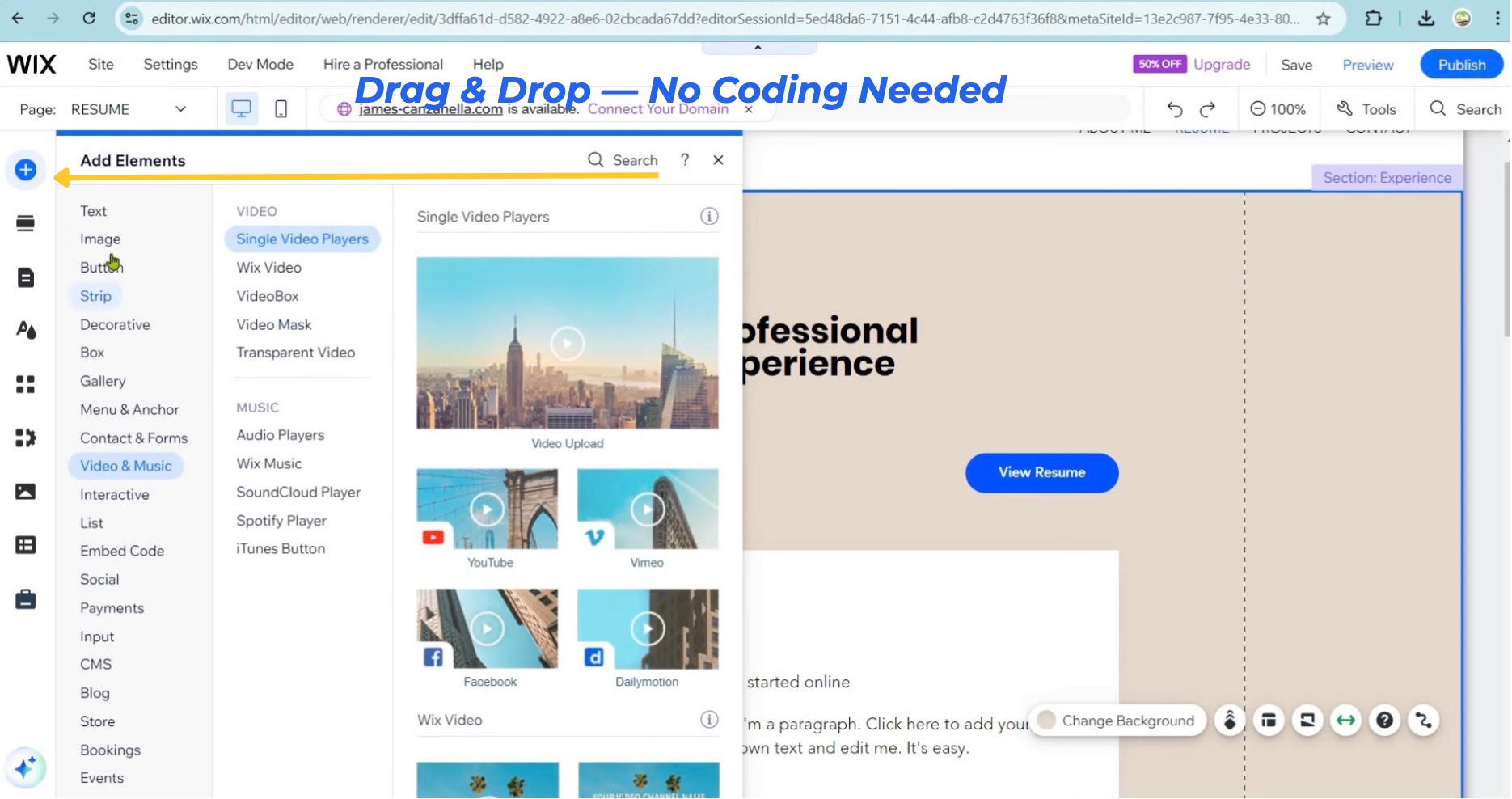
Wix offers one of the most generous permanent free plans available. You get access to the full editor, hundreds of templates, and a live published website — indefinitely. The limitations are real: Wix ads appear on every page, you’re on a branded subdomain, and storage is capped at 500MB with 1GB of bandwidth. No eCommerce on the free plan. But for getting something professional-looking online quickly, it’s hard to beat as a starting point. Explore Wix’s plans and pricing to see what the next step looks like when you’re ready.
Site123 is the most beginner-friendly option in this group — widely described as the fastest way to get a basic site live. The permanent free plan gives you 250MB of storage, 250MB of bandwidth, and up to 5 pages. Site123 branding appears on your site, and you’re limited to a branded subdomain. It’s genuinely the simplest option if you just need something online today. See what Site123 offers as a zero-cost starting point.
Hostinger doesn’t offer a permanent free plan, but it does offer a 14-day free trial with no credit card required. You get access to the full builder, including its AI site-generation tools and template library. The trial is a great way to road-test the platform properly before committing. After 14 days, you’ll need to upgrade to publish — but plans are competitively priced (at the time of writing). Check Hostinger’s trial and pricing before getting started.
Squarespace also runs on a 14-day free trial, no credit card required, with full feature access throughout. It’s particularly well-regarded for its visual quality and template design — which makes the trial worth taking if how your site looks is a priority. After 14 days, you’ll need a paid plan to go live. Start your Squarespace free trial and see if the design quality matches your brand.
Here’s a quick visual summary before we get into the details:
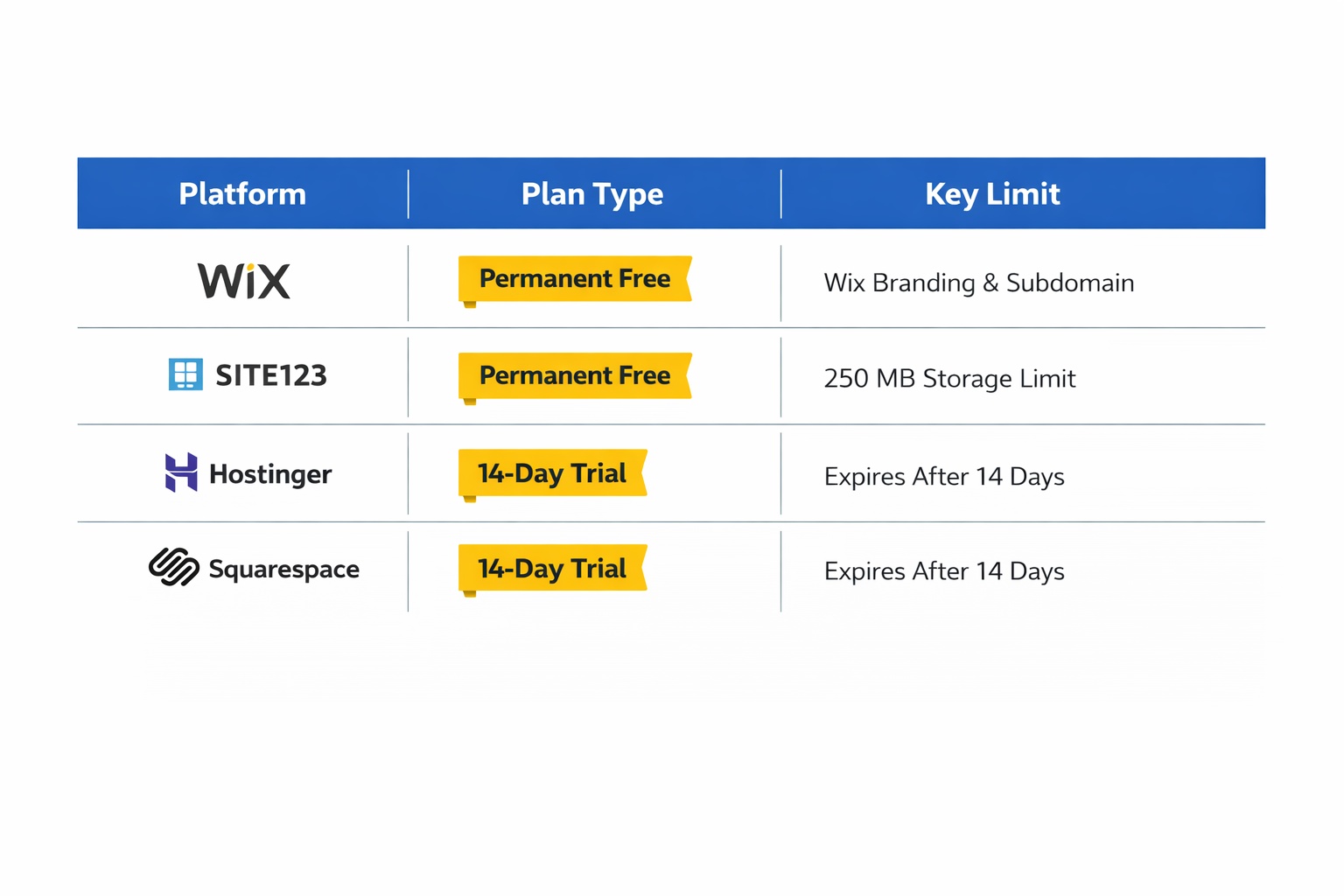
Quick Comparison: Free Plan Overview
Scroll horizontally on mobile if needed.
| Platform | Free Plan Type | Key Limitation |
|---|---|---|
| Wix | Permanent free plan | Wix ads + branded subdomain |
| Site123 | Permanent free plan | 5 pages max + Site123 branding |
| Hostinger | 14-day free trial | Must upgrade to publish live |
| Squarespace | 14-day free trial | Must upgrade to keep site live |
When Free Is Enough — and When It Isn’t
Staying free makes sense in some situations. In others, it works against you. Here’s an honest read on both.
Free is a smart choice if:
- You’re testing a platform before paying for it
- You need a basic “we’re open, here’s our contact info” page and budget is genuinely zero right now
- You’re learning how website builders work for the first time (most users feel comfortable within the first afternoon)
- It’s a side project where polished branding isn’t the priority
It’s time to upgrade when:
- You want customers to find you on Google — SEO is meaningfully limited on free plans
- You’re sharing your website URL publicly (a branded subdomain can quietly undermine trust)
- You want to sell products, accept bookings, or take any kind of payment online
- You’re ready to treat your website as a real business asset, not just a placeholder
Here’s the thing about cost: paid plans for most of these platforms start between $10–$17/month billed annually (at the time of writing). That’s less than most business lunches. If you’re curious what a professional website setup actually looks like end-to-end, the full breakdown is in how much does a website cost for a small business — it covers everything from DIY free plans to agency builds.
And if you’re weighing whether to build it yourself at all, website builder vs hiring a web developer makes the comparison clear without the sales spin.
Common Mistakes to Avoid with Free Plans
1. Treating a free trial like a free plan
Many business owners build an entire site during a 14-day trial and then feel blindsided by the upgrade prompt. Hostinger and Squarespace are trials — not permanent free options — and the clock starts the moment you sign up.
Fix: Set a calendar reminder on day one. You want to decide ahead of time, not scramble at the deadline.
2. Using a free plan for a site you want customers to take seriously
A yourbusiness.wixsite.com address with platform ads is perfectly fine for testing. It’s not ideal for the URL on your business card, your Google Business Profile, or your email signature.
Fix: Start free to confirm you like the platform and the layout. Then upgrade before you share the URL publicly.
3. Ignoring SEO limitations until it’s too late
Free plans often restrict key SEO features — custom meta descriptions, URL structure, and analytics. Many business owners discover this months after launch, wondering why their site isn’t showing up on Google.
Fix: If organic search matters to your business, factor in a paid plan with proper SEO tools from the start. Don’t rely on a free plan as a long-term SEO strategy.
4. Not testing the editor before committing to a platform
A platform can look great in screenshots but feel awkward in practice. This catches most people off guard when they first sit down to edit. The free trial exists precisely for this reason.
Fix: Use free trials and free plans to test the actual editing experience — not just browse the template gallery from the outside.
5. Skipping the “best for your type of business” research
Not every platform suits every business. Wix is strong for service businesses; Squarespace leans toward visual brands; Site123 is fastest for basics; Hostinger offers strong value when you upgrade.
Fix: Before committing, browse the best website builder for small business guide — it matches platforms to business types so you’re not guessing.
Next Steps (Do These in the Next 24–48 Hours)
- Pick one platform and sign up for the free plan or trial today. Don’t overthink it — Wix is the most forgiving starting point for most beginners. Expect to spend 2–3 hours getting a basic site structure in place: home page, about page, and contact page.
- Get something live before you perfect it. A published rough draft is more valuable than an unpublished polished one. You’ll improve it faster once it’s real.
- Decide on your domain name now, even if you don’t buy it yet. Most paid plans include a free domain for the first year. Knowing your ideal domain early means you’re not scrambling when you upgrade.
FAQ
Can I really build a business website for free?
Yes — Wix and Site123 both offer permanent free plans that let you publish a live website at no cost. The trade-offs are real: a branded subdomain, platform ads on your site, and limited storage. For testing ideas or getting a basic presence online, they’re legitimate options. For a professional long-term site that customers trust, a paid plan is usually the better investment.
What’s the difference between a free plan and a free trial?
A free plan is permanent — you can keep your site live indefinitely within the plan’s limits. A free trial (like Hostinger’s and Squarespace’s 14-day options) gives you full feature access for a limited time. After the trial expires, you need to upgrade to keep your site published. Both are free to start; they just work very differently in practice.
Do free website builders show ads on my site?
Most permanent free plans do display the platform’s own branding or ads on your pages — Wix and Site123 both do this (at the time of writing). For a business site you share publicly, this can look unprofessional. Upgrading to even a basic paid plan typically removes all platform ads.
Can I use my own domain name on a free plan?
No — permanent free plans give you a branded subdomain (like yourbusiness.wixsite.com) instead of a custom domain. Connecting your own .com or .co domain requires a paid plan on virtually every major website builder.
Will my free website show up on Google?
It can, but it’s harder. Free plans typically limit SEO features like custom meta descriptions, page URL control, and analytics. If getting found on Google is important to your business, a paid plan with full SEO tools gives you a meaningful head start.
Is Hostinger’s website builder actually free?
Hostinger doesn’t have a permanent free plan. It offers a 14-day free trial with no credit card required, giving you full access to its builder and AI tools. After 14 days, you’ll need to upgrade to a paid plan to keep your site live. The trial is genuinely useful for evaluating the platform before spending anything.
Which free website builder is easiest for a complete beginner?
Site123 is consistently regarded as the fastest and most beginner-friendly option — its guided setup can have a basic site live in under an hour. Wix gives you more flexibility and room to grow, but comes with a slightly steeper learning curve given its wider feature set. Both are worth trying before deciding.