

Ecommerce Website Builder Comparison for a Store That Can Grow

Ecommerce website builder comparison matters the moment your store needs to do more than display products. The platform you choose affects checkout reliability, sales tax handling, inventory management, design flexibility, and how much time you spend maintaining the business instead of running it.
I know this partly from experience. Around 1.5 years ago, I ran a Shopify dropshipping clothing store with more than 1,000 products listed. In that time, Shopify handled product management, checkout, abandoned-cart recovery, payment processing, and sales channels such as Facebook, Instagram, and TikTok reliably—I don’t run that store anymore, but the experience shaped how I evaluate ecommerce platforms today. I’ve also used Hostinger for more than two years, though not for a store. I run this blog on Hostinger, so my experience there comes from testing its website and ecommerce features directly rather than operating a live shop on it.
This guide is written primarily for U.S. small business owners choosing between Shopify, Wix, Squarespace, Hostinger, WooCommerce, and BigCommerce. If you’re selling from the EU (including Latvia), a dedicated section below covers the VAT, GDPR, and payment differences you’ll need to handle instead of U.S. sales tax.
Affiliate Disclosure
Some links in this article are affiliate links. If you purchase through one of them, I may earn a commission at no extra cost to you. Affiliate relationships do not change the trade-offs described here.
Quick Answer
If you want the safest platform for a store that may grow from dozens to hundreds or thousands of products, choose Shopify. Its subscription is not always the cheapest, but its hosted checkout, inventory tools, app ecosystem, and sales-channel integrations can reduce the risk of rebuilding later. Shopify’s official pricing currently lists Basic at $39 per month when paid monthly, or an annual-billing equivalent of $29 per month.
If you are testing a small product range and care more about simplicity or design than advanced operations, Wix or Squarespace may be a better fit. If your priority is ownership and customisation, WooCommerce is worth considering—but only if you are willing to manage hosting, updates, security, and extensions.
Ecommerce Website Builder Comparison Criteria
A platform can have hundreds of features and still be a poor choice for your store. Start with the parts of ecommerce that affect sales and daily workload.
Checkout and payment support
A beautiful product page cannot compensate for a confusing or unreliable checkout. Check whether the platform supports the payment methods your customers use, including cards, PayPal, Apple Pay, Google Pay, and Stripe.
For a U.S.-based store, most major platforms handle domestic card processing well out of the box. The differences show up more in fees, payout speed, and what happens when you need multi-currency or cross-border sales.
Sales tax handling (U.S.)
U.S. sellers deal with sales tax, not VAT—and it’s calculated differently depending on your nexus (the states where you have a tax obligation, based on location or sales volume). Most major platforms now offer automated tax calculation, but the cost structure varies.
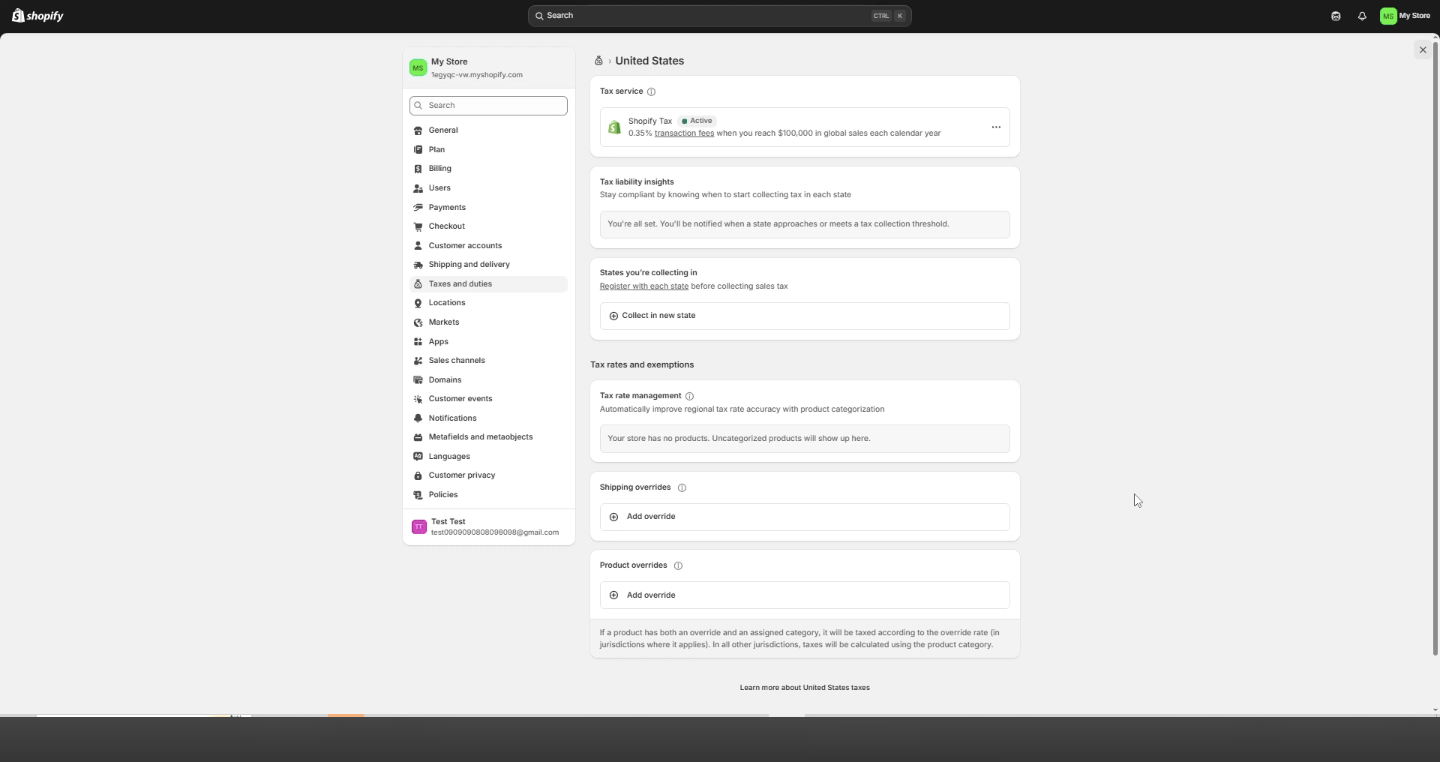
Shopify Tax is free until a store reaches the relevant annual sales threshold. After that, Shopify applies a tax-calculation fee to eligible orders, subject to per-order and annual limits. The rate can vary by account configuration, plan, store location, and Shopify’s current pricing. For example, the Shopify Tax screen shown below displays a 0.35% fee after $100,000 in annual global sales, so always confirm the rate inside your own Shopify admin before building it into your margin forecast. Shopify bills applicable Shopify Tax transaction fees separately from the main subscription.
Wix, Squarespace, and BigCommerce include basic tax calculation in their commerce plans, though the depth of automation (multi-state nexus tracking, marketplace facilitator rules) varies by platform and plan tier.
Transaction fees
Separate platform transaction fees from payment-processing fees. A payment processor charges for handling the card transaction. A platform may also charge an additional percentage, especially when you don’t use its native payment system.
Shopify’s Basic plan is listed at $29 per month on annual billing, but a third-party payment surcharge can apply if you skip Shopify Payments. The exact rate depends on the plan, so check the current pricing page before launch.
Wix’s official pricing lists the Core ecommerce plan at about $29 per month and Business at about $39 per month on annual billing. Wix does not generally add a separate platform transaction fee to standard product sales, but payment processing still applies.
Squarespace requires closer attention to the plan. Its official documentation shows that some lower plans include a commerce transaction fee, while higher commerce plans can remove it. Current examples include a 2% fee on certain Basic plans and 0% on Commerce Basic or higher, depending on the plan family. Don’t assume one universal Squarespace fee—check the plan shown in your account.
App ecosystem
Apps let you add subscriptions, product bundles, reviews, shipping rules, email marketing, fulfilment, accounting, and marketplace connections. They also add monthly costs and can create conflicts.
This was one of the clearest differences in my Shopify experience. With more than 1,000 products, an app ecosystem wasn’t a luxury—it made abandoned-cart recovery, multi-channel selling, and catalogue management practical. The downside is that a store can slowly collect too many paid tools.
Here’s the dissenting view: a large app marketplace isn’t automatically an advantage. If you sell 20 handmade products locally, a smaller toolset may be healthier because there are fewer settings to maintain and fewer recurring charges to audit.
Scalability
“Scalable” doesn’t simply mean a platform allows unlimited products. It also means the system can handle more orders, staff accounts, integrations, shipping rules, locations, and reporting without forcing a complete rebuild.
If you expect a 50-product catalogue to remain small, Wix, Squarespace, or Hostinger may be enough. If you expect to reach 1,000 SKUs, sell through multiple channels, or add wholesale buyers, Shopify is usually the safer direction. BigCommerce is also worth examining for higher-volume sellers who want substantial built-in commerce functionality.
Platform Trade-Offs
This is not a feature-count ranking. It’s a decision guide.
Shopify: best for operational growth
Shopify is the strongest choice when ecommerce is the main business rather than a small part of a brochure website. It offers a hosted checkout, product and inventory tools, sales-channel integrations, analytics, and a mature app ecosystem.
During my roughly 1.5 years running a Shopify store, I managed more than 1,000 listed items without the catalogue becoming the main operational problem. The real costs weren’t just the subscription: apps, payment processing, themes, fulfilment, and marketing tools also mattered.
Choose Shopify if your store may grow, you want less server maintenance, or you need multiple sales channels. Avoid it if you’re selling only a handful of products and will never use its broader commerce features.
Wix: best for simple stores with visual flexibility
Wix suits founders who want to build the website and store together. Its editor gives you more visual freedom than a highly structured ecommerce platform, and its commerce plans are accessible for smaller businesses.
Choose Wix if your store has a modest catalogue, branding and layout matter heavily, and you want a beginner-friendly editing experience. If you later need complex inventory, wholesale pricing, or a large fulfilment stack, check those requirements before launch rather than assuming the platform will handle them.
For a closer look at the trade-off between Wix and a budget-focused option, see this Hostinger vs Wix comparison for small business.
Squarespace: best for design-led selling
Squarespace is a natural fit for photographers, designers, food brands, consultants with products, and small catalogues where presentation is central to the sale. Its templates can help a store look polished without much design work.
The catch is that plan-level transaction fees and commerce features need careful checking. Squarespace’s official documentation indicates that some lower plans charge a commerce transaction fee, while dedicated commerce tiers can remove it.
Choose Squarespace if design and brand presentation come first. If your priority is a complex catalogue, deep inventory workflows, or wholesale operations, Shopify or WooCommerce may give you more room.
The Wix vs Squarespace pricing guide is useful if you’re deciding between these two design-oriented platforms.
Hostinger Website Builder: best for a budget-first launch
Hostinger is attractive when you want a low-cost, relatively simple way to get a store online. It’s particularly useful for a founder validating an idea before investing heavily in apps, custom development, or advanced operations.
My own experience with Hostinger comes from running this blog on it for more than two years and testing its website and ecommerce builder directly, rather than operating a live store there. That gives me a good sense of its setup, editor, and feature limits, even though I can’t speak to running high order volume through it the way I can with Shopify. Based on that testing, Hostinger is simpler and more budget-first, while Shopify is built for deeper, higher-volume ecommerce operations.
Choose Hostinger’s ecommerce plans if you’re launching a focused catalogue, want a straightforward setup, or are testing demand. If your plan already includes 1,000 products, multiple warehouses, wholesale buyers, and several selling channels, start with a platform designed for that complexity.
WooCommerce: best for ownership and customisation
WooCommerce is a free WordPress plugin, but the store itself isn’t free to operate. You pay for hosting, a domain, payment processing, security, backups, themes, and any extensions you need. WooCommerce states its core plugin has no monthly subscription or platform revenue share, while extensions can create ongoing annual costs.
Choose WooCommerce if you already use WordPress, want control over your data and design, and can handle technical maintenance or pay someone who can. Choose Shopify instead if you’d rather pay a predictable platform bill and avoid managing infrastructure.
BigCommerce: best for built-in commerce depth
BigCommerce targets stores that need more advanced built-in commerce capabilities and a path toward higher volume. Its official pricing shows entry plans around $39 per month when paid monthly, with an annual-billing equivalent around $29 per month. Higher tiers cost more, and sales-volume limits or plan rules may apply.
Choose BigCommerce if your catalogue, sales volume, or B2B requirements justify a more advanced platform from the beginning. For a first 20-product store, it may add complexity before you need it.
Ecommerce Platform Pricing Comparison
Pricing is easier to understand when you separate the monthly subscription from the cost of running the operation.
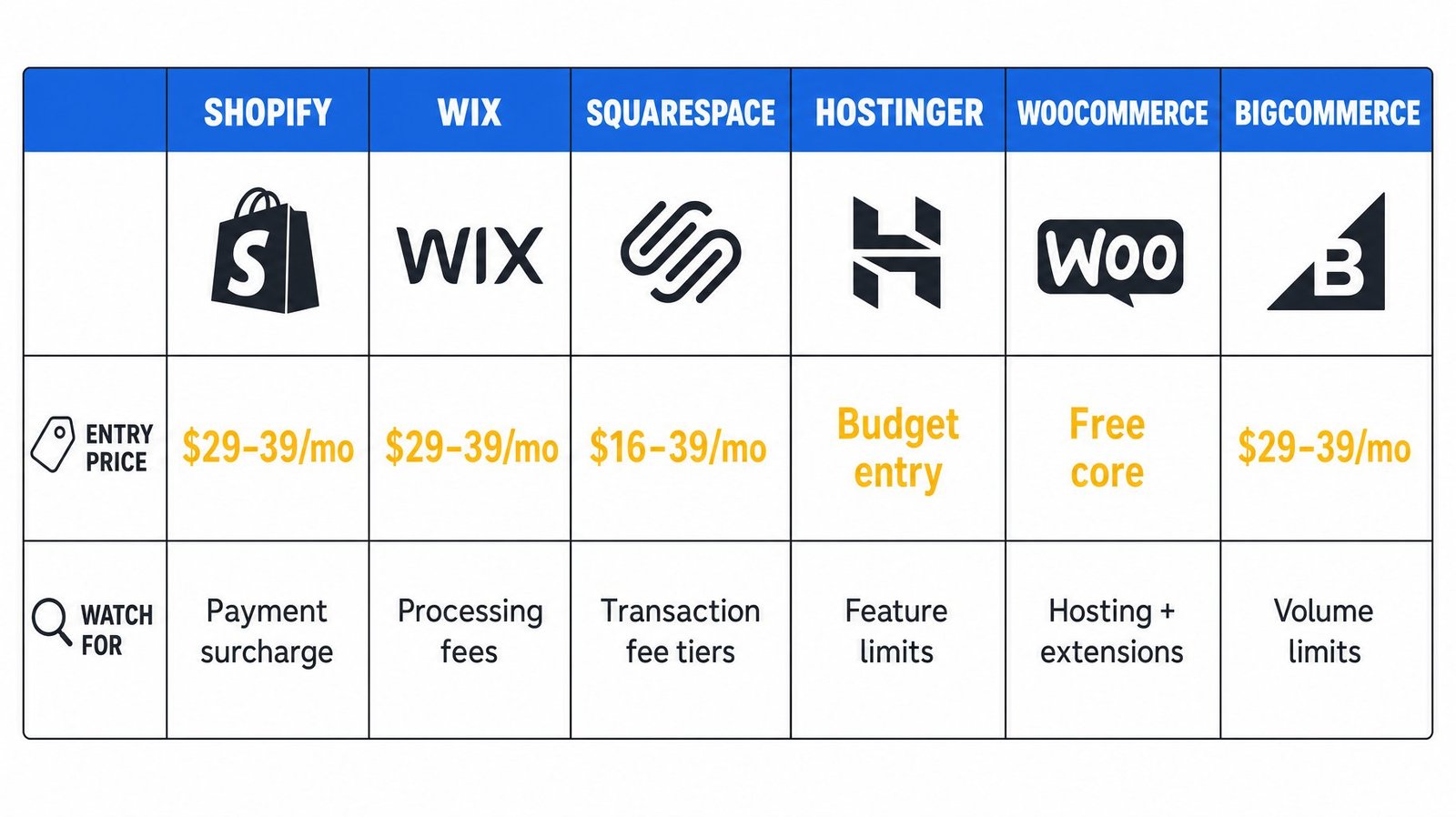
| Platform | Typical entry cost | Main cost to watch |
|---|---|---|
| Shopify | About $29/month annually or $39 monthly for Basic | Apps, payment processing, and possible third-party payment surcharge |
| Wix | About $29–$39/month on annual plans | Payment processing and plan-specific features |
| Squarespace | About $16–$39/month on annual plans, depending on plan | Platform transaction fee on some lower plans |
| Hostinger | Often lower than Shopify and Wix for entry ecommerce plans | Feature limits and possible upgrade costs |
| WooCommerce | Free core plugin | Hosting, maintenance, security, and extensions |
| BigCommerce | About $29/month annually or $39 monthly for entry plans | Sales-volume limits and higher-tier pricing |
These are directional figures, not guaranteed prices. Currency, introductory discounts, billing frequency, and plan availability can change the final amount.
For European and Latvian sellers: what changes
If you’re selling from the EU, the tax and compliance picture is different from the U.S. sales-tax model described above. Here’s what to check instead:
VAT replaces sales tax as your main tax obligation. The EU-wide distance-selling threshold is €10,000 per year in combined cross-border B2C sales; below that, you charge VAT at your home country’s rate, and above it, you either register in each customer’s country or use the One-Stop-Shop (OSS) to file one quarterly return covering all EU sales.
A newer SME scheme, active since January 2025 and continuing into 2026, lets EU-based small businesses with EU-wide turnover under €100,000 sell VAT-exempt across borders, as long as they stay under each country’s domestic threshold (up to €85,000). This is worth checking with an accountant if you’re a small Latvian store selling into other EU countries.
Importing low-value goods from outside the EU also changed in 2026: the old €150 customs-duty exemption was scrapped as of July 1, 2026, and a temporary flat €3 customs charge now applies to many low-value imports. If you dropship from outside the EU, this affects your landed cost.
GDPR and cookie consent apply regardless of platform, so checkout forms, email opt-ins, and analytics tracking need consent mechanisms built in, not bolted on later. Payment-wise, Stripe and PayPal both work across the EU, but confirm your platform supports local bank-transfer options and settles in euros without excessive conversion fees if you’re pricing in EUR.
Shopify, Wix, Squarespace, and BigCommerce all support VAT-inclusive pricing and OSS-compatible invoicing to varying degrees—check the specific tax settings in your account rather than assuming parity with U.S. tax tools.
Common Mistakes and Fixes
Choosing the cheapest plan without checking checkout features
Entry plans may lack abandoned-cart recovery, advanced shipping rules, staff permissions, or useful reporting. Compare the plan that includes your actual requirements, not the lowest number on the pricing page.
Treating tax setup as a “figure it out later” problem
Sales tax nexus (U.S.) and VAT thresholds (EU) both create real filing obligations once you cross certain revenue levels. Set up automated tax tools from day one rather than retrofitting them after your first big sales month.
Building a complex store too early
A large app stack can slow decision-making and increase costs. Start with the smallest reliable setup, then add tools only when a real business problem appears.
Ignoring migration before launch
Export your product data, customer records, orders, URLs, images, and metadata before you build. If you think you may move later, document how those assets can be exported from the beginning.
Confusing ownership with low effort
WooCommerce offers control, but you become responsible for more of the system. If you don’t want to manage updates, backups, and security, a hosted platform may be worth the extra subscription.
Next Steps
- Write down your expected product count, monthly order volume, states or countries served, and payment methods.
- Decide whether you prefer lower maintenance or greater technical control.
- Calculate a realistic monthly budget that includes apps, processing, tax tools, and your time.
- Test checkout on two shortlisted platforms using mobile, desktop, and your intended payment methods.
- Export a sample product catalogue before committing to confirm your data remains portable.
For the broader launch process, use this guide on how to start an online store. For a wider shortlist before narrowing down the platforms, see the best website builder for online stores.
FAQ
What is the best ecommerce platform for a small business?
For a small store with a modest catalogue, Wix, Squarespace, or Hostinger can be easier to manage. Shopify is the better choice if the store may expand, add sales channels, or require advanced inventory workflows. The best platform is the one that matches your next two years of needs, not just your launch-day budget.
How much does an ecommerce website cost?
A realistic starting budget ranges from roughly $15–$50 per month for a basic hosted store, before payment processing, tax tools, apps, and marketing. Shopify Basic is currently listed at $29 per month on annual billing or $39 monthly, while WooCommerce has free core software but separate hosting and extension costs.
Is Shopify too expensive for a first store?
Not necessarily. Shopify can cost more than a basic website builder, but the subscription may be worthwhile if it prevents a rebuild when your catalogue or order volume grows. For a small test store with only a few products, Hostinger, Wix, or Squarespace may provide enough selling functionality at a lower operating cost.
Will I lose sales if I switch ecommerce platforms?
A migration doesn’t automatically mean lost sales, but poor preparation can create broken links, missing products, payment failures, or checkout confusion. Export your data, preserve important URLs, test redirects, keep the old store available during the transition, and place a test order before announcing the change.
Do I need coding skills to use these ecommerce builders?
You can launch a basic store without coding on Shopify, Wix, Squarespace, Hostinger, and BigCommerce. WooCommerce is also accessible, but advanced customisation usually requires more technical knowledge. Even with a hosted builder, you may eventually need help with tax rules, integrations, analytics, or a custom checkout requirement.
How does sales tax work on these platforms?
Most platforms now automate U.S. sales tax based on your nexus. Shopify Tax is free until you hit $100,000 USD in annual sales, then charges a small per-order fee capped at $0.99. Wix, Squarespace, and BigCommerce include basic calculation in commerce plans, but multi-state nexus tracking depth varies—verify before you scale into new states.
Is WooCommerce cheaper than Shopify?
WooCommerce has no monthly fee for its core plugin, but the total cost depends on hosting, extensions, security, backups, and maintenance. Shopify is more predictable because hosting and core infrastructure are bundled. WooCommerce may be cheaper in a lean setup, but it’s not automatically cheaper once a growing store needs several paid extensions.
Can I sell digital products with these platforms?
Yes. Shopify, Wix, Squarespace, Hostinger, WooCommerce, and BigCommerce can support digital products through built-in features or extensions. Check delivery automation, download limits, subscription support, and customer-account functionality before choosing a platform for ebooks, templates, courses, or memberships.
My Verdict
If you’re building a 50-product store and want to validate demand quickly, choose Hostinger, Wix, or Squarespace according to whether budget, editing freedom, or visual presentation matters most.
If you’re building a store that could reach 1,000 products, sell across several channels, or support wholesale buyers, choose Shopify. My roughly 1.5 years managing a catalogue of more than 1,000 items showed why its operational depth matters: product management, checkout, abandoned-cart recovery, payments, and channel integrations worked together without requiring a custom build.
If you already know WordPress and want maximum control, choose WooCommerce. If you need more advanced built-in commerce features from day one, consider BigCommerce.
The key isn’t finding the platform with the longest feature list. It’s choosing the platform whose limitations you can live with—and whose strengths match the business you’re actually building, whether you’re taxing in dollars or euros.