
How Much Does a Website Cost for a Small Business: Real Numbers

How much does a website cost for a small business? The honest answer: anywhere from $100 a year to $35,000 upfront. That gap isn’t random pricing. It reflects three completely different paths, and most small business owners go into this decision without realising all three exist.
Here’s what surprises a lot of people: the cheapest option isn’t the riskiest. Done right, a DIY website builder can get you a clean, professional site for under $300 in the first year — no developer needed, no long-term contract. The most expensive route can cost $35,000 before a single page goes live. Knowing which path actually fits your business changes everything.
Quick Answer
A small business website costs roughly $100–$400/year with a DIY builder, $500–$5,000 for a freelancer, or $5,000–$35,000+ through a web design agency. For most small business owners — especially those just starting out — a website builder is the practical, affordable starting point. Total first-year costs on the DIY path typically land between $150 and $800.
How Much Does a Website Cost for a Small Business? The Three Paths
Pricing for websites looks confusing until you realise the wide range exists because there are three fundamentally different ways to build a site. Each path has its own cost structure, timeline, and trade-offs. Once you see them side by side, the numbers make a lot more sense.
Path 1 — DIY Website Builders ($0 to $30/Month)
Building your own site used to mean staring at code you didn’t understand. That’s not the reality anymore. Modern website builders are designed specifically for non-technical users, and most people can launch a clean, functional site over a weekend — no developer required.
You pay a monthly (or annual) subscription that typically covers hosting, templates, SSL, and basic features. No separate hosting invoices, no surprise developer bills.
What you can expect to spend:
- Free plans: $0/month (limited features, platform-branded subdomain)
- Entry-level paid plans: $10–$17/month
- Business plans with more features: $20–$30/month
- Domain name: ~$10–$15/year (often included free in year one)
- First-year total: roughly $100–$400
Popular options in this tier include Hostinger (one of the most affordable, starting around $2.99–$3.99/month on promotional pricing), Wix (more flexible drag-and-drop, starting around $17/month), and Squarespace (the most design-focused, starting around $16/month). For a full side-by-side breakdown of these platforms, the best website builders for small business comparison covers each one in detail.
Time investment: Expect 2–4 hours to get comfortable with the interface and a weekend to get a basic site live. Most users feel confident within their first afternoon.
This path works well for: service businesses, consultants, cafés, local shops, and anyone launching a first site on a limited budget.
Path 2 — Freelance Web Designer ($500 to $5,000+)
Hiring a freelancer means someone else builds the site for you. You describe what you need, they design and develop it, and you get a finished product — usually within a few weeks.
Costs vary significantly based on the designer’s experience, location, and project complexity. A newer freelancer might charge $500–$1,500 for a simple 5-page site. An experienced designer with a strong portfolio typically starts at $2,000–$5,000 for the same scope.
What you can expect to spend:
- Simple 5-page site: $500–$2,000
- Custom design with booking, gallery, or contact forms: $2,000–$5,000
- Ongoing maintenance (if agreed separately): $50–$200/month
The catch? Freelancer quality varies a lot. Always review portfolios, ask for references, and agree on revisions before work starts.
Path 3 — Web Design Agency ($5,000 to $35,000+)
Agencies bring a full team — designer, developer, copywriter, and often an SEO strategist — to your project. The result is typically more polished and strategic, but the price reflects the full-service approach.
What you can expect to spend:
- Small business website (5–15 pages): $5,000–$10,000
- Custom WordPress with SEO structure: $6,000–$15,000
- Full-service including copywriting, branding, and strategy: $15,000–$35,000+
- Ongoing retainer (maintenance + updates): $200–$500/month
This path makes sense for established businesses in competitive markets that rely heavily on inbound leads. For a brand-new small business getting online for the first time, it’s usually more than the situation requires. If you’re still weighing the DIY vs. professional build decision, the website builder vs hiring a web developer guide goes deeper on when each path makes the most sense.
What Else Affects the Cost?
Even after you choose a path, a few smaller recurring costs tend to show up that nobody warns you about. They don’t cost much individually — but it helps to budget for them upfront so nothing catches you off guard.
- Domain name: $10–$15/year (often free with a paid website builder plan in year one)
- SSL certificate: Free with most builders; ~$50–$100/year if purchased separately
- Stock photos or graphics: $0 using free libraries (Unsplash, Pexels); $20–$50 for a premium pack
- Email hosting: $3–$6/month per inbox (e.g., Google Workspace)
- Maintenance: Included with website builders; $50–$200/month if you hire someone
Most small business owners on a DIY builder land at $50–$100/month total once you factor in domain, plan, and optional extras.
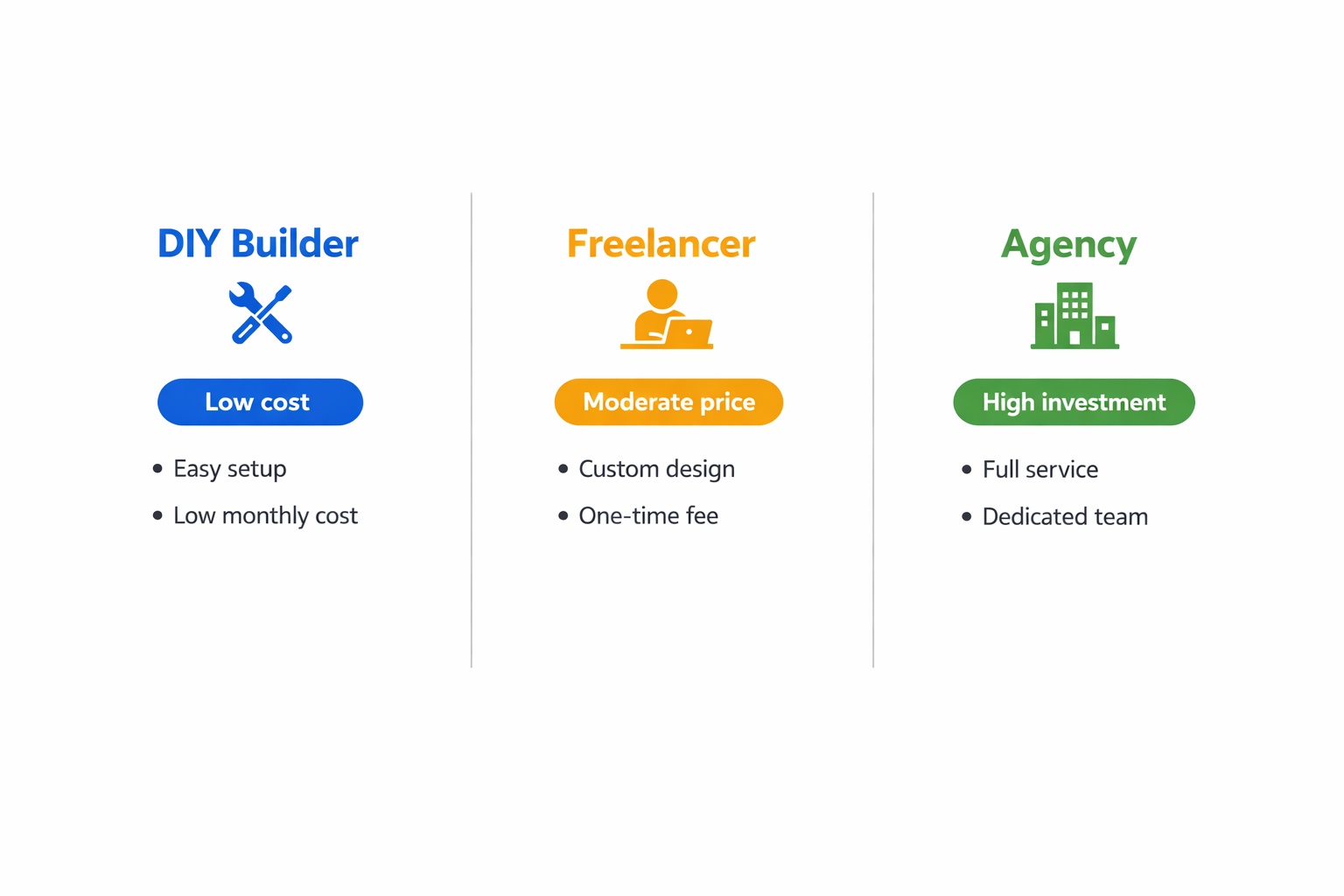
Quick Comparison
Quick reference — scroll horizontally on mobile.
| Path | Typical Cost (2026) | Best For |
|---|---|---|
| DIY Website Builder | $100–$400/year | Startups, tight budgets, non-technical owners |
| Freelance Designer | $500–$5,000 one-time | Owners who want help without a full agency |
| Web Design Agency | $5,000–$35,000+ one-time | Established businesses in competitive markets |
Common Mistakes to Avoid When Budgeting for a Website
1. Assuming a lower price means lower quality
Many business owners skip website builders entirely, assuming they’re not “professional enough.” In reality, platforms like Squarespace and Wix produce genuinely polished, client-ready results — and plenty of successful small businesses run on them long-term. The fix: judge by what the finished site looks like, not the price tag of the tool used to build it.
2. Not budgeting for ongoing costs
This catches most people off guard. The upfront build cost is just one part of the picture. Domain renewals, plan fees, email hosting, and the occasional plugin or add-on add up month by month. The fix: set aside an extra $50–$100/month in your operating budget, even on the DIY path, to cover the basics comfortably.
3. Investing in a custom site before validating the business
Many business owners commit $5,000–$10,000 to a custom site before confirming their product or service actually sells. The fix: start with a website builder to test your offer and attract your first customers, then upgrade when revenue justifies the investment.
4. Only previewing the desktop version
A site that looks great on a laptop but breaks on a phone loses customers fast. Easy to overlook when you’re building on a desktop screen. The fix: always check the mobile preview before publishing — every major website builder includes one, and it takes about 30 seconds.
5. Choosing a builder without comparing options
Not all website builders are the same. Some are better for service businesses, some for e-commerce, some for pure simplicity. The fix: spend 20 minutes reading a comparison guide before committing your card. The how to choose a website builder guide is a practical starting point.
Next Steps (Do This in the Next 24–48 Hours)
- Decide your path. If budget is tight or you’re just starting out, a DIY builder is the right move. If your business is already generating revenue and you need something more complex from day one, a freelancer is worth considering.
- Try a free plan or trial. Most website builders offer a free tier or a trial period — no credit card needed. Give yourself one afternoon to test the drag-and-drop editor and see what feels natural before you pay anything.
- Set a realistic first-year budget. For DIY: plan for $150–$400. For a freelancer: set aside at least $1,500. Write the number down before you start shopping — it keeps the decision focused.
FAQ
How much does a website cost for a small business per month?
On a DIY builder, expect $10–$30/month for the plan, plus roughly $1/month toward your domain. Including email hosting and minor extras, total monthly costs typically land between $15 and $50. If you hire someone to maintain a custom site, add $50–$200/month on top.
What is the cheapest way to build a small business website?
A DIY website builder is the most affordable option. Platforms like Hostinger offer plans starting under $5/month on promotional pricing, and your first full year — including a domain — can cost under $200. It’s not “cheap” in terms of quality; it’s efficient. Many businesses run on builders long-term without ever needing a developer.
Is it worth paying a web designer for a small business?
It depends on your situation. If you genuinely don’t have time to learn a builder and your business already generates revenue, a freelancer can save hours and deliver a more customised result. But if you’re just starting out or testing a new idea, a DIY builder gives you more control and keeps costs low until the business proves itself.
How much does website maintenance cost for a small business?
On a DIY builder, maintenance is essentially included in your monthly plan. If you hire someone to keep a custom site updated, expect $50–$200/month for light maintenance, or up to $500/month for regular content updates, security monitoring, and backups.
Do I need to pay for hosting separately?
Not with most website builders — hosting is bundled into the monthly subscription. If you build on self-hosted WordPress (WordPress.org), you pay for hosting separately, typically $3–$10/month for shared hosting. Platforms like Wix, Squarespace, and Hostinger Website Builder all include hosting in their plans.
How long does it take to build a DIY website?
Most small business owners can get a basic 5-page site live in one weekend using a modern builder. Allow 2–4 hours to learn the interface, a few more to customise a template, and another hour to add content and connect your domain. Some do it faster; some take a few weeks at their own pace. There’s no wrong speed.