
Best AI Website Builder for Small Business: What the AI Really Builds

The best AI website builder for small business isn’t the one with the flashiest demo — it’s the one whose AI actually understands what your business does before it starts designing. Type “bakery in Rīga” into five different tools and you’ll get five wildly different results: some produce a genuinely usable homepage with relevant copy, others spit out a generic template with your business name pasted on top. That gap between promise and output is exactly what most comparison articles skip over, and it’s the thing that determines whether you spend an afternoon polishing a site or starting over from scratch.
This matters even more once you factor in pricing. Nearly every AI builder on this list advertises an eye-catching intro rate, then renews at two to five times that price a year or two later — a detail buried far from the signup button.
Quick Answer
For most small businesses, Hostinger AI offers the best balance of low cost, decent AI output, and hosting reliability, especially if budget matters more than design polish. If you want richer AI-generated copy and a more premium look out of the box, Squarespace AI and Wix ADI are worth the higher price. Businesses that need dead-simple setup with almost no decisions to make should look at SITE123 or GoDaddy Airo.
Affiliate disclosure: This article contains affiliate links. If you sign up through one, I may earn a small commission at no extra cost to you — this doesn’t affect my recommendations.
Quick List: Top AI Website Builders
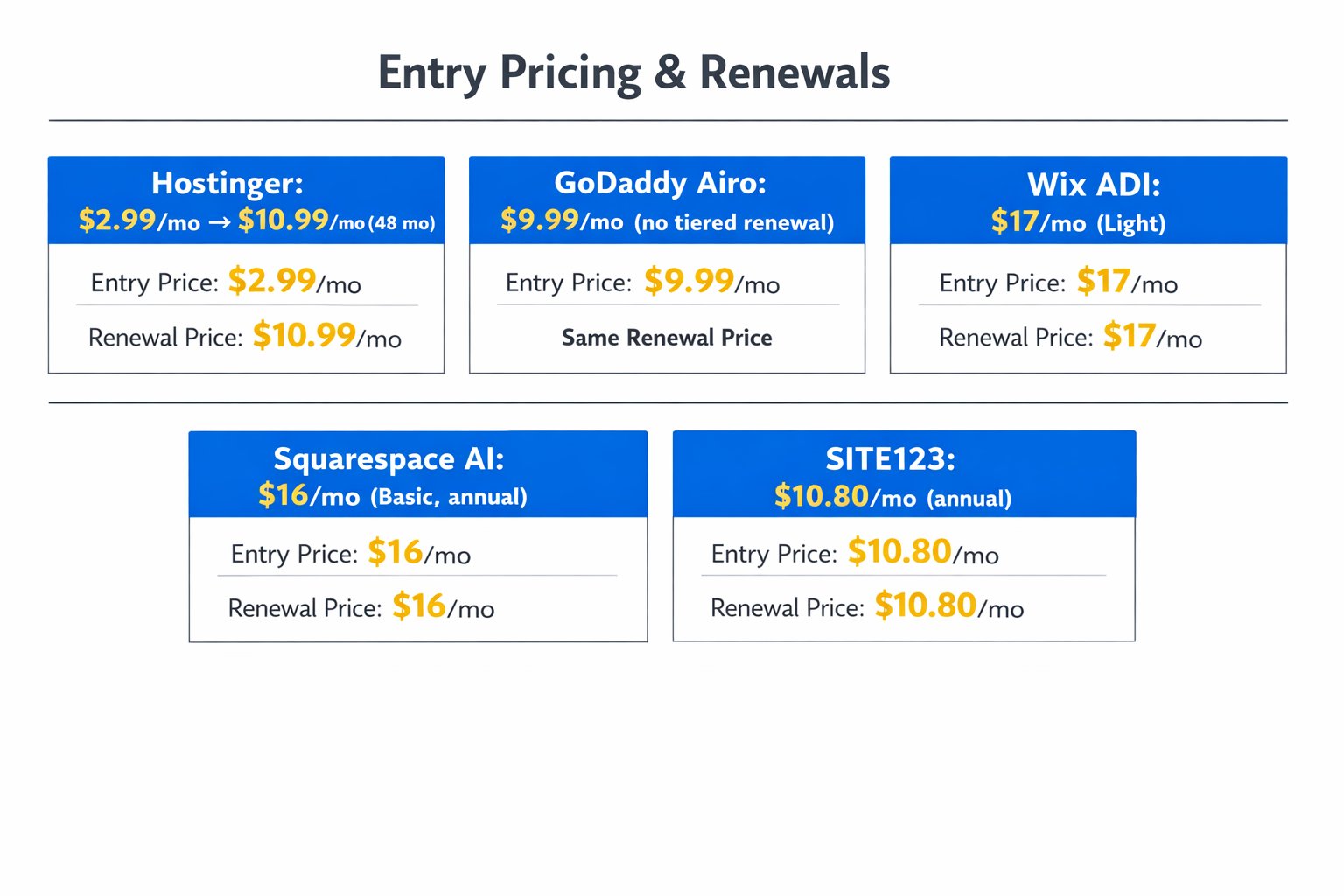
- Hostinger AI Website Builder — starting at $2.99/month (48-month intro term)
- GoDaddy Airo AI — starting at $9.99/month
- SITE123 — starting at $10.80/month (billed annually)
- Squarespace AI — starting at $16/month (billed annually)
- Wix ADI — starting at $17/month
Hostinger AI Website Builder — Cheapest AI Builder That Still Delivers
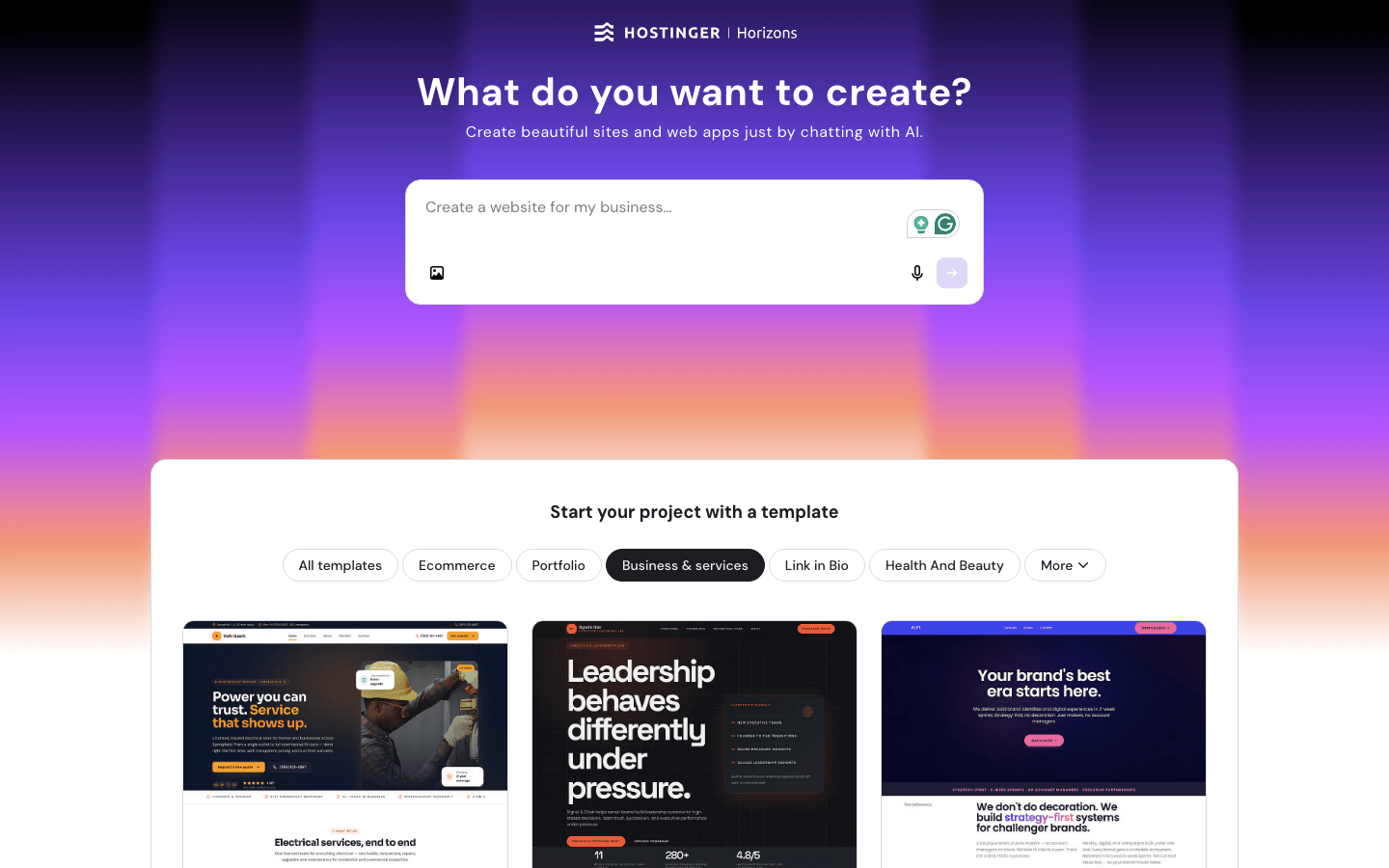
I’ve used Hostinger for over two years, both for hosting and its AI website builder, so this one comes from direct hands-on use rather than a quick test drive. Here’s the thing most people don’t expect: at this price point, you assume the AI output will feel like a downgrade — and honestly, it mostly doesn’t. Ask it to build a site for a local service business, and it drafts a full homepage with relevant sections, decent stock imagery, and copy that’s close enough to usable after a light edit.
Key features:
- AI generates a complete site from a short business description in under two minutes
- Built-in hosting, free domain, and SSL included on every plan
- AI tools for logo generation, heatmaps, and basic SEO suggestions
- Drag-and-drop editor for manual tweaks after the AI draft
- Business plan adds ecommerce with 0% transaction fees
Pricing: Premium plan starts at $2.99/month on a 48-month term, renewing at $10.99/month; Business plan starts at $3.99/month, renewing at $16.99/month. That renewal jump catches a lot of people off guard — it’s the trade-off for the rock-bottom intro price, so budget for it rather than being surprised in year four.
Pros: Genuinely affordable long-term compared to Wix or Squarespace, reliable uptime in my experience, AI output is usable with minor edits, ecommerce included on Business plan.
Cons: Design templates feel a notch less polished than Squarespace, customization options are more limited once you’re outside the AI-generated layout, longer commitment terms needed for the lowest prices.
Best for: Solo founders, local service businesses, and anyone prioritizing monthly cost over design flexibility. Not for: Businesses that need deep design customization or heavy third-party app integrations.
My Verdict: Hostinger AI is the most defensible pick when budget is the deciding factor, and its AI actually grasps business context better than the price suggests. Check Hostinger’s website builder plans to compare the Premium and Business tiers side by side.
Wix ADI — Best App Ecosystem, Hardest to Leave
Wix ADI asks a handful of questions about your business, then generates a full site with layout, color palette, and starter copy already in place. It’s one of the most recognizable names in this space, and that familiarity buys real trust with non-technical users who’ve heard of Wix before ever landing on the page.
Key features:
- Conversational AI onboarding that adapts layout to your industry
- Largest app marketplace of any builder on this list for adding bookings, forms, or chat
- Built-in SEO tools and analytics dashboard
- Strong ecommerce support with abandoned cart recovery
- Mobile-responsive editing baked into every template
Pricing: Wix’s Light plan starts at $17/month, with Core at $29/month and Business at $39/month, scaling up to roughly $159/month for the Business Elite tier depending on features needed.
Pros: Wide app ecosystem covers almost any add-on a small business could want, strong built-in SEO, large template library, free plan available for testing.
Cons: Migrating off Wix later is notoriously difficult since sites don’t export cleanly, pricing climbs quickly once you add apps, AI-generated copy still needs a real rewrite pass.
Best for: Businesses planning to add lots of third-party integrations (booking, membership, marketing automation) down the line. Not for: Anyone who might want to switch platforms in a year or two — the lock-in here is real, not hypothetical.
My Verdict: Wix ADI earns its reputation on ecosystem depth, but that same strength is what makes leaving expensive later — factor in switching costs before you commit long-term. Explore Wix’s premium plans and pricing to see which tier fits your feature needs.
Squarespace AI — Best Design Output, Premium Price to Match
Squarespace’s AI tools focus on generating polished, design-forward layouts, and it shows — templates here consistently look more professional straight out of the gate than most competitors. Here’s an honest, slightly contrarian take: plenty of guides call Squarespace the easiest builder for beginners, but in practice its section-based editor causes more early friction than people expect, since dragging elements between rigid blocks isn’t as intuitive as free-form editors like Wix.
Key features:
- AI-assisted layout and copy generation tied to premium template designs
- Strong built-in ecommerce with tiered transaction fees that shrink on higher plans
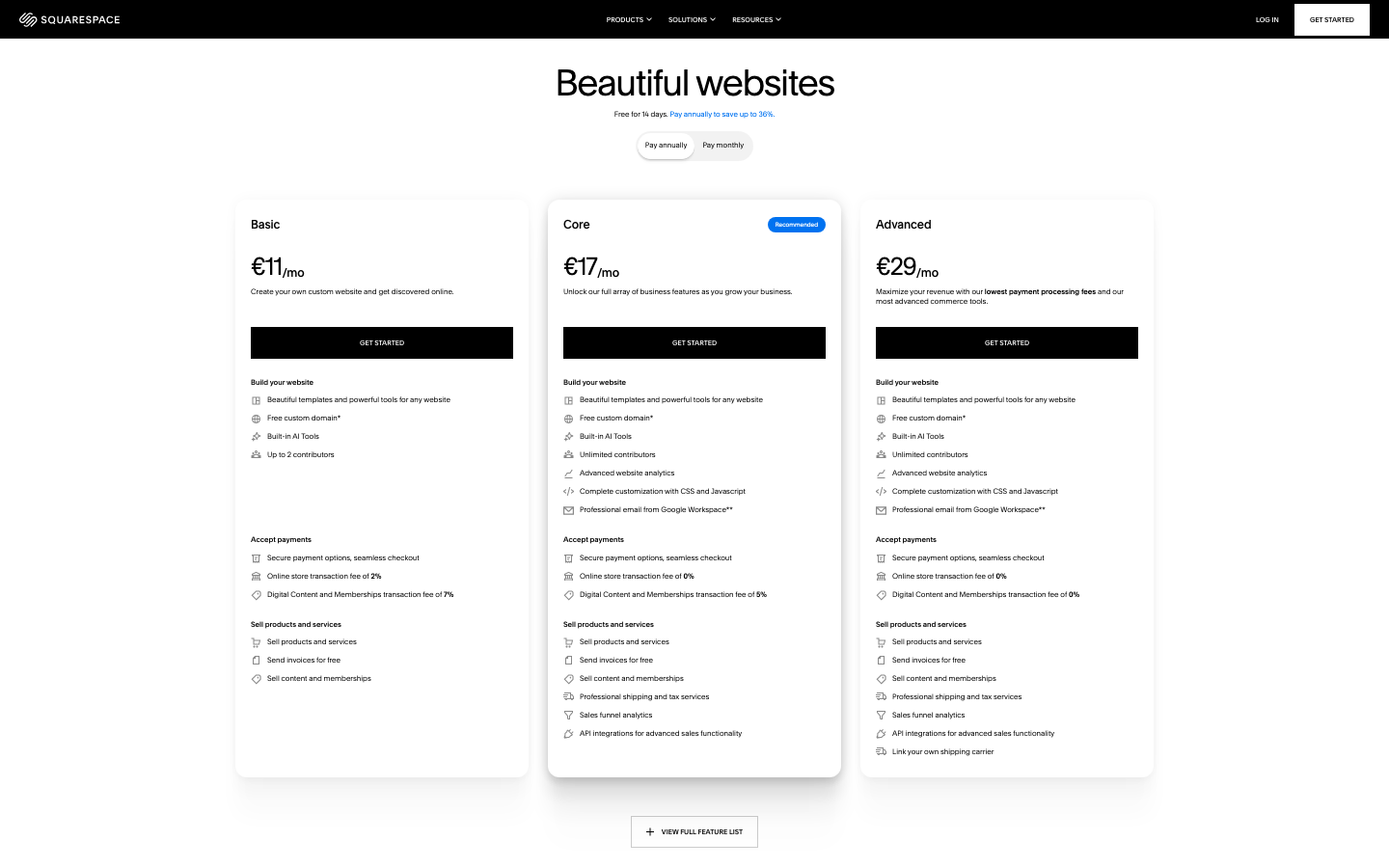
- Squarespace Payments integration with no commerce fees on Core and above
- Content-focused blogging and portfolio tools
- Consistently rated among the higher-scoring builders for design quality on major review platforms
Pricing: New four-tier structure billed annually: Basic at $16/month, Core at $23–29/month, Plus at $39/month, and Advanced at $99/month — monthly billing runs noticeably higher on every tier, so check the annual toggle before comparing prices.
Pros: Best-in-class visual polish out of the box, transaction fees disappear entirely on Core plan and above, strong for portfolio-heavy or ecommerce businesses.
Cons: Steeper learning curve for the section-based editor than the marketing suggests, pricier than Hostinger or SITE123 across every tier, fewer third-party app integrations than Wix.
Best for: Businesses where visual presentation is the main selling point — photographers, boutiques, restaurants. Not for: Budget-first businesses or anyone wanting a fully free-form drag-and-drop editor.
My Verdict: Squarespace AI wins on design quality alone, but that section-based editor is worth test-driving before you buy — the learning curve is easy to underestimate. Check Squarespace’s pricing page to compare the Basic and Core tiers.
SITE123 — Simplest Setup, Fewest Decisions to Make
SITE123 strips away nearly every design decision, guiding you through a linear setup where the AI picks a layout and you fill in the blanks. This catches some users off guard at first — less control can feel restrictive — but for someone who just wants a working site without fifty customization menus, it’s a relief rather than a limitation.
Key features:
- Linear, guided setup process with minimal design choices required
- Built-in booking, store, and blog modules included on paid tiers
- Free plan available indefinitely with SITE123 branding
- 14-day money-back guarantee on all premium plans
- Multilingual site support built in
Pricing: Paid plans start at $10.80/month billed annually for the entry Basic tier; higher tiers (Advanced, Professional, Gold) are sales-led without transparent self-serve pricing, so contact SITE123 directly for a quote.
Pros: Fastest path from zero to published site of any tool here, genuinely beginner-proof interface, solid multilingual support for businesses serving diverse customers.
Cons: Limited design flexibility compared to Wix or Squarespace, higher tiers lack transparent self-serve pricing, smaller app ecosystem overall.
Best for: First-time website owners who want the fewest possible decisions during setup. Not for: Businesses planning significant custom design work or complex ecommerce catalogs.
My Verdict: SITE123 trades flexibility for genuine simplicity, and for a business that just needs a credible online presence fast, that trade is worth making. Explore SITE123’s pricing plans to see what’s included at each tier.
GoDaddy Airo AI — Fastest Bundle of Domain, Site, and Marketing
GoDaddy Airo turns a domain purchase into a near-complete site: AI-generated layout, logo suggestions, and even a starter batch of social media posts, often in under 15 minutes. The appeal here isn’t design depth — it’s how much gets bundled into one setup flow for business owners who’d rather not juggle five separate tools.
Key features:
- AI generates site, logo, and a month of social post drafts from one onboarding flow
- Domain, hosting, and basic marketing tools bundled together
- Simple guided editor aimed at non-technical users
- Built-in basic SEO and business listing tools
- Fast setup optimized for brochure-style small business sites
Pricing: Plans start at $9.99/month, with domain bundles and add-ons (professional email, ecommerce, SEO boosts) priced separately — a fully loaded plan with add-ons can run $240–$600 over two years depending on what you attach.
Pros: Genuinely fast from purchase to live site, bundling reduces the number of separate subscriptions to manage, decent fit for consultants and local service businesses.
Cons: Design customization is shallow once you’re past the AI draft, add-ons can push the real monthly cost higher than the headline price suggests, smaller template variety than Wix or Squarespace.
Best for: Solo consultants and local businesses who want domain, site, and basic marketing handled in one place. Not for: Businesses that need heavy design control or a large product catalog.
My Verdict: GoDaddy Airo earns its keep on speed and bundling, not on design depth — go in expecting a brochure site, not a custom build. Explore GoDaddy’s website builder plans to see current bundle pricing.
Quick Comparison for the Best AI Website Builder for Small Business
Quick reference — scroll horizontally on mobile, or click platform names to jump to full reviews.
| Platform | Starting Price | Best For |
|---|---|---|
| Hostinger AI | $2.99/mo (renews ~$10.99/mo) | Budget-first small businesses |
| Wix ADI | $17/mo | App integrations and ecommerce growth |
| Squarespace AI | $16/mo (annual) | Design-first, visual businesses |
| SITE123 | $10.80/mo (annual) | Fastest, simplest setup |
| GoDaddy Airo | $9.99/mo | Bundled domain, site, and marketing |
Common Mistakes Small Business Owners Make
Many business owners judge an AI website builder entirely by the demo they see on the sales page. The fix: test the AI with your actual business description, not a generic example — the output quality difference between “coffee shop” and your real menu and neighborhood can be significant.
Many business owners lock into a long-term plan for the lowest advertised price without checking the renewal rate. The fix: always check the “renews at” figure before committing — on Hostinger, for example, that 48-month intro rate roughly triples at renewal, so budget accordingly.
Many business owners assume the AI understands their brand voice after one prompt. The fix: treat the first AI draft as a rough outline, not a finished product — plan on one round of manual editing regardless of which tool you choose.
Many business owners pick a builder based on price alone and skip checking export or migration options entirely. The fix: if there’s any chance you’ll switch platforms later, check how easily your content exports before you build months of content on a locked-in system — this is a bigger factor for AI builders specifically, since AI-generated layouts often don’t translate cleanly between platforms.
Many business owners overlook transaction fees when comparing ecommerce-ready AI builders. The fix: check the fee schedule on ecommerce plans, since some drop to 0% only on higher tiers — Squarespace’s Basic plan still charges a transaction fee, for instance.
Next Steps (Next 24–48 Hours)
- Pick two builders from this list and run the same business description through both AI generators — comparing real output side by side takes about 20 minutes and reveals more than any feature list.
- Check the renewal price (not just the intro price) for your top choice before entering payment details.
- If budget is the deciding factor, start with Hostinger’s lowest tier and upgrade only once you’ve tested the AI output yourself.
If you’re still weighing builders beyond AI-specific tools, our guide to the best website builder for small business covers non-AI options too, and our breakdown of the cheapest website builder for small business digs deeper into long-term pricing traps.
FAQ
Is an AI website builder actually cheaper than a traditional one long-term?
Not always. Many AI builders advertise low intro prices that renew much higher — Hostinger’s Premium plan, for example, jumps from $2.99/month to $10.99/month at renewal. Compare the renewal rate, not just the signup price, before deciding.
I’m not techy at all — will I actually be able to use this?
Yes. Every tool on this list is built for non-technical users, with SITE123 and GoDaddy Airo being the simplest since they limit design decisions during setup. Most first-time users can publish a basic site within an hour.
Which AI website builder produces the best-quality output for small businesses?
Squarespace AI generally produces the most polished visual output out of the box, while Hostinger AI performs well above its price point for straightforward local business sites. Quality depends heavily on how detailed your business description is when prompted.
Can I switch AI website builders later if I outgrow one?
Technically yes, but it’s rarely simple — most AI-generated sites don’t export cleanly between platforms, and Wix in particular is known for difficult migrations. If switching flexibility matters, check export options before committing long-term.
Do AI website builders include hosting, or do I need that separately?
All five builders in this guide bundle hosting into their plans, so you don’t need a separate hosting account. This differs from platforms like WordPress.org, which typically require hosting to be purchased separately — see our guide on how much a website actually costs for a small business.
What’s the real difference between an AI website builder and hiring a web developer?
An AI builder generates a working site in minutes for a fraction of the cost, while a developer offers full custom design and functionality at a much higher price. For a full cost breakdown, see our guide on website builder vs hiring a web developer.