
Squarespace for Small Business: What You Get, What You Pay, and Whether It’s Worth It in 2026

Squarespace review for small business owners keeps getting more interesting — because the platform hasn’t stood still, and neither have its prices. You could spend $19/month and get a genuinely polished website up in a weekend, or you could spend $119/month and still wonder why a few key features cost extra. That gap is real, and understanding it upfront saves you from buyer’s remorse six months in.
Here’s the thing: Squarespace has one of the strongest reputations for design quality in the website builder market. The templates are consistently the cleanest out of the box — that’s well-earned. But it also has a complicated relationship with its customers on review platforms, and the pricing structure rewards people who know exactly what they need before signing up. This review gives you the honest version of both.
Prices shown are as of May 2026 — Prices may vary by location and promotional offers. Verify current rates on Squarespace’s pricing page before purchasing.
Quick Answer
Squarespace is a strong choice for small business owners who want a beautiful, professional website without hiring a developer. The Core plan at $35/month (billed annually) is the sweet spot for most businesses — it removes transaction fees, unlocks integrations, and gives you enough room to grow. It’s not the cheapest option on the market, but the design quality and all-in-one feature set justify the price for the right business.
Affiliate disclosure: This article contains affiliate links. If you click through and make a purchase, I may earn a small commission at no extra cost to you. I only recommend tools I believe are genuinely useful for small business owners.
Squarespace Review for Small Business: Plans at a Glance
Here’s what you’re looking at across Squarespace’s four plans:
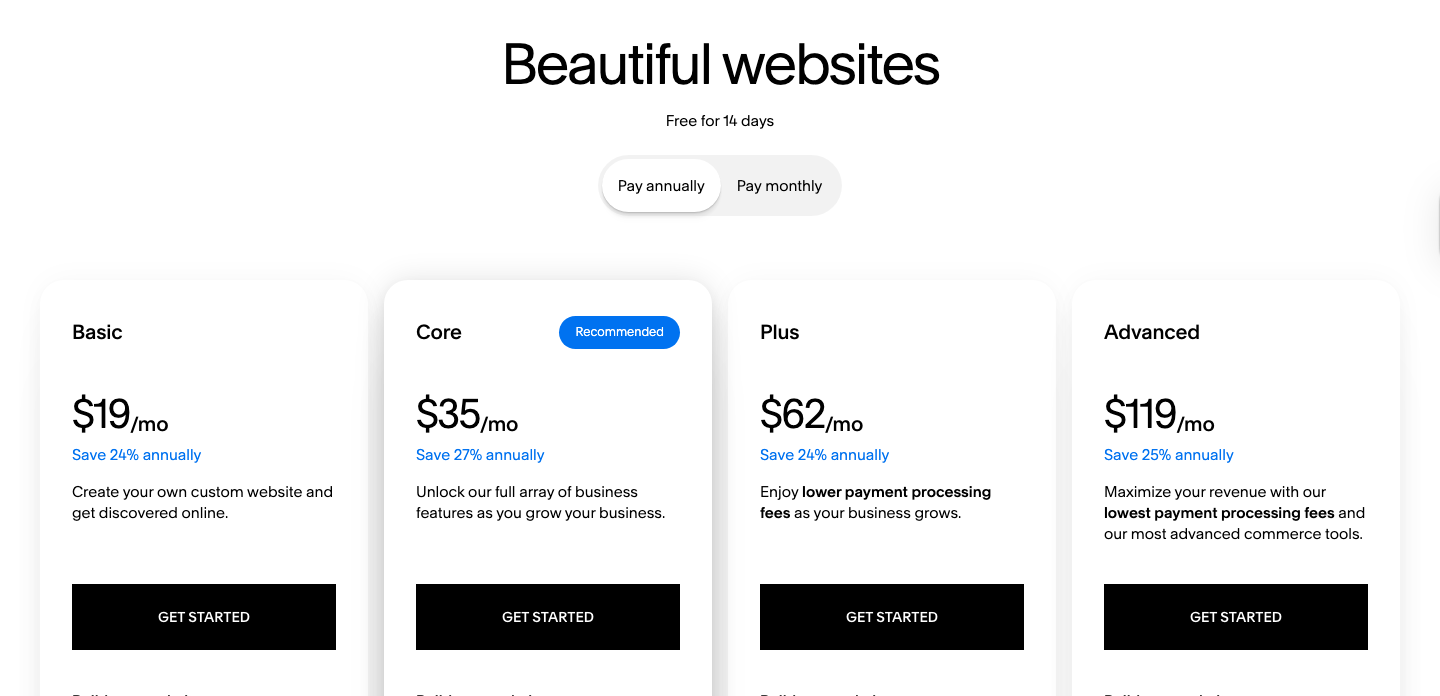
| Plan | Monthly Billing | Annual Billing | Best For |
|---|---|---|---|
| Basic | $25/month | $19/month | Simple sites, portfolios, blogs |
| Core | $48/month | $35/month | Service businesses, small shops |
| Plus | $82/month | $62/month | Growing ecommerce |
| Advanced | $159/month | $119/month | High-volume online stores |
Annual billing saves you roughly 24–27% across all plans — worth factoring in if you’re committed to the platform for at least a year.
Squarespace Core Plan — The Right Plan for Most Small Businesses
Getting a professional website online used to mean either hiring a developer or settling for something that looks like it was built in 2009. That’s no longer the case, and Squarespace’s Core plan sits right in the middle of the value argument — enough features to run a real business, without paying for tools you won’t use.
The Core plan at $35/month (billed annually, or $48/month month-to-month) is Squarespace’s recommended tier for a reason. It removes the 2% commerce transaction fee that the Basic plan charges, which alone can pay for the price difference if you’re processing any meaningful volume. You also get access to custom code blocks, third-party integrations (including Zapier and Google Workspace’s first year free), promotional pop-ups, and unlimited contributors — features the Basic plan simply doesn’t include.
Key features:
- No commerce transaction fee (saves money vs. Basic’s 2% fee immediately)
- Custom code blocks and site-wide code injection for advanced customisation
- Third-party integrations: Zapier, ChowNow, Meta Pixel, Facebook dynamic ads
- Promotional pop-ups and announcement bars to capture leads
- Commerce analytics for tracking sales performance
- Unlimited contributors — useful for teams or agencies managing the site
- 5 hours of video storage included
Pricing:
- $35/month billed annually ($420/year)
- $48/month billed monthly
- 14-day free trial — no credit card required
Pros:
- Transaction fee elimination pays back the cost difference quickly
- Custom code access means you can extend functionality when needed
- Clean, structured editor — professional results without design experience
- All-in-one hosting, SSL, and domain management
Cons:
- $13/month jump from Basic is noticeable if you don’t need integrations
- No free plan — only a time-limited trial
- Less template flexibility than Wix if you want pixel-level customisation
- Customer support experience is uneven based on Trustpilot feedback
Best for: Service businesses, consultants, photographers, restaurants, and small online shops that want a professional presence without a developer.
Not for: Businesses that need deep customisation, complex inventory management, or want the lowest possible monthly cost.
My Verdict: The Core plan is the right starting point for most small business owners. The design quality is genuinely premium, the feature set covers the basics and then some, and the transaction fee removal makes the math work for anyone selling online. If budget is tight, start with the 14-day free trial and test it before committing annually.
Explore Squarespace’s Core plan and current pricing to see if it fits your budget.
Squarespace Basic Plan — When Less Is Actually Fine
Not every small business needs integrations or pop-up lead capture. If you’re a solo consultant, a local service provider, or someone launching a portfolio site, paying $19/month for a clean, professional web presence is genuinely good value.
The Basic plan covers the essentials: a custom domain, unlimited pages, solid blogging tools, built-in SEO settings, and Squarespace’s full template library. You can even sell products — just keep in mind that a 2% transaction fee applies on every sale (on top of payment processor fees). That’s fine for occasional sales, but it adds up fast if selling online is a core part of your business.
Key features:
- Full access to all Squarespace templates
- Unlimited pages and bandwidth
- Built-in SEO tools (meta titles, descriptions, sitemaps)
- Basic ecommerce — sell products, services, or digital downloads
- 30 minutes of video storage
- 24/7 customer support access
Pricing:
- $19/month billed annually ($228/year)
- $25/month billed monthly
- 14-day free trial included
Pros:
- Genuinely affordable for a well-designed website
- Great entry point to test the platform before upgrading
- No technical setup required — hosting, SSL, and security included
Cons:
- 2% transaction fee eats into margins for ecommerce use
- No custom code or third-party integrations
- No promotional pop-ups or announcement bars
- Limited video storage (30 minutes)
Best for: Freelancers, portfolios, local service businesses with no or minimal online selling.
Not for: Anyone running an active online store or needing marketing integrations.
My Verdict: Basic is a solid starting point if selling online isn’t your main goal. The design quality alone makes it worth more than the price suggests — but the moment you start processing sales regularly, upgrade to Core. The transaction fee difference will fund the upgrade quickly.
Compare the Basic and Core plans side by side on Squarespace’s pricing page.
Squarespace Plus and Advanced — For Businesses Scaling Up
Once you’re past the early stage and processing real ecommerce volume, Plus and Advanced enter the picture. These plans aren’t for most small businesses starting out — but they’re worth knowing about so you can plan ahead.
The Plus plan ($62/month annually) drops the payment processing fee from 2.9% + $0.30 to 2.7% + $0.30, and the Digital Product fee from 5% to 1%. It also bumps video storage to 50 hours. For businesses selling courses, memberships, or physical products at scale, those savings compound. The Advanced plan ($119/month annually) pushes processing fees down to 2.5% + $0.30, eliminates the Digital Product fee entirely, and unlocks the most powerful commerce analytics and shipping tools Squarespace offers.
Key features (Plus & Advanced):
- Lower payment processing fees across the plan lineup
- Up to unlimited video storage (Advanced)
- Advanced shipping and commerce tools (Advanced)
- Full analytics dashboard
- Everything in Basic and Core included
Pricing:
- Plus: $62/month annually / $82/month monthly
- Advanced: $119/month annually / $159/month monthly
Best for: Established ecommerce businesses, online course creators, and stores with high transaction volumes where lower processing fees translate to real savings.
Not for: Early-stage businesses or service providers without significant online sales volume.
My Verdict: Don’t jump to Plus or Advanced unless your current transaction fees make the math obvious. Run the numbers: if you’re processing enough volume that the fee reduction saves you $30–40/month, the upgrade pays for itself. Otherwise, stay on Core and revisit in 6–12 months.
Quick Comparison
Quick reference — scroll horizontally on mobile, or click plan names to jump to full reviews.
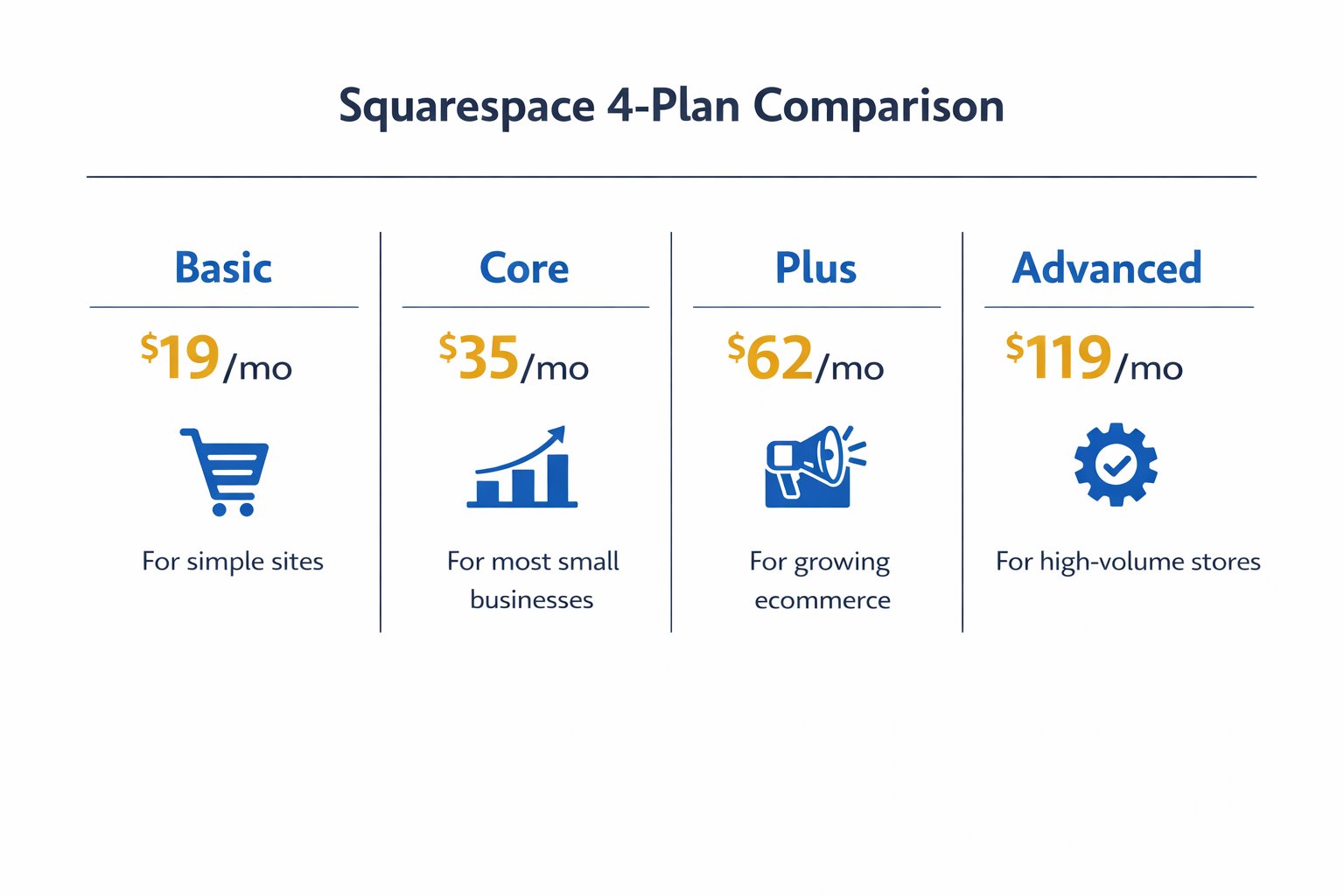
| Plan | Starting Price | Best For |
|---|---|---|
| Basic | $19/month (annual) | Portfolios, simple sites |
| Core | $35/month (annual) | Most small businesses |
| Plus | $62/month (annual) | Growing ecommerce |
| Advanced | $119/month (annual) | High-volume stores |
The Trustpilot Problem — What It Means for You
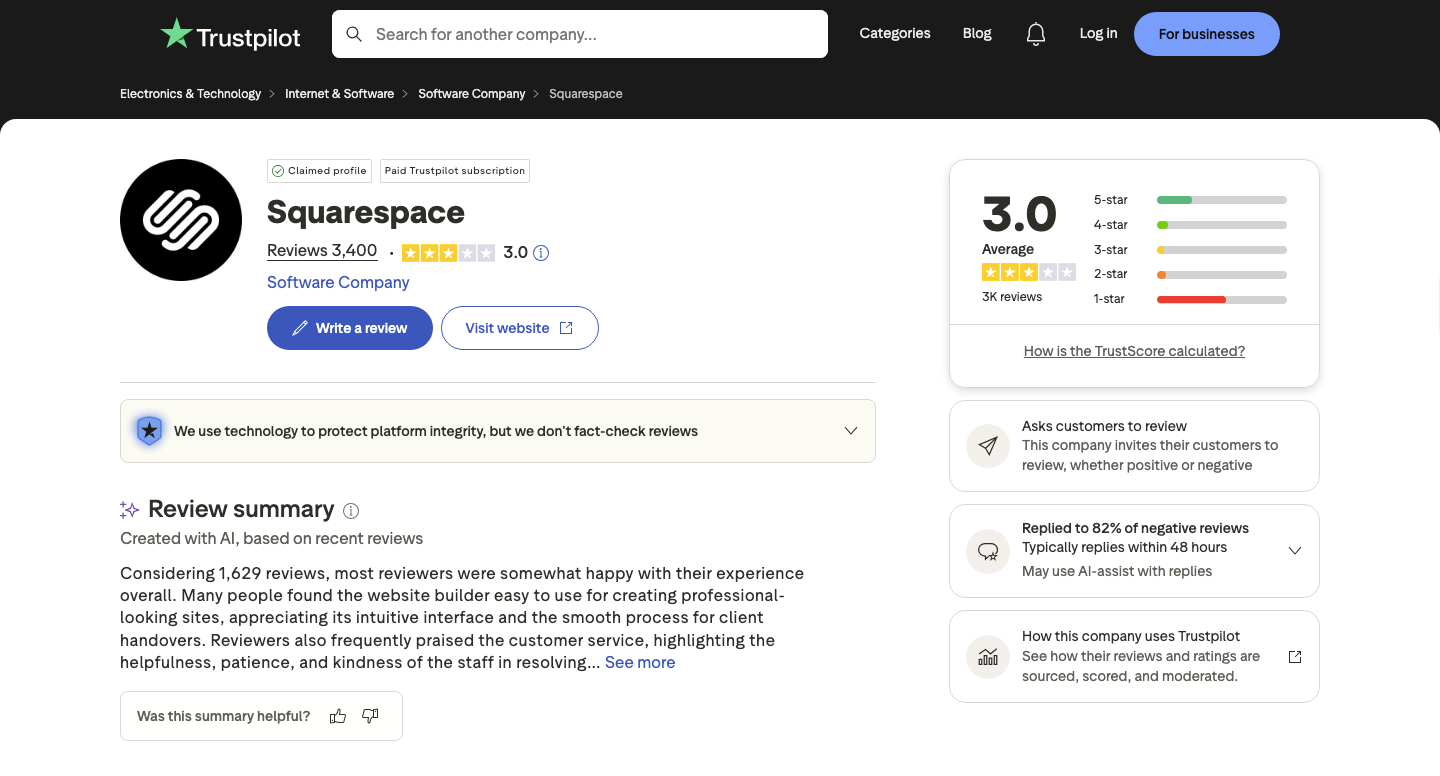
Squarespace holds a 3.0 out of 5 on Trustpilot across 3,394 reviews — a polarised split between loyal fans and frustrated customers, not a uniform thumbs-down. The complaints follow a clear pattern: customer support responsiveness, UI changes that disrupt existing sites, and billing friction when cancelling. Worth noting: Squarespace replies to 82% of negative reviews, typically within 48 hours — which suggests the issues are being heard, even if they haven’t all been solved.
Here’s what this actually means for a small business owner: the core product — templates, editor, hosting reliability, SEO tools — is consistently well-regarded. The friction tends to come from support interactions and account management, not from the website builder itself. So going in with realistic expectations matters. Use the 14-day trial to test the editor hands-on before committing. Know the cancellation policy before you enter billing details. And if you hit a support issue, the Help Center’s written documentation is generally more useful than waiting for live support.
The design quality and all-in-one reliability are real. The customer service experience is uneven. Both things can be true.
Common Mistakes Small Business Owners Make With Squarespace
1. Starting on Basic and selling products without noticing the transaction fee
This catches many business owners off guard. A 2% fee on every sale sounds small until you do the monthly math. If you’re actively selling, start with Core — the fee removal pays for the price difference surprisingly fast.
2. Paying monthly instead of annually
Many small business owners sign up monthly to “try it out” and then forget to switch. The monthly rate is 25–37% higher than the annual equivalent. If you’ve tested the platform and you’re happy, switch to annual billing at renewal. It takes two minutes and the savings are immediate.
3. Choosing a template for aesthetics alone
All Squarespace templates use the same editor, but the layout structure varies enough that switching templates later means significant rebuilding. Pick one that matches your content structure (service pages, portfolio, blog) — not just the one that looks prettiest in the gallery.
4. Ignoring SEO settings at launch
Squarespace has solid built-in SEO tools, but they don’t configure themselves. Many business owners launch without setting page titles, meta descriptions, or connecting Google Search Console. Spending 30–45 minutes on these settings at launch is one of the highest-ROI things you can do. If you’re unsure where to start, how to choose a website builder walks through what to look for in a platform’s SEO setup.
5. Comparing monthly prices instead of annual rates
When comparing Squarespace to competitors, many business owners compare the monthly price — which makes it look more expensive than it is. Always compare annual billing rates for a fair apples-to-apples view. For context on how Squarespace stacks up on price, Wix vs Squarespace pricing breaks it down clearly.
Next Steps (What to Do in the Next 24–48 Hours)
- Start the 14-day free trial. No credit card required. Pick one of Squarespace’s service business or portfolio templates and spend 20–30 minutes building a rough version of your homepage. The hands-on experience is worth more than any review. Check Squarespace’s pricing page for current promotions — discounts of 10–29% off the first year are commonly available at sign-up. Start your free Squarespace trial here.
- Decide on Core vs Basic before you commit. If you’re selling anything — products, services, bookings — Core’s transaction fee removal will likely pay for itself within a few months. If it’s a purely informational site, Basic is genuinely fine. Not sure which platform is right for you at all? The best website builder for small business guide compares all the major options.
- Set up your core SEO settings on day one. Before you do anything else at launch, fill in every page’s meta title and description, connect Google Search Console, and verify your sitemap is submitted. It takes under an hour and it’s the kind of task that’s easy to defer indefinitely — don’t. For a broader look at what a website actually costs to run, how much does a website cost for a small business covers all the numbers.
FAQ
Is Squarespace good for small business in 2026?
Yes — for the right type of business. Squarespace is particularly well-suited to service businesses, freelancers, consultants, photographers, and small ecommerce shops that want a professional-looking site without hiring a developer. The design quality is consistently strong, and the all-in-one setup (hosting, SSL, domain management) removes a lot of technical overhead. It’s less ideal if you need deep customisation or the lowest possible price.
How much does Squarespace cost for a small business?
The most practical plan for most small businesses is the Core plan at $35/month billed annually ($420/year). The Basic plan starts at $19/month annually if budget is the primary concern. Monthly billing is available but runs significantly higher — Basic at $25/month and Core at $48/month. All plans include a 14-day free trial with no credit card required. For a broader look at website costs, see how much does a website cost for a small business.
What’s the difference between Squarespace Basic and Core?
The most important differences are: Core removes the 2% commerce transaction fee, adds custom code blocks, unlocks third-party integrations (Zapier, Meta Pixel, etc.), and includes promotional pop-ups and unlimited contributors. Basic is fine for informational sites and light selling. Core is the right choice the moment you’re actively selling products or services online.
Does Squarespace have a free plan?
No. Squarespace does not offer a permanent free plan. It offers a 14-day free trial with full access to all editor features, which is enough time to build a working prototype and test the platform properly. No credit card is required to start.
Is Squarespace worth it compared to cheaper builders?
It depends on what you value. Squarespace costs more than budget alternatives like Hostinger, but the template quality, editor consistency, and all-in-one setup are genuinely stronger. If you want the fastest path to a professional-looking site without any technical fuss, Squarespace typically justifies the premium. If cost is your primary constraint, there are cheaper options worth considering — the Wix vs Squarespace vs Hostinger comparison covers the trade-offs in detail.
Can I build a Squarespace website myself with no experience?
Yes. The editor is structured and beginner-friendly — most small business owners can have a working site live within a day or two. There is a small learning curve compared to the very simplest drag-and-drop builders, but it’s manageable. The main caveat: the structured template system means less flexibility than Wix if you want a very specific layout that doesn’t fit the template’s existing structure.
What are Squarespace’s biggest downsides?
The three most common issues reported by small business owners: pricing is higher than budget competitors; customer support responsiveness is inconsistent (Squarespace holds a 3.0/5 on Trustpilot across 3,394 reviews, reflecting a polarised user base); and the platform’s extension marketplace is more limited than WordPress or Wix. None of these are dealbreakers for the right business, but they’re worth knowing before you commit.
Should I use Squarespace or hire a web developer?
For most small businesses, Squarespace (or another website builder) is the smarter starting point. A developer-built site can cost $3,000–$10,000+ upfront, while Squarespace runs a few hundred dollars a year and gives you full control over updates without ongoing developer fees. The website builder vs hiring a web developer guide breaks down when each option makes sense.