
Cheapest Website Builder for Small Business: What You Actually Pay

Finding the cheapest website builder for small business sounds simple — until you notice that the $2.99/month headline price requires locking in 48 months upfront, and the real cost after year one is $10.99. That gap isn’t unique to one platform. It’s how the whole industry works, and most comparison articles don’t bother to show you both numbers.
This guide does. Every platform below includes the intro rate and the renewal rate — so you can see what you’re actually signing up for before you enter your card details. A few builders genuinely stay affordable long-term. Others front-load the savings heavily. Knowing the difference now saves a real headache at year two.
Quick Answer
Hostinger is the cheapest website builder for small business at $2.99/month (48-month term). WordPress.com starts at $4/month on annual billing with stable renewal pricing. GoDaddy and SITE123 both land under $12/month on annual plans. Wix and Squarespace start higher but offer significantly more design flexibility. If budget is the priority right now, Hostinger gives you the most for the least — but always check the renewal rate before you commit. Need a broader comparison beyond price? See the full best website builder for small business guide.
Affiliate disclosure: This post contains affiliate links. If you buy through one of my links, I may earn a small commission at no extra cost to you — it helps keep this blog going.
The 6 Cheapest Website Builders for Small Business (2026)
- Hostinger Website Builder — from $2.99/mo
- WordPress.com — from $4/mo
- GoDaddy Website Builder — from $9.99/mo
- SITE123 — from $10.80/mo
- Squarespace — from $16/mo
- Wix — from $17/mo
Hostinger Website Builder — The Lowest Price, With One Real Trade-Off
I’ve been running this blog on Hostinger’s infrastructure for over two years — on their hosting with WordPress.org rather than their dedicated website builder, but the same reliability and value-first approach carries across both products. The Hostinger Website Builder is their all-in-one solution, and based on what small business owners consistently report, the experience matches the promise: fast setup, solid performance, and a price point that’s genuinely hard to beat.
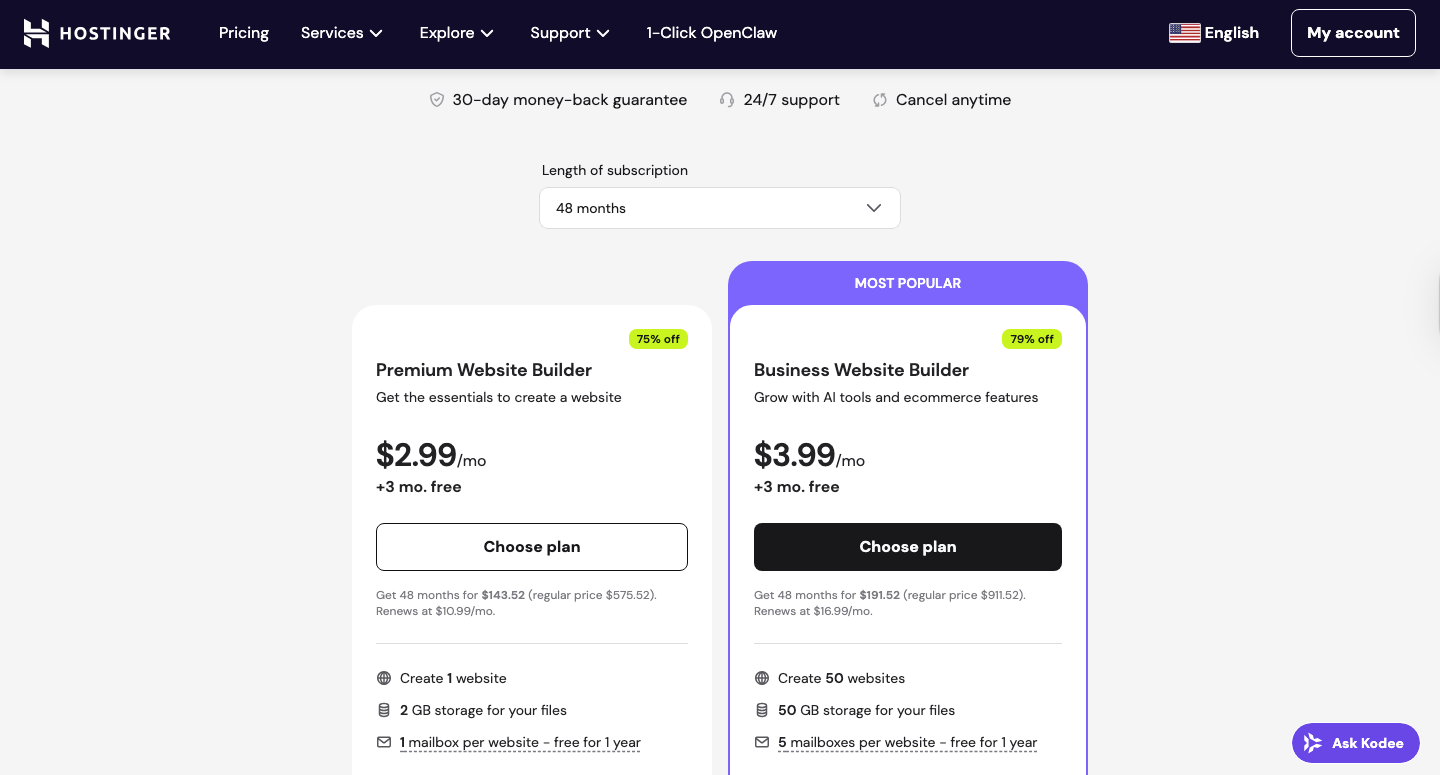
Here’s the thing to understand upfront: that headline rate of $2.99/month is real, but it comes with a commitment. You’re paying for 48 months in one go — $143.52 total. If that feels like a lot, the monthly cost looks less dramatic written that way. But if you cancel after the 30-day money-back window, you won’t get a full refund. Eyes open going in.
Key Features:
- AI-powered builder generates a full site draft in minutes — tweak from there
- 300+ designer-made templates across business categories
- Free domain for 1 year, free SSL, and built-in SEO tools included
- Email campaigns, AI blog generator, and AI logo maker on Business plan
- Mobile editing and 24/7 customer support on all plans
Pricing:
- Premium: $2.99/mo (48-month term, $143.52 upfront) | Renews at $10.99/mo
- Business: $3.99/mo (48-month term) | Renews at $16.99/mo
- 30-day money-back guarantee
Pros:
- Lowest verified intro price of any builder reviewed here
- Rock-solid infrastructure — uptime has been consistently reliable in my experience
- AI builder genuinely saves setup time for complete beginners
- Zero transaction fees on Business plan
Cons:
- 48-month commitment required for the intro rate
- Renewal is nearly 4x the advertised price
- Premium plan limited to 1 website with 2GB storage
- Not ideal if you’re still testing your business concept
Best for: Budget-focused small businesses confident they’ll be online long-term
Not for: Anyone wanting month-to-month flexibility, or who might switch platforms within two years
My Verdict: Hostinger delivers the best genuine value at the low end of the market, and the infrastructure backs up the price point. The trade-off is transparent — you’re locking in 48 months to get that rate. If you’re committed to your business for the long haul, it’s a reasonable deal. If you’re still figuring things out, consider starting on a 12-month term at a slightly higher monthly rate.
Explore Hostinger’s website builder plans and pricing to see current rates and compare term lengths.
WordPress.com — The Most Affordable Flexible Option, With the Most Stable Renewal Pricing
A lot of small business owners confuse WordPress.com with WordPress.org, and the confusion is understandable — same name, very different products. WordPress.com is a fully managed hosted platform. You sign up, pick a plan, and build your site. No servers, no installs, no plugins to manually update. The Personal plan starts at $4/month ($48/year on annual billing), making it one of the most affordable options for businesses that want the WordPress ecosystem without the technical overhead.
Here’s what makes WordPress.com stand out on the renewal question: the pricing is genuinely stable. The annual rate holds at renewal, and domain renewal is $13/year for a .com — no first-year discount followed by a steep jump. That’s rare in this industry, and it’s worth factoring into the real long-term cost comparison. If you’re weighing this option against a fully self-hosted setup, the website builder vs WordPress breakdown is worth a read.
Key Features:
- Access to 50,000+ plugins on Business and Commerce plans
- Dozens of premium themes included across all paid plans
- Built-in newsletter and subscriber tools
- Automated real-time backups and malware scanning
- Free domain for 1 year on all annual paid plans
Pricing:
- Free: $0/mo (WordPress.com subdomain, ads shown to visitors)
- Personal: $4/mo ($48/year) | Renews at same rate | 6GB storage
- Premium: $8/mo ($96/year) | Renews at same rate | 13GB storage
- Business: $25/mo ($300/year) | Renews at same rate | 50GB storage
- Domain renewal: $13/year for .com from year two — no markup
- Transaction fees: 8% on Personal, 4% on Premium (waived on Business and above)
Pros:
- Most stable renewal pricing of any platform on this list — no price-hike trap
- Familiar WordPress name with zero server management required
- Excellent for blogs, newsletters, and content-heavy sites
- Strong security and backup features included as standard
Cons:
- Transaction fees on Personal and Premium plans reduce value for sellers
- Less intuitive drag-and-drop than Wix or GoDaddy
- Design flexibility more limited than dedicated website builders
Best for: Content-focused businesses, bloggers, and anyone who wants the WordPress name with managed hosting and no pricing surprises at renewal
Not for: Pure beginners expecting slick drag-and-drop, or businesses needing ecommerce on the tightest budget
My Verdict: WordPress.com is the only platform on this list where the renewal price matches the intro price — and that predictability has real value when you’re budgeting long-term. At $4/month for the Personal plan, it’s the best option for content-first businesses that don’t need a flashy builder interface.
Check WordPress.com’s current pricing and plan features to see which tier matches your needs.
GoDaddy Website Builder — Fast, Practical, and Fairly Priced
GoDaddy’s website builder gets dismissed as a side product to their domain business, but that reputation is outdated. The current builder is genuinely fast to set up, beginner-friendly, and priced competitively at $9.99/month (annual) for the Basic plan. For a local service business — a plumber, salon, or contractor — that just needs a clean, functional website launched quickly, GoDaddy does the job without much fuss.
The GoDaddy Airo AI tool generates a full site from a few prompts about your business. It’s not the most sophisticated AI output, but it’s fast and gives you something real to work with on day one. Built-in appointment booking and payment links are available on higher plans, which is genuinely useful for service-based businesses that don’t want to pay for a separate booking tool.
Key Features:
- GoDaddy Airo AI generates a site draft from a business description
- 100+ professional templates, mobile-friendly by default
- Free professional email trial included with all paid plans
- Built-in appointment booking, payment links, and invoicing on Premium+
- Marketing dashboard with basic SEO wizard
Pricing:
- Basic: $9.99/mo (annual) | Free domain included
- Premium: $14.99/mo (annual)
- Commerce: $20.99/mo (annual) | Full online store, 0% transaction fees
- Free 7-day trial available, then limited free version
Pros:
- Fastest time-to-launch of any builder here for a basic service site
- Free professional email trial included
- Appointment booking built in on higher plans
- 24/7 phone and chat support
Cons:
- Template designs less polished than Wix or Squarespace
- Limited design flexibility and customisation depth
- Free plan is genuinely minimal — treat it as a trial only
Best for: Local service businesses that need a professional site live fast without prioritising visual design
Not for: Creative businesses or anyone where the website’s visual impact directly drives purchasing decisions
My Verdict: GoDaddy is practical over pretty, and for many small businesses that’s exactly the right call. At $9.99/month with built-in booking and a free email trial, it delivers solid real-world value. If launching fast matters more than standing out visually, it deserves a serious look.
See GoDaddy Website Builder’s plans and pricing to compare features across tiers.
SITE123 — The Fastest Setup on This List (And the Most Forgiving for Beginners)
Many business owners who haven’t built a website before spend weeks overthinking the decision. SITE123 removes almost every decision from the process. Fewer template choices, simpler structure, and a setup flow that’s almost impossible to break. That’s intentional — it’s built for people who want to be live today, not next month.
The paid plan starts at $10.80/month (annual, paid upfront) and includes custom domain connection and the removal of SITE123 branding. If you’ve been putting off getting a website because it feels overwhelming, SITE123 genuinely lowers that barrier more than any other builder here. You can also start completely free on their subdomain plan to test it before spending a cent. For more options on this front, the free website builder for small business guide covers the free landscape in honest detail.
Key Features:
- One of the fastest setup flows in any builder — most users launch same day
- Free plan available with SITE123 subdomain
- Custom domain connection on all paid plans
- Built-in store feature included on paid plans
- 24/7 live chat support on all plans
Pricing:
- Free: $0/mo (250MB storage, SITE123 subdomain, platform branding shown)
- Premium: from $10.80/mo (annual, paid upfront) — free domain for 1 year
- Plans available in 3, 12, 24, and 36-month terms
- 14-day money-back guarantee on paid plans
Pros:
- Fastest, most beginner-friendly setup of any builder reviewed here
- Free plan lets you test the builder before paying anything
- No technical decisions required — structure is pre-decided for you
- 14-day money-back guarantee
Cons:
- Very limited design flexibility — layout structure is mostly fixed
- Fewer templates than Wix or Squarespace
- Not suitable for visually ambitious brands
Best for: Non-technical business owners who need a basic site live today — services, contact page, about, done
Not for: Businesses where visual distinctiveness drives sales, or those anticipating complex functionality down the road
My Verdict: SITE123 trades design flexibility for radical simplicity, and for a certain type of business owner, that’s the right trade. If getting live matters more than looking unique, this is the lowest-friction path on this list. Just know that as your business grows, you may outgrow the platform’s limitations.
Explore SITE123’s plans and pricing — confirm your tracked affiliate link before publishing, as this currently uses a direct URL.
Squarespace — The Best-Looking Sites, With a Renewal Rate Worth Noting
Squarespace has earned its design reputation. The templates are consistently the most refined out of the box — minimal, editorial, and visually polished in a way the cheaper builders rarely match. The Basic plan starts at $16/month (annual). But here’s what the intro price doesn’t tell you: it renews at $25/month — a 56% jump. For businesses where first impressions drive decisions, that higher long-term cost is often still worth it. But go in knowing the real number.
What sets Squarespace apart isn’t just the templates. It’s the overall consistency of the design experience. Everything from fonts to spacing is tighter and more considered than Wix or GoDaddy. If you care about how your website looks and want a professional result without hiring a designer, Squarespace is the builder that makes that easiest.
Key Features:
- Best-in-class template quality — consistently clean, editorial, and modern
- Built-in blogging, portfolio, and ecommerce functionality across all plans
- Free domain for 1 year on annual plans, SSL included
- Squarespace AI writing assistant across all tiers
- 14-day free trial — no credit card required
Pricing:
- Basic: $16/mo (annual) | Renews at $25/mo
- Core: $23/mo (annual) | Renews at $36/mo
- Plus: $39/mo (annual) | Renews at $40/mo
- Advanced: $99/mo (annual) | Renews at $72/mo
- Domain renewal: $20–$70/year from year two depending on extension
Pros:
- Most visually polished templates of any builder reviewed here
- Strong for portfolios, creative businesses, and service providers
- Clean, consistent design experience from setup to publish
- No transaction fees on any plan
Cons:
- No free plan — 14-day trial only
- Renewal rate is 56% higher than the intro rate on Basic
- Less flexible layout control than Wix for custom arrangements
Best for: Photographers, consultants, creative agencies, and boutique businesses where visual quality drives trust and conversions
Not for: Businesses on the tightest possible budget, or those needing extensive third-party app integrations
My Verdict: Squarespace is the builder you choose when you need your website to look designed — without paying a designer. The renewal jump is real and worth planning for, but the template quality consistently delivers results that outperform cheaper alternatives at default settings. Budget for $25/month from year two and the value equation still holds for image-driven businesses.
Explore Squarespace’s current pricing and plans and use the 14-day trial to test before committing.
Wix — The Most Flexible Builder, With the Most Room to Grow
Wix is the most widely used and most flexible website builder on this list. The Light plan starts at $17/month (annual) — the highest entry point here. But Wix offers something the cheaper platforms don’t: genuine creative freedom, a drag-and-drop editor with real layout control, and a deep app marketplace that lets you add functionality without switching platforms as your business grows.
The catch? The Light plan’s 2GB storage fills up faster than you’d expect if you’re adding photos regularly. Most small businesses will want the Core plan at $29/month to get comfortable room and the ability to accept payments. If you’re comparing Wix and Hostinger directly for a small business on a budget, the Hostinger vs Wix comparison covers both in detail. The short version: Hostinger wins on price, Wix wins on flexibility.
Key Features:
- 800+ templates across every industry and business type
- Drag-and-drop editor with full layout control — no grid restrictions
- Wix App Market with 300+ integrations and extensions
- Built-in AI tools for content, images, and site building
- Free plan available with Wix-branded subdomain
Pricing:
- Light: $17/mo (annual) | Free domain for 1 year | 2GB storage
- Core: $29/mo (annual) | 50GB storage | Accept payments
- Business: $39/mo (annual) | 100GB storage | Full ecommerce
- Free plan available (Wix subdomain, Wix ads displayed on your site)
- 14-day money-back guarantee
Pros:
- Maximum design flexibility of any builder on this list
- Huge template library with genuinely strong variety
- Strong app market for adding features as you scale
- Free plan available for testing before committing
Cons:
- Highest entry price on this list
- Can feel overwhelming for complete beginners due to the number of options
- Light plan’s 2GB storage limit is tight for image-heavy sites
Best for: Small businesses with strong design goals, or those planning to scale features and functionality over time
Not for: Businesses on the tightest budget, or those who need the simplest possible setup and just want to be live fast
My Verdict: Wix costs more upfront than every other builder here, but it gives you the most room to grow. If you’re investing in one platform for the long haul — and you want the flexibility to evolve your site as your business evolves — Wix’s editor and app ecosystem make the premium worthwhile. Just don’t start on the Light plan if you expect to add payments or ecommerce — you’ll hit its ceiling fast.
Explore Wix’s plans and pricing to find the tier that fits your needs before committing.
Quick Comparison
Quick reference — scroll horizontally on mobile, or click platform names to jump to full reviews.
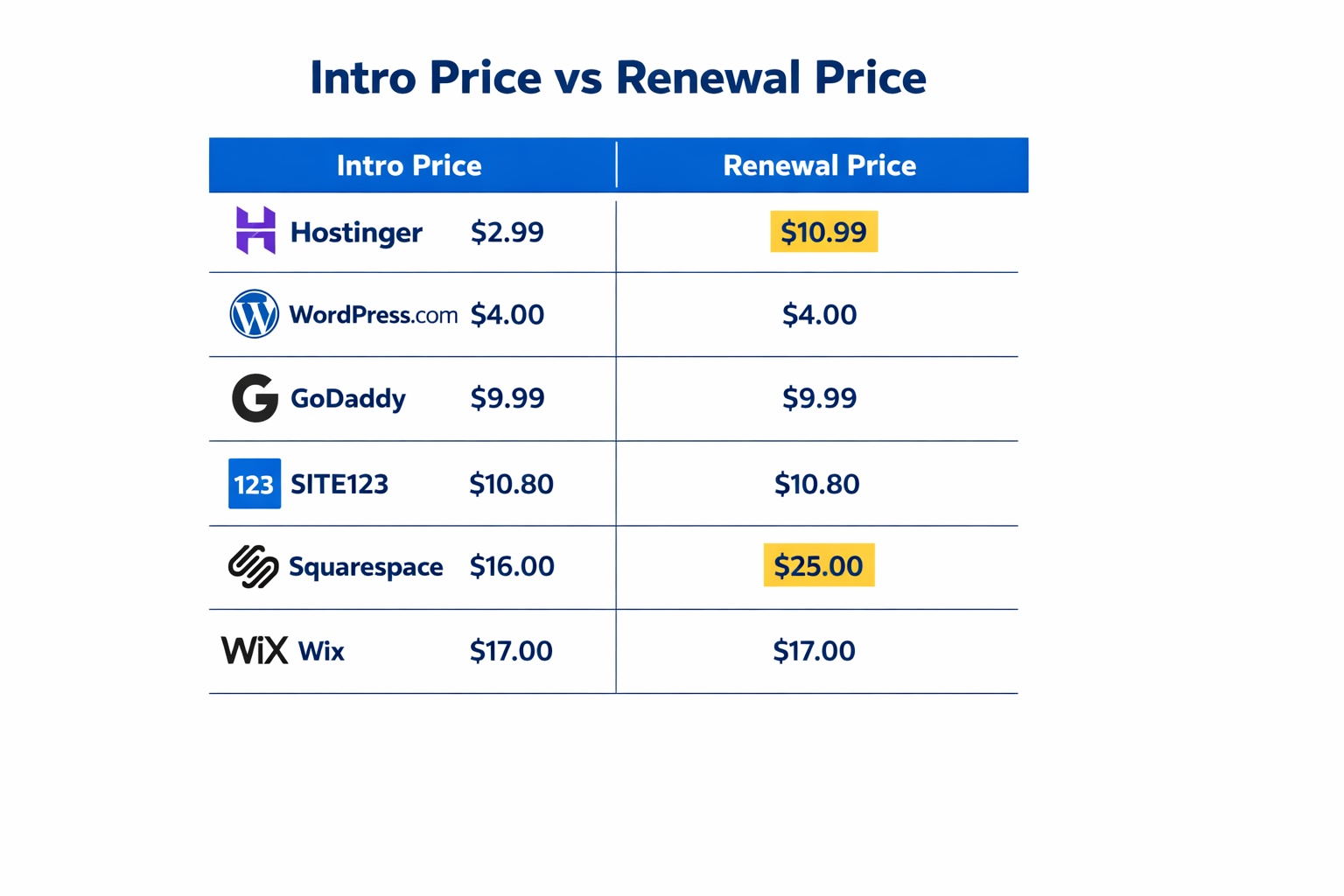
| Platform | Price (Intro → Renewal) | Best For |
|---|---|---|
| Hostinger | $2.99 → $10.99/mo* | Tightest budget, long-term commitment |
| WordPress.com | $4 → $4/mo (stable) | Content-heavy, blog-first businesses |
| GoDaddy | $9.99/mo (stable) | Local service businesses, fast setup |
| SITE123 | $10.80/mo (varies by term) | Total beginners, fastest launch |
| Squarespace | $16 → $25/mo | Design-forward, creative businesses |
| Wix | $17/mo (stable annually) | Maximum flexibility, growth-focused |
Hostinger’s $2.99/mo requires a 48-month upfront commitment. All prices based on annual billing unless noted.
Common Mistakes to Avoid When Choosing a Cheap Website Builder
1. Choosing by intro price alone
Many business owners sign up for the lowest advertised rate without checking the renewal price. A $2.99/month plan that becomes $10.99/month in four years is still a good deal — if you knew that going in. The fix: always look for the renewal rate before you confirm payment. It’s usually listed in small text directly below the intro price on the plan card. This article’s comparison table shows both numbers for every platform.
2. Picking a plan they’ll immediately outgrow
It’s easy to start on the cheapest tier only to discover that connecting a custom domain, accepting payments, or adding more storage requires an immediate upgrade. The fix: before choosing a plan, write down three must-haves — custom domain, payment ability, storage limit — and confirm they’re all included. Five minutes of checking saves a frustrating same-day upgrade fee.
3. Ignoring the commitment period
A 48-month lock-in is fine for a confident, established business. For someone still testing a new idea, it’s a real risk. The fix: if you’re still figuring out whether your business model works, start with a 12-month plan. The monthly cost is higher, but you’re not four years into a commitment that no longer fits your direction. Most platforms offer multiple term lengths — Hostinger included.
4. Treating free plans as a real business option
Free plans exist on Wix, SITE123, WordPress.com, and GoDaddy — but they all include platform branding on your site and a subdomain URL like yoursite.wixsite.com instead of yoursite.com. That’s fine for testing. For a business, it reads as unfinished to customers. The fix: budget at least $10–17/month for a professional result, and use the free plan only to test the builder before committing to a paid term.
5. Missing the money-back window
Every platform here offers a money-back guarantee (14–30 days). This catches most people off guard — they build their site, publish it, and assume everything is settled without properly stress-testing it. The fix: within the first week, build your full site, check it on mobile, test every contact form, and confirm load speed is acceptable. Use the remaining days as a safety buffer, not your primary build time.
Your Next Steps (Do These in the Next 24–48 Hours)
- Pick one platform and start a free trial today. Don’t spend more than 30 minutes deciding. Pick the one that matches your budget and comfort level, sign up, and spend one afternoon building a draft. Most users feel comfortable with the basics within their first 2–3 hours. Deciding in theory takes longer than deciding by doing.
- Check the renewal rate before you enter payment details. Open the pricing page of your chosen platform, scroll to the fine print, and write down what you’ll pay after the intro term ends. If that number still fits your budget — great, proceed. If it doesn’t, either choose a shorter term or pick a different platform now rather than after you’ve built the whole site.
- Verify your three must-haves are included in your chosen plan. Custom domain, SSL certificate, and at least one contact form cover 90% of what a basic small business site needs. Confirm all three are included before you pay. If you’re unsure what else your site needs, the how to choose a website builder guide walks through the full decision clearly.
Frequently Asked Questions
What is the cheapest website builder for small business in 2026?
Hostinger is the cheapest at $2.99/month on a 48-month plan — the lowest verified intro rate of any builder reviewed here. WordPress.com comes in second at $4/month annually with the added advantage of stable renewal pricing. If you want a shorter commitment without a multi-year lock-in, GoDaddy at $9.99/month is the most affordable flexible option.
Is a cheap website builder actually good enough for a real business?
Yes — for most small businesses, it genuinely is. A service business, local shop, or solo consultant needs a clean design, a contact form, and a working mobile layout. Hostinger, GoDaddy, and SITE123 all deliver exactly that at under $12/month. The more expensive builders add design flexibility and advanced features — valuable if you need them, unnecessary if you don’t.
What’s the real cost after the intro period ends?
This is the question most comparison articles skip. Hostinger’s $2.99/month intro becomes $10.99/month at renewal. Squarespace’s $16/month jumps to $25/month. WordPress.com is the exception — its annual rate stays stable at renewal with no price increase. Always check the renewal rate before committing to any term. The comparison table in this article shows both numbers for every platform.
Do cheap website builders include a free domain?
Most do on paid annual plans. Hostinger, GoDaddy, Wix, Squarespace, and WordPress.com all include a free domain for the first year on paid annual plans. SITE123 includes one on Premium plans. After year one, domain renewal typically costs $13–20/year for a .com. Factor that into your ongoing budget. For a full breakdown of what website costs look like beyond the builder price, see how much does a website cost for a small business.
Can I build a free website for my small business?
Technically yes — Wix, SITE123, GoDaddy, and WordPress.com all have free plans. The honest answer is that free plans are better treated as trials than permanent business tools. They show platform branding on your site and use a subdomain URL rather than a proper domain, which reads as unfinished to customers. Budget at least $10/month for a professional result. The free website builder for small business guide covers the free options in honest detail if you want to explore them first.
Is it better to use a website builder or hire a developer?
For most small businesses starting out, a website builder is the right call. A decent developer-built site starts at $2,000–5,000 and takes weeks. A website builder gets you live this week for under $20/month. The exception is when you need complex custom functionality that no builder can replicate. For a clear side-by-side breakdown, the website builder vs hiring a web developer comparison lays it out honestly.
Which cheap website builder is best for a complete beginner?
SITE123 is the most beginner-friendly — the setup flow is almost impossible to break and most users are live within a few hours. GoDaddy is a close second with its AI-assisted setup. If you’re a beginner who also cares about design quality, Squarespace’s structured templates produce more polished results than most builders at their default settings, even without any design experience.
Do I need technical skills to use a cheap website builder?
No. Every platform on this list is designed for non-technical users. You don’t need to write code, manage servers, or understand hosting configurations. The drag-and-drop editors handle layout, and all plans include SSL security and mobile optimisation automatically. The most technical thing you’ll do is connect a custom domain — a process that takes about 10 minutes and is covered step-by-step in every platform’s help centre.