
Wix vs Squarespace vs Hostinger: Real Prices, Real Trade-offs

Wix vs Squarespace vs Hostinger — one platform starts at under $3 a month, another is the go-to choice for designers who care deeply about aesthetics, and the third lets you build almost anything you can imagine. The gap between them isn’t just price. It’s three completely different philosophies about what a website builder should be.
Here’s the catch: none of them is objectively the best. The right answer depends entirely on what matters most to your business right now. After two-plus years of using Hostinger personally, and researching Wix and Squarespace extensively, I’ll break down exactly where each platform wins — and where it genuinely falls short.
Quick Answer
For most small business owners who want a clean, professional site without overspending, Hostinger is the practical starting point. Squarespace is the right choice if your visual brand is everything and budget is secondary. Wix makes the most sense if you need specific features — bookings, memberships, multilingual support — and want maximum flexibility. Still weighing the broader landscape? My best website builder for small business guide covers more options side by side.
Affiliate disclosure: This article contains affiliate links — I may earn a small commission if you sign up through them. I only recommend tools I’ve personally used or thoroughly researched.
Top 3 Builders at a Glance
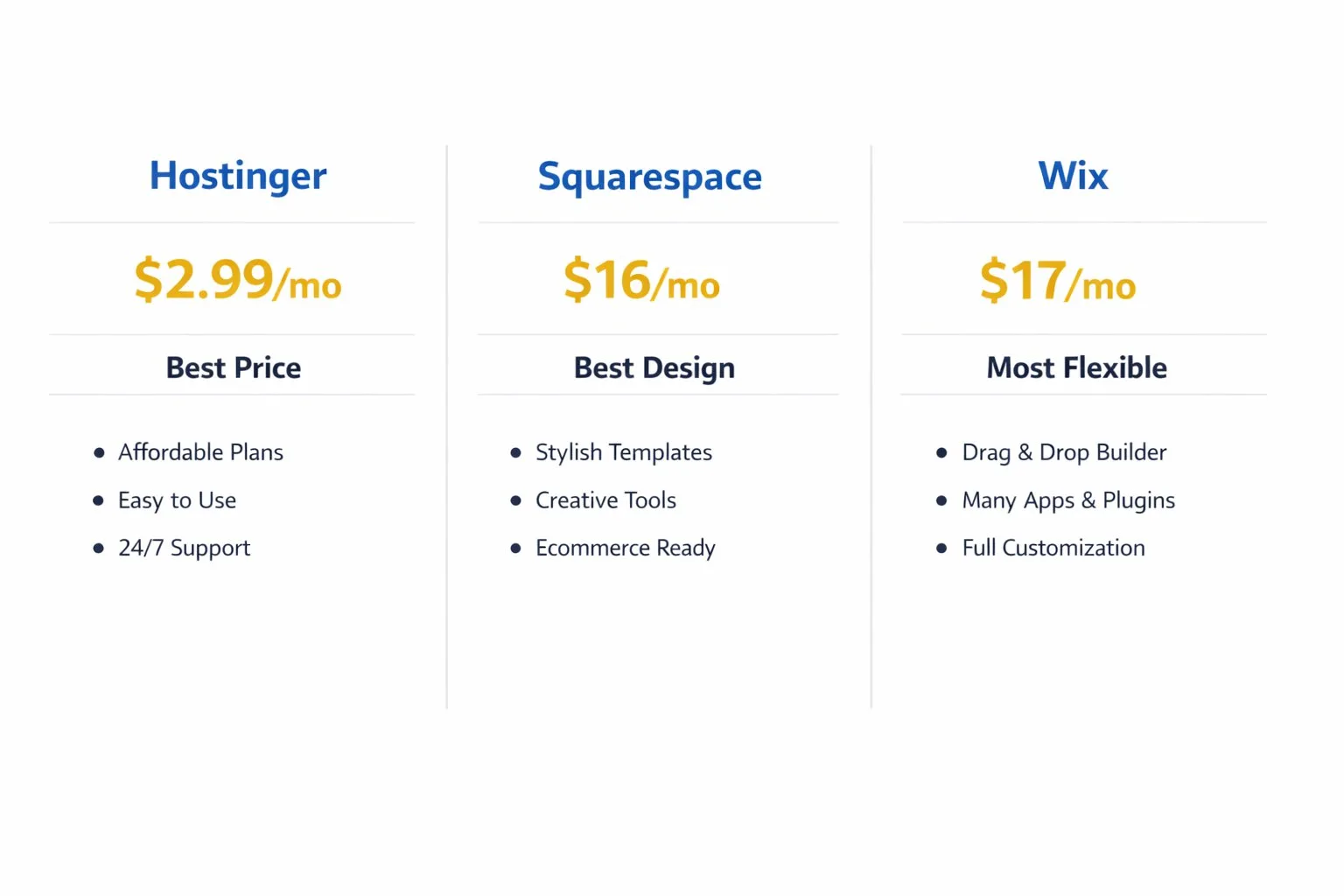
- Hostinger — starting at $2.99/month (48-month plan + 3 months free)
- Squarespace — starting at $16/month (annual)
- Wix — starting at $17/month (annual)
Hostinger — Best Value for Budget-First Business Owners
Getting a website up when budget is tight is something every small business owner understands. The pressure to look professional from day one — without spending a fortune before you’ve made a single sale — is real. Hostinger solves that tension better than any mainstream builder on the market, and it does it without stripping out the features that actually matter.
I’ve been using Hostinger for over two years to build and manage websites, and it consistently delivers more value per dollar than anything else I’ve tested. If you want more context on how it stacks up across a wider pool of builders, my best website builder for small business guide covers the full picture.
Key Features:
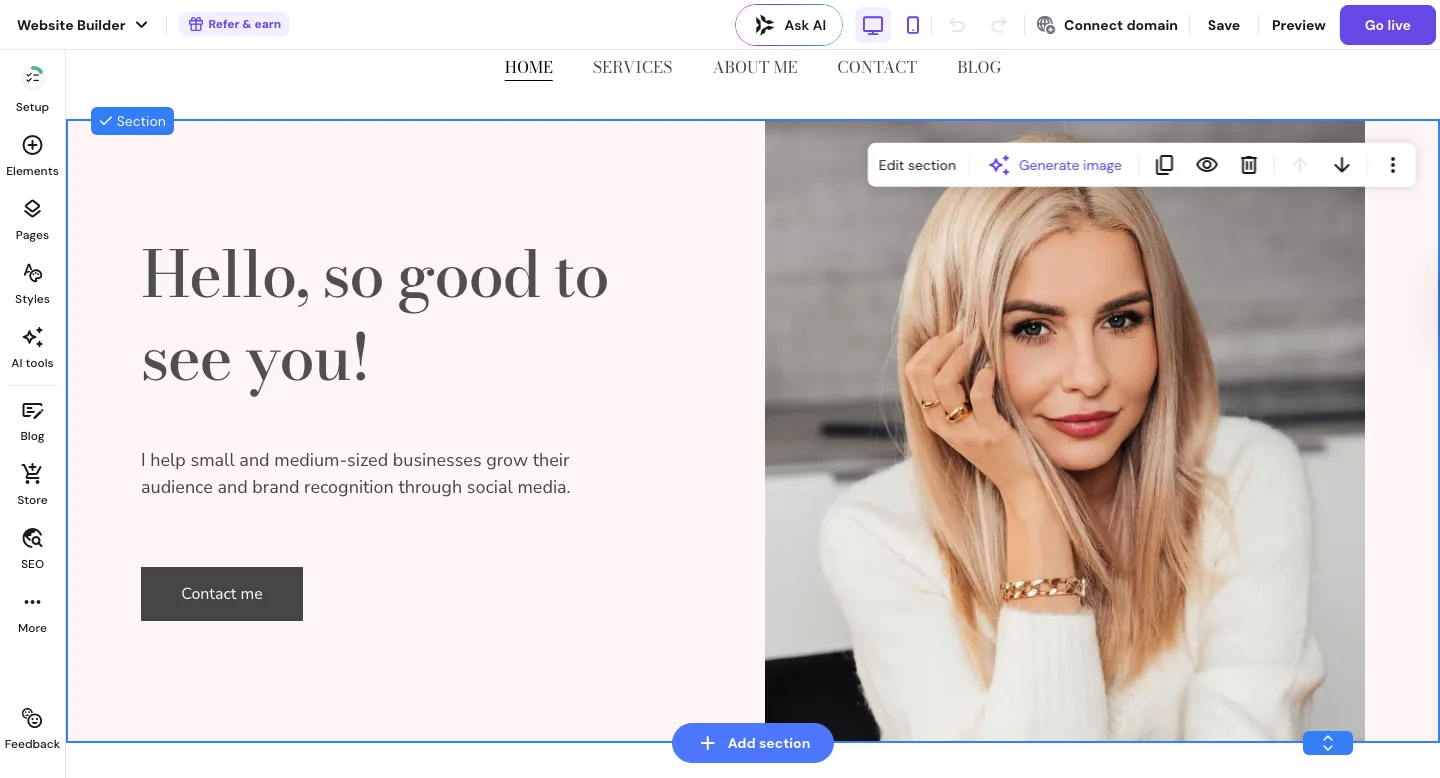
- AI website builder generates a full site from a short text prompt — most people have something live within 30 minutes
- Drag-and-drop editor with 300+ industry-organized templates
- Built-in ecommerce on the Business plan (physical and digital products, 0% transaction fees, up to 1,000 products)
- Free domain included for the first year on annual plans
- 24/7 live chat support — fast and genuinely helpful in my experience
Pricing:
- Premium Website Builder: $2.99/month (48-month plan + 3 months free) — renews at $10.99/month
- Business Website Builder: $3.99/month (48-month plan + 3 months free) — renews at $16.99/month
- 30-day money-back guarantee on paid plans
Pros:
- Lowest starting price of any mainstream website builder
- AI tools dramatically cut setup time for beginners
- Free domain on annual plans
- 0% transaction fees on the Business plan
- Fast, responsive 24/7 support
Cons:
- Renewal rates jump significantly after the introductory term ($2.99 → $10.99/month on Premium)
- Ecommerce capped at 1,000 products — not suitable for large catalogues
- Fewer third-party app integrations than Wix
- Template variety is more limited than Squarespace
Best for: Small business owners, local service providers, and freelancers who need a clean, professional website without a large upfront spend.
Not for: Brands that need an extensive plugin ecosystem, large-scale ecommerce stores, or Wix-level design customization.
My Verdict: Hostinger gives you more for your money than any platform in this comparison — that’s not a marketing claim, it’s what two-plus years of actual use has shown me. The AI builder alone saves hours, the support team is reliable, and even at renewal it remains competitively priced against Wix and Squarespace’s entry rates.
Explore Hostinger’s Website Builder plans and pricing to see what fits your business.
Squarespace — Best for Design-Led Brands
Plenty of business owners have launched a site and immediately felt like it looked cheaper than their competitors’ — even after hours of tweaking. That’s not a skills problem; it’s a tools problem. Squarespace was built specifically for people who want their website to look like it was designed by a professional, without hiring one.
The platform’s reputation for visual quality is well-earned. Its templates are consistently among the cleanest available, and the design system is opinionated in a useful way — it actively steers you toward layouts that look good. That’s a real advantage when design isn’t your strong suit. If you’re weighing whether to use a builder at all, my website builder vs hiring a web developer breakdown shows you where the real cost difference lies.
Key Features:
- 100+ professionally designed templates with a strong editorial visual style
- Fluid Engine drag-and-drop editor with precise layout control
- Built-in blogging with strong formatting and scheduling tools
- Ecommerce available on all plans — transaction fees (2%) apply on Basic and Core; the Plus plan removes them entirely
- AI-powered SEO tools that optimize page titles, meta descriptions, and image alt text automatically
Pricing:
- Basic: $16/month (annual billing) — ecommerce included, 2% transaction fee
- Core: $23/month (annual billing) — removes transaction fees
- Plus: $39/month (annual billing) — full ecommerce, no transaction fees
- Advanced: $99/month (annual billing)
- 14-day free trial, no free plan
Pros:
- Best-in-class template design and visual consistency
- Clean interface makes it hard to produce a poor-looking result
- Ecommerce available on all plans (even Basic)
- Strong native blogging platform
- AI SEO tools now included across plans
Cons:
- Pricier than Hostinger at every comparable tier
- Transaction fees on Basic and Core plans eat into margins for product sellers
- Fewer third-party integrations than Wix
- No free plan — trial only
Best for: Photographers, creative agencies, coaches, consultants, and service businesses where first visual impressions drive client decisions.
Not for: Budget-focused owners, high-volume product sellers who want zero transaction fees without paying for the Plus tier, or businesses that need a wide app ecosystem.
My Verdict: Squarespace is the right tool if your brand lives and dies by how it looks. The design quality is genuinely a tier above budget builders, and among the most praised by small business owners who’ve switched from more cluttered platforms. If you plan to sell products, just confirm which plan removes transaction fees before you commit.
Check Squarespace’s current plans and pricing to find your best fit.
Wix — Best for Flexibility and Feature Range
Feeling boxed in by your website builder is a real frustration — you want to add a booking system, a member area, or a custom form, and suddenly you’re hitting walls the platform won’t let you pass. Wix was built to remove those walls, and for most small businesses with specific feature requirements, it delivers.
It’s the most feature-rich option of these three by a meaningful margin. The app market includes 300+ integrations — appointment scheduling, loyalty programs, event management — and the editor gives you near-complete control over layout and design. That flexibility is genuinely powerful if you know what you need. For a focused head-to-head on two of these platforms, see my Hostinger vs Wix for small business breakdown.
Key Features:
- 300+ app integrations via the Wix App Market
- Built-in booking, events, and membership management tools
- Wix AI builder for faster initial site generation
- eCommerce available from the Core plan ($29/month)
- Multi-language support for businesses serving international customers
Pricing:
- Light: $17/month (annual) — basic site, no ecommerce, 2 GB storage
- Core: $29/month (annual) — ecommerce unlocked
- Business: $36/month (annual)
- Business Elite: $159/month (annual)
Pros:
- Most flexible editor and layout control of the three
- Largest app marketplace — something for almost every business type
- Strong built-in tools for service businesses (bookings, events, memberships)
- 800+ templates across dozens of categories
- Free forever plan available (ad-supported, limited features) — unique among these three
Cons:
- More features means more decisions — can feel overwhelming for complete beginners
- Light plan’s 2 GB storage fills quickly with images or video
- No ecommerce on the entry-level Light plan
- No free trial — free plan only
Best for: Small businesses that need specific functionality — bookings, memberships, multi-language pages — or want maximum design freedom and a wide integration library.
Not for: Budget-first owners who just need a clean five-page website, or beginners who want a fast, guided setup with minimal decisions.
My Verdict: Wix is the most capable platform of the three for businesses with specific feature requirements. The app ecosystem is deep and the flexibility is real. The tradeoff is complexity — you’re making more choices at every stage, and the learning curve is steeper than Hostinger’s AI-first approach. If you’re not sure yet what features you’ll eventually need, you may find yourself paying for functionality you won’t use for months.
Explore Wix’s business plans and pricing to see which features match your needs.
Quick Comparison
Quick reference — scroll horizontally on mobile, or click platform names to jump to full reviews.
| Platform | Starting Price | Best For |
|---|---|---|
| Hostinger | $2.99/month | Budget-first small businesses |
| Squarespace | $16/month | Design-led brands |
| Wix | $17/month | Flexibility and feature range |
Common Mistakes When Choosing Between These Three Builders
1. Choosing based on the introductory price alone
Many business owners see Hostinger’s $2.99/month headline and sign up for the longest plan without checking what happens at renewal. The Premium plan renews at $10.99/month — still competitive, but worth knowing before you lock in four years.
Fix: Factor the renewal rate into your comparison from the start. Most platforms price this way — it’s not a trap, but it does change the long-term math. My cheapest website builder for small business guide shows the true all-in costs side by side.
2. Assuming Squarespace’s Basic plan includes zero transaction fees
The Basic plan does allow you to sell products — but it charges a 2% transaction fee on every sale. Many business owners discover this only after their first few orders, when it starts to add up.
Fix: If you’re selling regularly, calculate whether the Core plan ($23/month, no transaction fees) is cheaper than paying 2% on all sales through the Basic plan. For moderate sales volumes, the upgrade usually pays for itself quickly.
3. Choosing Wix’s Light plan and running into storage limits
At $17/month, the Light plan includes just 2 GB of storage — easy to fill if you have product images, downloadable files, or any kind of media library. Easy to overlook when starting out.
Fix: If your site will hold more than basic text and a few images, start on the Core plan ($29/month). Upgrading mid-build adds unnecessary friction.
4. Skipping the free trial before committing to a long-term plan
All three platforms offer a way to test before paying — Hostinger has a 30-day money-back guarantee, Squarespace offers a 14-day trial, and Wix has a free forever plan. This catches most people off guard when they jump straight to the cheapest long-term billing option.
Fix: Spend 30–60 minutes in the actual editor before locking in any long-term plan. The feel of a builder matters as much as any feature list — and you’ll know within half an hour whether it clicks.
5. Forgetting that free domain renewals kick in from year two
All three platforms include a free domain in year one on qualifying plans. After that, domain renewals typically run $15–25/year. It’s not a large cost, but it surprises a lot of business owners on their first renewal email.
Fix: Budget for domain renewal from year two onwards. While you’re at it, check my how much does a website cost for a small business guide for a complete picture of ongoing website costs.
Your Next Steps (This Week)
- Identify your one non-negotiable priority. Price, design, or functionality — pick one. That single answer points directly to one of these three platforms. Still unsure how to weigh the decision? My how to choose a website builder guide walks through the criteria in plain English.
- Test your top pick for 30 minutes. Use Hostinger’s 30-day money-back guarantee, Squarespace’s 14-day free trial, or Wix’s free plan. Most business owners know within half an hour whether a builder feels right. A basic site is typically live within a few hours once you’ve committed.
- Do a full cost check before signing up. Monthly rate, renewal rate, domain cost, and any paid add-ons you’ll actually need. If budget is your main concern, explore Hostinger’s Website Builder plans here — the 30-day money-back guarantee means you can test it completely risk-free.
FAQ
Which is cheapest — Wix, Squarespace, or Hostinger?
Hostinger is the most affordable by a wide margin, starting at $2.99/month on a 48-month plan (plus 3 months free). Squarespace starts at $16/month and Wix at $17/month on annual billing. Even at renewal ($10.99/month), Hostinger remains cheaper than the entry plans of either competitor. If budget is the deciding factor, Hostinger wins without much debate.
Is Squarespace worth the extra cost for a small business?
For design-led businesses — photographers, coaches, consultants, agencies — yes. Squarespace templates are consistently among the most polished available, and the platform makes it genuinely hard to build something that looks unprofessional. If how your site looks directly affects how much clients trust you, the extra monthly cost is usually justified.
Can I sell products on all three platforms?
Yes, but with different conditions. Squarespace allows selling on all plans, though the Basic plan charges a 2% transaction fee per sale — the Core plan ($23/month) removes that fee. Wix unlocks ecommerce from the Core plan ($29/month). Hostinger includes ecommerce on the Business plan ($3.99/month, 48-month term) but caps product listings at 1,000.
Which is easiest for a complete beginner?
Hostinger is the most beginner-friendly starting point — describe your business and the AI generates a full site in minutes with minimal decisions required. Most people have something live within 30 minutes. Squarespace has a cleaner interface once you’re in, but the initial setup involves more choices. Wix has the most options, which can feel overwhelming when you’re just getting started.
What is Wix’s main advantage over the other two?
Flexibility and feature depth. Wix has the largest app marketplace of the three (300+ integrations), plus built-in tools for bookings, memberships, events, and multi-language sites that are difficult to replicate on Hostinger or Squarespace without workarounds. It’s also the only one of the three with a free forever plan.
What happens to Hostinger’s price at renewal?
Hostinger’s introductory pricing applies to the initial billing term only. The Premium Website Builder renews at $10.99/month; the Business plan renews at $16.99/month. Both remain competitive compared to Wix and Squarespace’s standard rates — but the jump from $2.99 to $10.99 is worth planning for before you commit to a 48-month term.
Should I use Hostinger or Wix for a local service business?
Both work well, but they suit different needs. Hostinger is the better starting point if you want a fast, clean site without a steep learning curve or high cost. Wix makes more sense if you need booking tools, a customer login area, or specific app integrations. For a deeper comparison, check my Hostinger vs Wix for small business guide.
Is it hard to switch platforms later if I change my mind?
Switching website builders means rebuilding your site — there’s no direct migration between these three platforms. That makes the initial choice matter more than it might seem. Testing before committing (even 30 minutes) is time well spent, and it’s exactly why all three platforms offer some form of free trial or guarantee.